Task 2: Prepare GGHub Clusters and Ansible Orchestration Host
Perform the following steps to complete this task:
- Step 2.1 - Deploy Primary and Standby Clusters for GGHub
- Step 2.2 - Deploy Ansible Orchestration Host
- Step 2.3 - Download the Required Oracle GoldenGate Software to the Ansible Orchestration Host
Step 2.1 - Deploy Primary and Standby Clusters for GGHub
Each GGHub cluster must be deployed as a 2-node Oracle Grid Infrastructure system with job role separation as described in Grid Infrastructure Installation and Upgrade Guide for Linux.
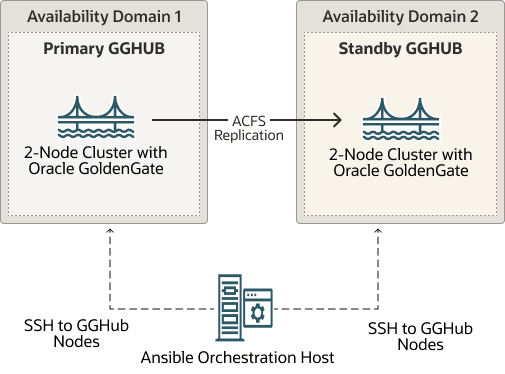
Complete Requirements for GGHub Clusters
Primary and standby GGHub clusters must meet the following requirements:
- Deploy GGHub clusters with Oracle Linux 8 operating system and 19c Grid Infrastructure software with the latest release update.
- Configure required OS users on the GGHub cluster nodes as follows:
- Oracle Clusterware software owner, typically
gridfor job role separation installations, which will exist as a result of the Clusterware installation. - Oracle GoldenGate software owner, typically
oracle, which is used by Ansible automation to install GoldenGate software. - GGHub orchestration user, such as
opc, which has privileged access (su/sudo) torootOS user.- The Ansible orchestration user from the Ansible orchestration host will login to
each GGHub node as this OS user using passwordless ssh key configuration to run
commands as
root,grid, ororacle, as required. - This passwordless ssh key configuration is performed in a later step.
- The Ansible orchestration user from the Ansible orchestration host will login to
each GGHub node as this OS user using passwordless ssh key configuration to run
commands as
- Oracle Clusterware software owner, typically
- Allocate an unused application virtual IP address (APP VIP) on each GGHub cluster on the
clusterware public network.
- The APP VIP is a cluster resource that Oracle Clusterware manages, and is migrated to another cluster node in the event of a node failure or planned maintenance.
- The APP VIP is used to ensure that the primary GGHub ACFS replication process sends GoldenGate trail files to the correct standby GGHub node where the file system is currently mounted. This is accomplished by co-locating the APP VIP and the ACFS CRS resources on the same node.
- Set up passwordless ssh key configuration for the
gridOS user between the primary and standby GGHub clusters to support ACFS replication. Specifically this requires the following:SSH From SSH To Purpose gridOS user on each primary GGHub nodegridOS user on each standby GGHub cluster node using the APP VIP nameNote: In the
griduser'sknown_hostsfile on all standby GGHub cluster nodes, add the primary cluster APP VIP name or address to each primary cluster node entryACFS snapshot based replication gridOS user on each standby GGHub nodegridOS user on each primary GGHub cluster node using the APP VIP nameNote: In the
griduser'sknown_hostsfile on all primary GGHub cluster nodes, add the standby cluster APP VIP name or address to each standby cluster node entry.ACFS snapshot based replication if the ACFS replication direction is reversed or GGHub standby is converted to primary. For additional guidance follow the instructions in Configuring ssh for Use With Oracle ACFS Replication to configure ssh connectivity between the primary and standby nodes.
- Allocate 10GB free disk space to support staging installation files. The software
staging directory is supplied during GGHub deployment.
Ansible automation copies the software files to the designated staging directory, but it temporarily uses the GGHub orchestration user's home directory. Therefore, in addition to the staging directory, at least 10 GB of free space is required in the user's home directory.
- Install the required packages and python modules as listed in the table below:
Required modules and libraries Description iptables-services Required by Ansible automation for nginx configuration
python3.12 Ansible automation requires minimum python version 3.12 for compatibility. Python 3.12 interpreter path is required in a later step.
python3.12-pip pip package manager associated with a python 3.12 installation.
lxml, packaging, pexpect Python modules required by Ansible automation. Install using the command:
$ python3.12 -m pip install lxml packaging pexpectFor more details refer to Oracle Linux documentation https://public-yum.oracle.com/oracle-linux-python.html#InstallFromAppStream
- Configure python3 to use Python 3.12 as the default version on the cluster nodes by
running the command below as a privileged
user:
# update-alternatives --config python3 - Install NGINX version 1.24 or higher. Follow the steps provided in the NGINX
documentation https://nginx.org/en/linux_packages.html#RHEL to install
NGINX.
NGINX configuration is performed by Ansible automation during the GGHub deployment.
- For compatibility and software requirements if SELinux is planned to be enabled on the GGHub cluster nodes, refer to My Oracle Support document 3102722.1 Oracle Automatic Storage Management Cluster File System (ACFS) Replication and Security-Enhanced Linux (SELinux).
Step 2.2 - Deploy Ansible Orchestration Host and Configure GGHub Ansible Collection
Provision a separate Oracle Linux 8 host to act as the Ansible orchestration host. This lightweight orchestration host is used to run Ansible playbooks or scripts and login to GGHub nodes to execute specific tasks to help automate the GGHub deployment.
Perform the following steps on the Ansible orchestration host:
- Step 2.2.1 - Install Packages Required for Ansible
- Step 2.2.2 - Configure Ansible Environment and Install GGHub Ansible Collection
- Step 2.2.3 - Download the Required Oracle GoldenGate Software to the Ansible Orchestration Host
Step 2.2.1 - Install Packages Required for Ansible
Install the required packages listed in the table below. To install the required packages subscribe to the Oracle Linux 8 channel on the Unbreakable Linux Network, or configure a yum repository from the Oracle Linux yum server website.
Follow Configuring a System to Use Oracle Linux Yum Server to define the required repositories on the Ansible orchestration host.
| Packages for Oracle Linux 8 Ansible orchestration host | Repository |
|---|---|
| python3.12 | ol8_appstream |
| python3.12-pip | ol8_appstream |
| bzip2 | ol8_baseos_latest |
After defining the required yum repositories, install the required packages as a privileged user on the Ansible orchestration host.
$ sudo dnf install python3.12 python3.12-pip bzip2Additional python packages and libraries are installed in a later step using pip package manager, which, by default, uses the python package index (PyPI) repository. Allow Ansible orchestration host to access python package index repository from https://pypi.org or use an approved internal package repository to install the required packages in your python environment.
Step 2.2.2 - Configure Ansible Environment and Install GGHub Ansible Collection
Perform the following sub-steps to complete this task:
- Step 2.2.2.1 - Create or Identify Ansible Orchestration User
- Step 2.2.2.2 - Obtain GGHub Ansible Collection
- Step 2.2.2.3 - Update the Default Python Version on the Ansible Orchestration Host
- Step 2.2.2.4 - Ensure That the pip Package Manager is Installed
- Step 2.2.2.5 - Execute the Script python_venv_activate.sh From the GGHub Collection Directory
- Step 2.2.2.6 - Activate Python Virtual Environment
Step 2.2.2.1 - Create or Identify Ansible Orchestration User
Create or
identify a non-privileged OS user on the Ansible orchestration host, such as
ansible, that owns the Ansible installation and can be used to execute
all Ansible orchestration tasks.
The Ansible orchestration user will login to the
GGHub orchestration user on each primary and standby GGHub node using passwordless ssh to
run commands as root, grid, or oracle, as
required.
All subsequent steps on the Ansible orchestration host are performed as the Ansible orchestration user.
Step 2.2.2.2 - Obtain GGHub Ansible CollectionGGHub Ansible collection (Bundled Ansible automation assets such as playbooks, roles, scripts, plugins, in a single, versioned unit) can be downloaded from MOS article KB858669 - Oracle GoldenGate MicroServices Architecture High Availability with zero or near-zero downtime.
In this example
/u01/maagghub/ is used as the top level directory for staging all of the
files on the Ansible orchestration host.
Extract the downloaded Ansible collection
under the /u01/maagghub/gghub-ansible-collection/ directory on the Ansible
orchestration host.
$ mkdir -p /u01/maagghub

$ cd /u01/maagghub

e.g.
unzip gghub-onprem-yyyymmdd.zip -d /u01/maagghub/gghub-ansible-collectionThe required python version is python3.12 or higher. Update the default python version on the Ansible orchestration host if required.
$ sudo update-alternatives --config python3

There are 2 programs which provide 'python3'.

  Selection    Command
-----------------------------------------------
*  1           /usr/bin/python3.6
 + 2           /usr/bin/python3.12

Enter to keep the current selection[+], or type selection number: 2

Validate the python version.

$ python3 --version
Python 3.12.11Check if the pip package manager is installed using the following python command. The command should display the pip package manager version without errors.
$ python3.12 -m pip -V
pip 23.2.1 from /usr/lib/python3.12/site-packages/pip (python 3.12)The python_venv_activate.sh script performs the following
operations on the Ansible orchestration host:
- Creates
venv,ansibleandcollectionssubdirectories under the/u01/maagghub/directory, which is used as the Ansible base directory for creating the python virtual environment in this example. - Creates the Python virtual environment named
'venv'.If a virtual environment with the same name already exists, the script attempts to update the MAA GGHub collection in the virtual environment while skipping other steps.
- Copies the
ansible.cfgenvironment configuration file under the directory/u01/maagghub/with recommended parameter settings. - Activates the python virtual environment.
- Installs GGHub required Ansible packages and libraries using pip package manager.
By default the pip package manager uses the python package index (PyPI) repository. Allow Ansible orchestration host to access python package index repository from https://pypi.org or use an approved internal package repository.
- Updates python pip package installer.
- Installs the Ansible MAA GGHub collection under the
/u01/maagghub/collections/directory. - Lists the GGHub collection version.
$ cd /u01/maagghub
$ sh gghub-ansible-collection/python_venv_activate.shPython virtual environment needs to be activated before running any Ansible commands on the Ansible orchestration host.
$ source /u01/maagghub/venv/bin/activateAfter activation of virtual environment the prompt changes as shown here.
(gghub) [~]$Verify that python and ansible executables are being used from the virtual environment home.
$ which python ansible
/u01/maagghub/venv/bin/python
/u01/maagghub/venv/bin/ansible
Update GGHub Ansible collection to newer version
To upgrade an already installed GGHub
collection to the latest available version, extract the new collection in directory
/u01/maagghub/gghub-ansible-collection-new/ and run the following
command:
$ cd /u01/maagghub
(gghub) [~]$ ansible-galaxy collection install /u01/maagghub/gghub-ansible-collection-new --upgrade
To
install a specific version of the GGHub collection, extract the collection in directory, for
example /u01/maagghub/gghub-ansible-collection-version/, and use the
following
command:
(gghub) [~]$ ansible-galaxy collection install /u01/maagghub/gghub-ansible-collection-version:==X.Y.ZCreate a software repository directory (for example,
/u01/maagghub/stage) on the Ansible orchestration host and stage the
following software on the Ansible orchestration host:
- Oracle GoldenGate 23ai software:
- Review Doc ID 1645495.1 to identify the latest Oracle GoldenGate 23ai Patch Set Availability document in the OGG v23ai Patch Set Availability Notes section.
- From the latest Patch Set Availability document, download the patch with description "Oracle GoldenGate <OGGRU> for Oracle (Complete Install)".
- Oracle Grid Infrastructure Standalone Agents for Oracle Clusterware 19c:
- Download the agent software version 10.2 or higher, using the "Download" section in document Oracle Grid Infrastructure Standalone Agents for Oracle Clusterware
Make a note of the software repository directory path as it is used in a later step.