Lake Cache
Lake Cache keeps frequently reused external data inside AI Database storage so eligible queries can avoid repeated remote reads. It is persistent schema storage in database data files, not an in-memory, result, or buffer cache. It has its own storage, population, refresh, retirement, and monitoring lifecycle.
Scope, Behavior, and Use Cases
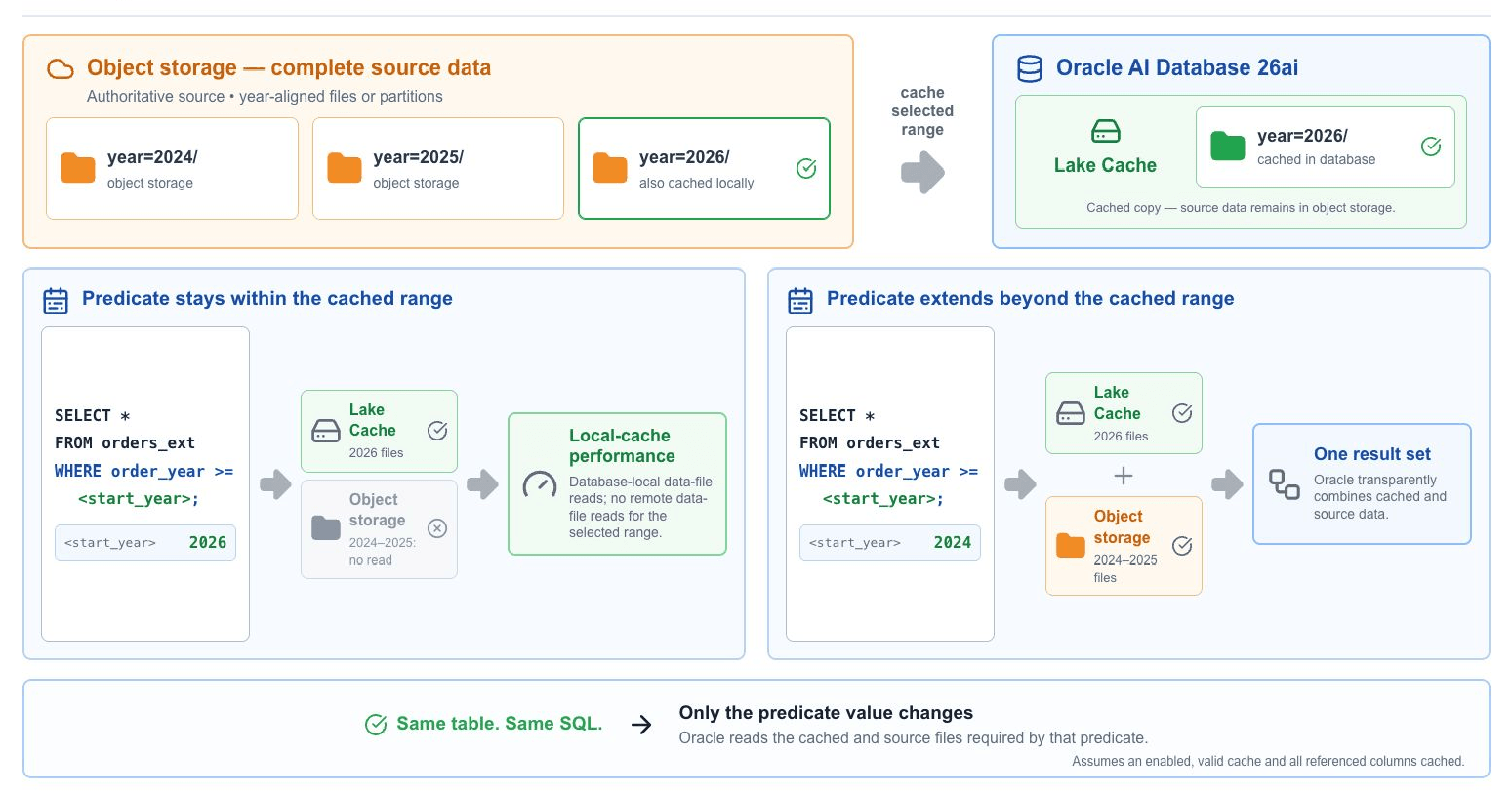
Lake Cache materializes eligible source data in the database while preserving the source table interface. Applications continue to query the external table or mounted catalog table; eligible reads can be transparently served from local cached data without SQL changes.
Image 6-1. Predicate-driven Lake Cache Routing
| Capability | Behavior |
|---|---|
| Eligible sources | Partitioned and non-partitioned persistent external tables and eligible tables exposed through mounted catalogs. The source must be queryable before a cache is created. |
| Formats | Persistent external tables may be backed by Parquet, ORC, Avro, CSV, or Iceberg. Mounted-catalog support is documented for eligible catalog-backed Iceberg tables. Eligibility remains deployment-, source-, and access-path-specific. |
| Transparent use | The optimizer can redirect eligible reads to cached data without changing application SQL. |
| Fine-grained content | Policy-based caches can target all files, a percentage of files, matching paths, recent files, and optionally a subset of columns. |
| Local storage | The cache is a persistent, table-like schema object stored in database data files. It consumes database storage and schema quota. |
| Separate metadata lifecycle | Lake Cache stores table data; DBMS_CATALOG can cache remote catalog metadata. Refresh these caches independently. |
Lake Cache Query and Lifecycle Model
External table or mounted catalog table Lake Cache data inside the database existing application SQL. Control lifecycle: create and size populate validate monitor refresh or retire disable or drop.
Note - Use Lake Cache when remote repetition is the problem.
| Workload | Good cache target | Expected benefit |
|---|---|---|
| Interactive BI and dashboards | Frequently scanned tables, partitions, or selected columns. | Can reduce and stabilize latency after the cache is populated and selected by the optimizer. |
| Cross-cloud or cross-region analytics | Hot datasets read repeatedly from S3, GCS, Azure, or another region. | Can reduce repeated network latency, provider requests, and egress. |
| Materialized view refresh | External source data reused on each scheduled refresh. | Can reduce repeated remote reads and make refresh time more predictable. |
| Recent-file pipelines | The latest hours or days selected with ADD_LATEST_FILES. |
Local access to the populated landing-zone window for eligible queries. |
| Lookup joins and feature engineering | Small reference datasets or repeatedly scanned training features. | Local reads for eligible joins and repeated notebook scans. |
| Bursty object-store access | High-traffic external data that is repeatedly requested. | Fewer repeated remote requests and less exposure to variable remote throughput. |
Prerequisites, Storage, and Resources
| Requirement | What to verify |
|---|---|
| Feature availability and release | The deployment documentation explicitly supports Lake Cache, and the database runs Oracle AI Database 26ai. Do not infer Lake Cache availability from the database version alone. |
| Queryable source | A persistent external table or eligible mounted catalog table can be queried by the cache owner. For object@catalog_name, the catalog must define DEFAULT_SCHEMA; otherwise use schema.object@catalog_name. |
| Schema ownership | The cache is created in the user’s own schema. |
| Storage quota | The schema has capacity for the persistent cache object and populated data. |
| Source credentials | Credentials permit the database to query the source table and read its source files. |
| Package access | The cache administrator can execute the package used by the selected model: DBMS_EXT_TABLE_CACHE for policy-based management or DBMS_CACHE for automatic management. |
Sizing the Cache Deliberately
- Use
MAX_CACHE_SIZEfor a byte limit orMAX_CACHE_PERCENTfor a percentage of the schema quota. - For policy-based settings, the documented precedence is: percentage overrides size when both are defined; an explicitly defined size applies when no percentage or schema quota is defined; schema quota alone yields a default cache limit of 10% of that quota; and no size, percentage, or quota yields an unlimited cache limit. Use
DBMS_EXT_TABLE_CACHE.GET_USER_PROPERTYto readMAX_CACHE_SIZEorMAX_CACHE_PERCENT. Always retain an operational database storage margin.
BEGIN
  DBMS_EXT_TABLE_CACHE.SET_USER_PROPERTY(
    owner => 'SALES',
    property_name => 'MAX_CACHE_PERCENT',
    property_value => 30);

  DBMS_EXT_TABLE_CACHE.SET_USER_PROPERTY(
    owner => 'SALES',
    property_name => 'CONSUMER_GROUP',
    property_value => 'LOW');
END;
/
Read back the policy-based size setting:
SELECT DBMS_EXT_TABLE_CACHE.GET_USER_PROPERTY(
         property_name => 'MAX_CACHE_PERCENT',
         owner => 'SALES') AS max_cache_percent
FROM dual;
GET_USER_PROPERTY returns MAX_CACHE_SIZE or MAX_CACHE_PERCENT; it does not return CONSUMER_GROUP.
Population and refresh can run in a configured database resource consumer group. Set CONSUMER_GROUP with the package that owns the management model: DBMS_EXT_TABLE_CACHE for policy-based caches or DBMS_CACHE for automatic caches. If no group is set, the documented default is MEDIUM. Set the property to NULL to return to that default.
Select the Management Model
The following table provides a comparison of policy-based and automatic Lake Cache management to help select cache creation, refresh, space, and lifecycle behavior for your workload.
| Decision | Policy-based management | Automatic management |
|---|---|---|
| Package | DBMS_EXT_TABLE_CACHE |
DBMS_CACHE |
| Best for | Known hot files, selected columns, controlled freshness, or a customized retention policy. | Many eligible sources where the database should adapt to observed workload use. |
| Creation and 5population | The owner explicitly creates and populates each cache. | The database creates AUTO caches and attempts to populate the complete eligible source table. |
| Refresh | Manual and policy-driven; modified files must be repopulated. | Scheduled automatically, with optional on-demand refresh. |
| Space pressure | No automatic eviction; new population can stop or fail until space is freed. | Least-recently-accessed AUTO caches can be dropped during refresh cycles. |
| Coexistence | Existing policy-based caches remain policy-based when automatic management is enabled. | New automatic caches are marked AUTO. |
Selection Rule
Select policy-based management when you can state exactly what must be cached and how it becomes fresh. Select automatic management when workload observation should drive creation, refresh, and eviction. By default, automatic caching is disabled.
Image 6-2. Lake Cache lifecycle
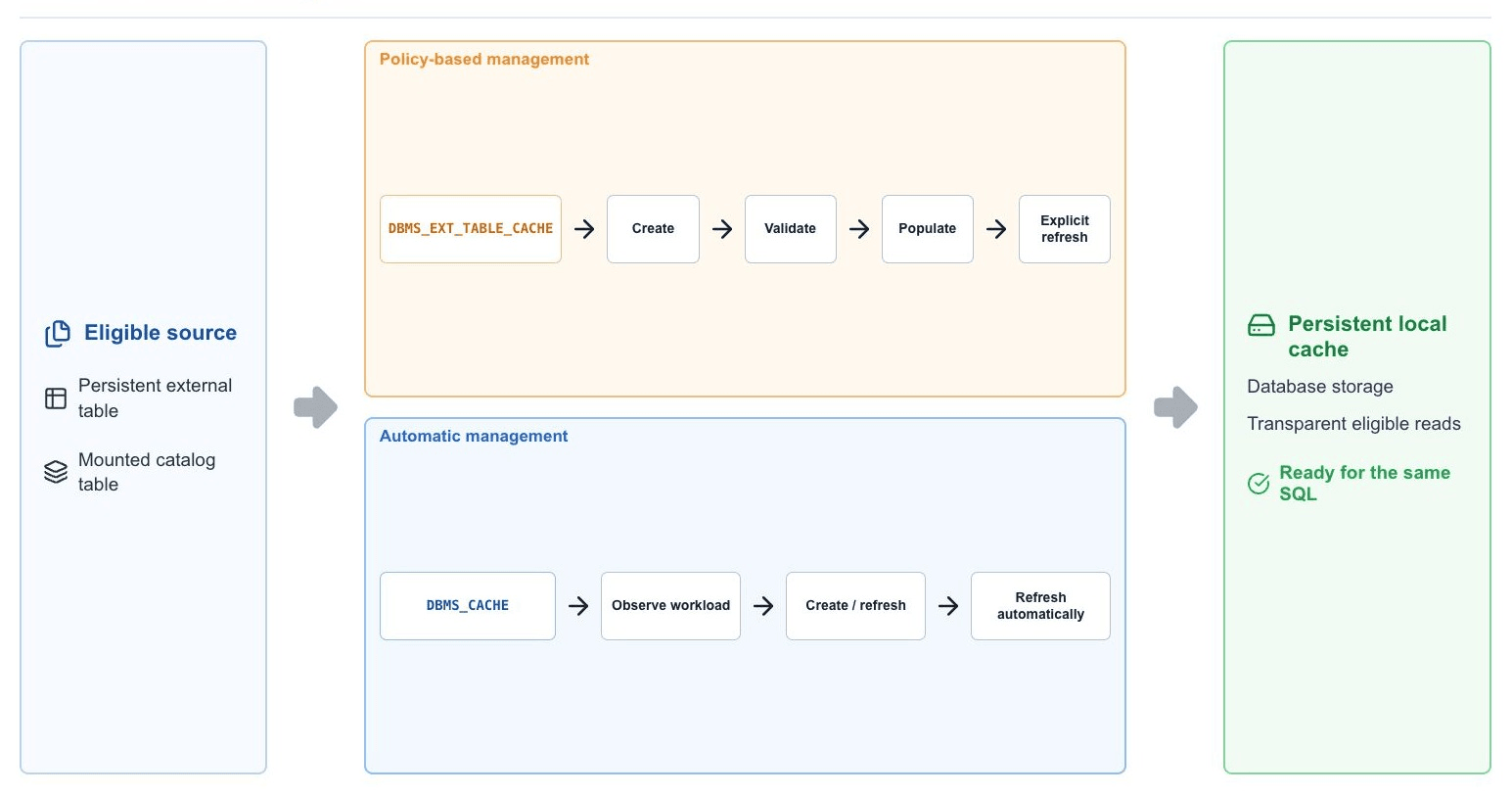
Policy-based Cache Lifecycle
Policy-based management exposes the complete cache lifecycle through DBMS_EXT_TABLE_CACHE. A cache definition is enabled by default and starts empty: creating it records data-dictionary metadata but does not allocate cache-data space until files are populated.
Create, Validate, Populate, and Verify
BEGIN
  DBMS_EXT_TABLE_CACHE.CREATE_CACHE(
    owner => 'SALES',
    table_name => 'ORDERS_XT',
    partition_type => 'PATH',
    col_subset => '["ORDER_ID","ORDER_DATE","REGION","AMOUNT"]');

  DBMS_EXT_TABLE_CACHE.VALIDATE(
    owner => 'SALES',
    table_name => 'ORDERS_XT',
    raise_errors => TRUE);

  DBMS_EXT_TABLE_CACHE.ADD_TABLE(
    owner => 'SALES',
    table_name => 'ORDERS_XT');
END;
/

SELECT external_table_name, cached, disabled, cache_cur_size
FROM user_external_tab_caches;
partition_type => 'FILE' partitions the cache by the invisible FILE$PATH and FILE$NAME columns. partition_type => 'PATH' partitions it by FILE$PATH only, which groups objects by source folder. FILE$PATH contains the path before the object name; FILE$NAME contains the text after the final slash. The optional col_subset parameter is a JSON array of source columns; omitting it makes all columns cache-eligible. A query that needs other columns may still read those columns from the external source.
| Lifecycle Intent | Procedure | Behavior |
|---|---|---|
| Create an enabled, empty cache definition | CREATE_CACHE |
Creates persistent schema metadata. No cache-data space is allocated until population. |
| Validate the source relationship | VALIDATE |
Reports when the referenced source table is missing or the cache is invalid. raise_errors defaults to TRUE. |
| Set or inspect policy preferences | SET_USER_PROPERTY, GET_USER_PROPERTY |
Sets sizing or the consumer group. The getter returns MAX_CACHE_SIZE or MAX_CACHE_PERCENT. |
| Populate all files or a percentage | ADD_TABLE |
percent_files accepts 1 through 100; omitting it selects all files. percent_files and force are mutually exclusive. Unchanged cached files are skipped unless force => TRUE. |
| Populate one file | ADD_FILE |
Targets an exact file_url. An unchanged cached file is skipped unless force => TRUE. |
| Populate matching paths | ADD_BY_LIKE |
Uses a JSON path_filters array. esc_char makes % or _ literal; force overwrites cached matches. |
| Populate recently modified files | ADD_LATEST_FILES |
since is an INTERVAL DAY TO SECOND; max_files limits the file count; force overwrites cached files. |
| Synchronize source-file changes | REFRESH_TABLE |
Removes cached data for files that no longer exist and loads new or newly modified files. |
| Remove one file or matching files | DROP_FILE, DROP_BY_LIKE |
Removes selected cached files and releases their cache space. DROP_BY_LIKE uses JSON path filters. |
| Retire older files | RETIRE_FILES |
Removes cached files older than the before INTERVAL DAY TO SECOND. |
| Empty but retain the cache | CLEAR |
Removes all cached files and de-allocates their space while retaining the cache definition. |
| Stop or resume optimizer use | DISABLE, ENABLE |
Disabling retains cached data but prevents optimizer rewrite to the cache. Enabling makes the cache eligible again. |
| Remove definition and data | DROP_CACHE |
Removes cache metadata and cached data and releases the associated storage. |
Populate a Recent-File Window
BEGIN
  DBMS_EXT_TABLE_CACHE.ADD_LATEST_FILES(
    owner => 'SALES',
    table_name => 'ORDERS_XT',
    since => INTERVAL '2' DAY,
    max_files => 100,
    force => FALSE);
END;
/
since is relative to the current timestamp, max_files caps the number of files selected, and unchanged cached files are skipped unless force => TRUE.
Refresh a Policy-based Cache
BEGIN
  DBMS_EXT_TABLE_CACHE.REFRESH_TABLE(
    owner => 'SALES',
    table_name => 'ORDERS_XT');
END;
/
Note - Policy-based freshness is explicit. Policy-based caches do not refresh or evict automatically. Use
REFRESH_TABLEor the applicable population procedure after source changes. A deleted source file makes its cached representation invalid and unavailable. When the applicable storage limit is reached, further population stops or fails until space is freed.
For complete signatures and parameter-level details, see DBMS_EXT_TABLE_CACHE.
Automatic Cache Lifecycle
Automatic management is disabled, by default. Set a non-zero MAX_CACHE_SIZE or MAX_CACHE_PERCENT with DBMS_CACHE to enable it for the configured scope. Configuration can be global or per user, and user properties override global defaults. Oracle selects eligible source tables from workload use, creates caches marked AUTO, attempts to populate each complete source table, and refreshes AUTO caches on a database-managed schedule. Existing policy-based caches remain policy-based.
Enable for one schema
BEGIN
  DBMS_CACHE.SET_USER_PROPERTY(
    owner => 'SALES',
    property_name => 'MAX_CACHE_SIZE',
    property_value_num => 10737418240);
END;
/

SELECT external_table_name, cached, auto
FROM all_external_tab_caches
WHERE owner = 'SALES';
Set a global default and refresh on demand
BEGIN
  DBMS_CACHE.SET_GLOBAL_PROPERTY(
    property_name => 'MAX_CACHE_PERCENT',
    property_value_num => 20);

  DBMS_CACHE.REFRESH(
    owner => 'SALES',
    refresh_type => 'ALL');
END;
/| Control or procedure | Behavior | Scope and precedence |
|---|---|---|
DBMS_CACHE.SET_GLOBAL_PROPERTY |
Sets default automatic-cache properties for database users. | MAX_REFRESH_WINDOW is global-only. A global MAX_CACHE_PERCENT is applied per user against that user’s assigned quota, not as one database-wide pool. |
DBMS_CACHE.SET_USER_PROPERTY |
Sets automatic-cache properties for one schema. | User properties override global defaults. Omitting owner targets the current schema. CONSUMER_GROUP is configured at this user level. |
DBMS_CACHE.GET_GLOBAL_PROPERTY, DBMS_CACHE.GET_USER_PROPERTY |
Read the configured automatic-cache properties. | The global getter includes MAX_REFRESH_WINDOW; the user getter covers user-level size, percentage, and refresh-mode properties. |
MAX_CACHE_SIZE, MAX_CACHE_PERCENT |
Set the automatic-cache allowance in bytes or as a percentage of user quota. | A non-zero value enables automatic management for the configured scope. |
AUTO_REFRESH_MODE |
Sets the default refresh scope: ALL, CURRENT, or NEW. |
ALL is the documented default. An explicit refresh_type in REFRESH takes precedence. |
MAX_REFRESH_WINDOW |
Sets the maximum number of seconds for an automatic refresh cycle. | Database/global only. If the window expires, refresh exits normally and remaining eligible work is queued for the next cycle. |
DBMS_CACHE.REFRESH(owner, ‘ALL’) |
Refreshes existing AUTO caches and creates new eligible caches as needed. | Use an explicit refresh type in examples and runbooks. |
DBMS_CACHE.REFRESH(owner, ‘CURRENT’) |
Refreshes existing AUTO caches only. | Does not create new caches. |
DBMS_CACHE.REFRESH(owner, ‘NEW’) |
Creates new eligible AUTO caches only. | Does not refresh existing caches. |
DBMS_CACHE.CLEAR(owner) |
Drops all Lake Cache objects for the specified owner and releases their storage. | This differs from DBMS_EXT_TABLE_CACHE.CLEAR, which retains one policy-based cache definition. |
Whole-table Constraint - Automatic population attempts to cache the complete eligible source table. If the configured allowance cannot hold the complete source, population can fail. Use policy-based caching when only selected files or columns should be retained.
During a scheduled or on-demand automatic refresh, Oracle can create new caches, update or repopulate existing caches, mark inaccessible caches invalid and remove them on a subsequent cycle, and drop least-recently-accessed AUTO caches under space pressure. The refresh schedule is database-managed; no fixed interval is documented. For complete signatures, see DBMS_CACHE.
Monitor and Diagnose
Use the same monitoring views for caches sourced from persistent external tables and mounted catalog tables. The availability of dictionary views is subject to selected deployment and release updates.
| View | Use |
|---|---|
DBA_EXTERNAL_TAB_CACHES |
Database-wide cache definitions, state, sizing, and ownership for administrators. |
ALL_EXTERNAL_TAB_CACHES |
Cache definitions accessible to the current user. |
USER_EXTERNAL_TAB_CACHES |
Cache definitions owned by the current schema. |
DBA_EXTERNAL_TAB_CACHE_LOCATIONS |
Database-wide file-level cache state for administrators. |
ALL_EXTERNAL_TAB_CACHE_LOCATIONS |
Cached source locations accessible to the current user. |
USER_EXTERNAL_TAB_CACHE_LOCATIONS |
Cached source locations owned by the current schema; the USER view omits OWNER. |
DBA_PENDING_LAKE_TRANS |
Inspect pending Iceberg lake transactions in the database context. |
CDB_PENDING_LAKE_TRANS |
Inspect pending Iceberg lake transactions in the CDB/container-aware context |
Cache-definition views expose state and sizing columns such as CACHED, STALE, DISABLED, CACHE_MAX_SIZE, CACHE_CUR_SIZE, LAST_REFRESH_TIME, and AUTO.
Location views expose file-level columns such as PATH, FILE_NAME, CACHED, STALE, CACHE_SIZE, FILE_SIZE, USAGE_COUNT, ETAG, FILE_LAST_MODIFIED, LAST_REFRESHED, and LAST_ACCESSED. REFRESH_INTERVAL is reserved for future use and does not define a configurable refresh interval.
-- Find active or stale cached locations.
SELECT table_name, cached, stale, last_refreshed,
       last_accessed, usage_count
FROM all_external_tab_cache_locations
ORDER BY stale DESC, usage_count DESC;

-- Inspect inventory and space use in the current schema.
SELECT external_table_name, cache_cur_size,
       cache_max_size, disabled, auto
FROM user_external_tab_caches;
Compare Cold, Warm, and Refresh Behavior
- Record the source state and run the representative query before population.
- Populate or refresh the cache and verify its state and size in the dictionary views.
- Run the same SQL and compare elapsed time, remote I/O, returned rows, and execution plan.
- Modify, add, and retire test source files according to the real ingestion pattern.
- Verify that freshness and space behavior match the selected policy under concurrency.
Mounted Catalog and Iceberg Tables
Lake Cache can store data from eligible catalog-backed Iceberg tables queried with Catalog SQL syntax. Eligibility is deployment- and release-specific. Certified integrations can include Databricks Unity Catalog, Snowflake Polaris Catalog, and AWS Glue; confirm the supported catalog/provider matrix for the selected deployment before creating the cache.
| Step | Required state | Action |
|---|---|---|
| 1 | The supported catalog is mounted. | Mount the supported catalog with DBMS_CATALOG as described in Chapter 4. |
| 2 | The target table is queryable. | Validate schema.table@catalog_name, or table@catalog_name when DEFAULT_SCHEMA is configured. |
| 3 | The owner has schema quota. | Create the cache in the owner’s schema with the catalog-qualified table name. |
| 4 | The definition validates. | Populate and manage it using the same policy-based procedures used for external-table caches. |
BEGIN
  DBMS_EXT_TABLE_CACHE.CREATE_CACHE(
    owner => 'SALES_SCHEMA',
    table_name => 'ORDERS@SALES_ICEBERG_CAT',
    partition_type => 'FILE');

  DBMS_EXT_TABLE_CACHE.ADD_TABLE(
    owner => 'SALES_SCHEMA',
    table_name => 'ORDERS@SALES_ICEBERG_CAT');
END;
/
In CREATE_CACHE, owner is the local schema that owns the cache, and table_name contains the catalog-qualified source name. The example uses ORD ERS@SALES_ICEBERG_CAT and therefore assumes that DEFAULT_SCHEMA is configured for the catalog; otherwise use the remote schema-qualified form. partition_type => 'FILE' manages cache content by individual source file.
Two independent caches -
DBMS_CATALOGmetadata caching controls discovery and visibility of catalog objects and snapshots. Lake Cache controls locally retained table data. Flush or prefill catalog metadata when the object is missing or unresolved; refresh Lake Cache when the object is visible but its local data no longer represents the desired source state.
Freshness and Failure Behavior
The following listed conditions exhibit corresponding expected behavior:
- Policy-based cache was just created - Only metadata exists; no source data is cached until the cache is populated explicitly.
- A cached source file was modified - A policy-based cache does not update itself. Use
REFRESH_TABLEor the applicable add procedure; use force when an overwrite is required. - A cached source file was deleted - The corresponding cached data becomes invalid and cannot be retrieved.
- Quota or configured limit is reached - Policy-based population stops; automatic whole-table population can fail.
- Policy-based cache is disabled - Cached data remains allocated, but the optimizer cannot rewrite queries to use it.
- A query needs a non-cached column - The query may still read the required non-cached columns from the external source.
AUTOcache is under space pressure - Less-recently-accessedAUTOcaches can be removed during a refresh cycle.AUTOcache becomes invalid - The cache is marked invalid and is removed during a subsequent refresh cycle.
Lake Cache is not source-of-record storage - It does not replace object-store retention, Iceberg maintenance, catalog metadata refresh, external-table statistics, partition pruning, or an ingestion pipeline. Define the authoritative source and the tolerated cache lag before enabling it.