Building Blocks
This section describes common structures and concepts used to define Agent Spec components and build flows, including fields, identifiers, references, input and output contracts, tools, and connections.
Some of these structures, such as component fields, identifiers, references, and input and output contracts, are shared by Flows and Agents. Others, such as control-flow and data-flow connections, apply specifically to Flows. Understanding these structures makes Agent Spec definitions easier to read and write and clarifies how specifications and execution values are supplied to and returned by the runtime APIs.
Components and Their Common Fields
Components are represented as JSON objects. Each component declares a supported component_type, which selects its schema and behavior, and an id, which identifies it within the applicable scope. Fields that recur across component schemas include name, description, and metadata.
Each component type defines its own set of required and optional fields. A Flow contains nodes and connections, an Agent contains instructions and capability references, whereas a tool definition describes an operation that the runtime can invoke.
Component IDs and References
A component’s id field establishes its identity within the applicable scope. A component’s name field is a human-readable label and does not establish identity.
A $component_ref refers to a component defined in $referenced_components by its id. This symbolic reference allows the same component definition to appear in multiple supported locations without being duplicated:
{"$component_ref": "lookup-orders-tool"}For a referenced definition, the $component_ref value, the $referenced_components collection key, and the component’s id must agree exactly.
Flow connections also use component references to identify their source and destination nodes. A matching component name does not create a reference.
Inputs, Outputs, and Supported Data Types
Input and output declarations form typed contracts between callers, components, and Flow nodes. Each endpoint has a case-sensitive title and a declared value shape.
| Category | Supported declarations |
|---|---|
| Scalar | string, number, integer, boolean, and null |
| Structured | object and array |
| Union or nullable | A supported set of alternatives in anyOf |
| Nested | items for arrays and properties or additionalProperties for objects |
For example, this declaration describes an array of string order identifiers:
{
  "title": "order_ids",
  "type": "array",
  "items": {"type": "string"}
}
The runtime validates values against their declared input and output contracts when they cross an execution or data-flow boundary.
Tools
A tool definition describes an operation that the runtime can invoke. In a Flow, a ToolNode invokes a specific declared tool. An Agent can invoke declared tools as part of its iterative model-and-tool loop.
The same tool contract remains important in both cases: its operation type, configuration, accepted arguments, returned values, privileges, and other execution boundaries are defined independently of the component that invokes it.
Example: Order Status
An order-status solution can combine the building blocks as follows:
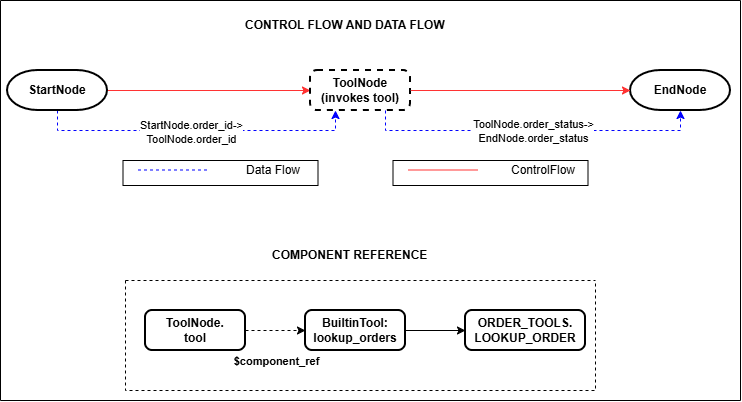
Description of the illustration ToolNode Control Flow and Component Reference
In this example:
- The component
idfields identify the nodes and tool definition. - A
$component_refconnects theToolNodeto theBuiltinTool. - Input and output declarations define the contracts for
order_idandorder_status. - Control-flow connections determine when each node becomes eligible to run.
- Data-flow connections transfer values between declared endpoints.
During execution:
- The runtime receives
order_idand validates it against the Flow input contract. - Execution begins at the
StartNode, which exposesorder_idto the graph. - A data-flow connection transfers
order_idfrom theStartNodeoutput to theToolNodeinput. - A control-flow connection makes the
ToolNodeeligible to run after theStartNodecompletes. - The
ToolNoderesolves its$component_refto the declaredBuiltinTooland invokes the tool withorder_id. - The tool produces
order_status, which becomes the declared output of theToolNode. - A data-flow connection transfers
order_statusto theEndNode, while a control-flow connection makes theEndNodeeligible to run after theToolNodecompletes. - The
EndNodepublishesorder_statusas the Flow output returned to the caller.