Define an Agent
This page explains how to define an Agent, resolve its component references, write its instructions, and understand its execution boundaries. For the execution model and advantages, see Agents.
Agent Fields
| Field | Requirement | Description |
|---|---|---|
component_type | Required | Identifies this component as an Agent. |
id | Required | Uniquely identifies the Agent for symbolic references. |
name | Required | Provides a human-readable component name. |
llm_config | Required | Identifies the supported LLM configuration used for model invocations. |
system_prompt | Required | Defines the Agent's role, task, and behavioral instructions. |
inputs | Optional | Declares the named, typed values accepted by the Agent. |
outputs | Optional | Declares the named, typed values produced by the Agent. |
tools | Optional | References individual tools available during model-and-tool rounds. |
toolboxes | Optional | References collections of tools available to the Agent, where supported. |
human_in_the_loop | Optional | Configures supported human participation during execution. |
$referenced_components | Optional | Contains component definitions resolved by symbolic references. |
Order-Support Agent Definition
The following Agent answers order questions using one LLM configuration and two tools:
| Tool | Input | Result |
|---|---|---|
lookup_order | order_id | Current order status and delivery information. |
check_return_eligibility | order_id | Return eligibility and the applicable return window. |
The Agent accepts a customer request and returns a response:
| Direction | Name | Type |
|---|---|---|
| Input | request | string |
| Output | response | string |
{
  "component_type": "Agent",
  "id": "order-support-agent",
  "name": "order_support_agent",
  "inputs": [
    {
      "title": "request",
      "type": "string"
    }
  ],
  "outputs": [
    {
      "title": "response",
      "type": "string"
    }
  ],
  "llm_config": {
    "$component_ref": "application-llm-config"
  },
  "system_prompt": "Answer order-support questions using the tools available to you. Do not infer order status or return eligibility without using the applicable tool.",
  "tools": [
    {
      "$component_ref": "lookup-orders-tool"
    },
    {
      "$component_ref": "check-return-eligibility-tool"
    }
  ],
  "$referenced_components": {
    "application-llm-config": {
      "component_type": "DbmsVectorChainLlmConfig",
      "id": "application-llm-config",
      "name": "application_llm_config",
      "provider": "openai",
      "url": "https://api.openai.com/v1/chat/completions",
      "model": "gpt-4.1-mini",
      "credential_name": "AI_PROVIDER_CREDENTIAL"
    },
    "lookup-orders-tool": {
      "component_type": "BuiltinTool",
      "id": "lookup-orders-tool",
      "name": "lookup_order",
      "description": "Return the current status and estimated delivery date for an order.",
      "inputs": [
        {
          "title": "order_id",
          "type": "string"
        }
      ],
      "outputs": [
        {
          "title": "order_status",
          "type": "string"
        },
        {
          "title": "estimated_delivery",
          "type": "string"
        }
      ],
      "executor_name": "Oracle In-DB Agent Executor",
      "tool_type": "plsql_exec",
      "configuration": {
        "schema_name": "APP_SCHEMA",
        "package_name": "ORDER_TOOLS",
        "procedure_name": "LOOKUP_ORDER"
      }
    },
    "check-return-eligibility-tool": {
      "component_type": "BuiltinTool",
      "id": "check-return-eligibility-tool",
      "name": "check_return_eligibility",
      "description": "Determine whether an order is eligible for return and provide the return window.",
      "inputs": [
        {
          "title": "order_id",
          "type": "string"
        }
      ],
      "outputs": [
        {
          "title": "return_eligible",
          "type": "boolean"
        },
        {
          "title": "return_window_days",
          "type": "integer"
        }
      ],
      "executor_name": "Oracle In-DB Agent Executor",
      "tool_type": "plsql_exec",
      "configuration": {
        "schema_name": "APP_SCHEMA",
        "package_name": "ORDER_TOOLS",
        "procedure_name": "CHECK_RETURN_ELIGIBILITY"
      }
    }
  }
}
This definition includes the Agent and every component referenced directly by it. The LLM configuration and tools remain separate component definitions, but they are contained in the Agent's $referenced_components collection.
For each symbolic reference, the $component_ref value, the $referenced_components key, and the referenced component's id match
exactly. For example, all three values for the order-lookup tool are lookup-orders-tool.
The provider endpoint, model, and credential name are example configuration values and must be replaced with values supported by the target environment. The PL/SQL procedures and their parameters must also exist and remain compatible with the corresponding tool input and output declarations.
Write Agent Instructions
The system_prompt field defines the Agent's task and behavioral instructions. It can contain literal instructions and template variables that reference named Agent inputs. A variable such as {{request}} resolves to the value of the Agent input whose title is request.
The example system prompt defines the Agent's task and describes when factual order information requires a tool:
Answer order-support questions using the tools available to you. Do not infer order status or return eligibility without using the applicable tool.These instructions establish that:
- The Agent handles order-support questions.
- Current order status comes from the order-lookup tool.
- Return eligibility comes from the return-eligibility tool.
The prompt can incorporate the Agent's request input explicitly:
Answer the following order-support request using the tools available to you: {{request}}

Do not infer order status or return eligibility without using the applicable tool.
Template variable names are case-sensitive and must match the corresponding Agent input titles.
Instructions guide model behavior but do not authorize the underlying operations. Oracle AI Database Agent Engine still validates Tool calls and enforces the privileges, credentials, and network controls that apply to each Tool.
How the Order-Support Agent Executes
For example, the caller supplies:
Where is order 7812, and can I return it when it arrives?One possible execution is:
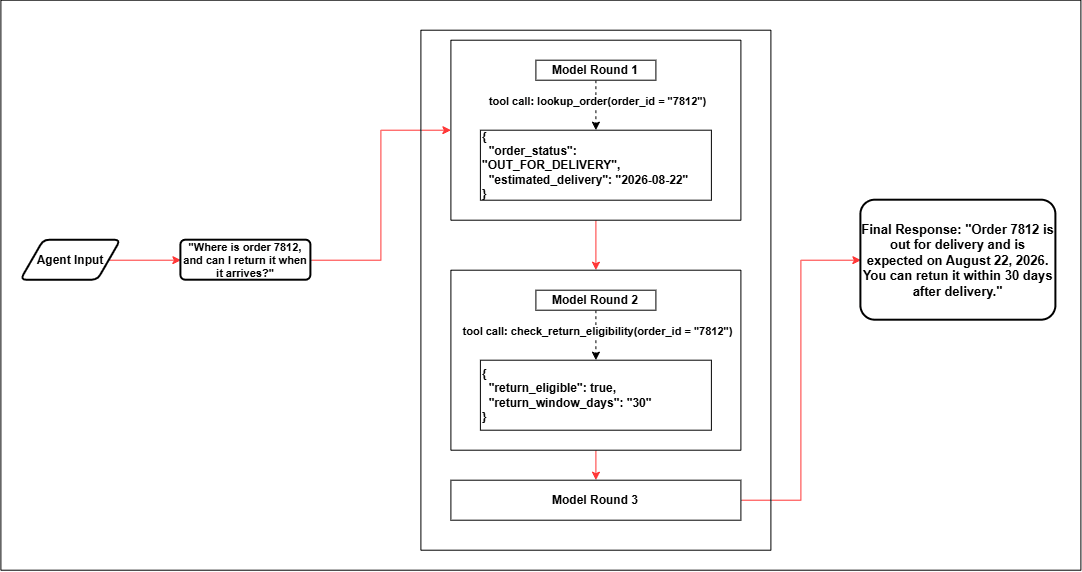
Description of the illustration Multi-Round Order-Support Agent Execution
During this execution:
- The runtime invokes the model with the Agent instructions, customer request, and descriptions of the two available tools.
- The model returns a call to
lookup_order. - The runtime resolves the tool, validates
order_id, and the Agent invokes the tool. - The order status and delivery date are added to the context for the next model invocation.
- The model returns a call to
check_return_eligibility. - After validating and invoking the second tool, the runtime adds the eligibility result to the context.
- The next model invocation produces the final response, which is mapped to
Agent.response.
This sequence is specific to the supplied request. Another request might require one tool, several tool calls, or no tool call.
Runtime Validation and Execution Boundaries
The model determines whether to return a final response or produce a tool call, but the runtime controls what can be executed:
- Only tools available to the Agent can be invoked.
- Tool names and arguments are validated before execution.
- Database privileges and security controls apply to data and procedure access.
- Invalid or unknown tool calls are rejected.
- Runtime limits bound the number of model-and-tool rounds.
Model output does not grant additional privileges, introduce executable operations, or bypass a tool's input and output contracts.