ToolNode
A ToolNode represents one predefined tool invocation at a specific point in a Flow. The Flow determines when the node can execute, and the Tool
definition referenced by the node identifies the operation that is invoked. No model selects the operation.
When the ToolNode executes, it receives typed values through its declared inputs, resolves its tool reference, invokes the referenced Tool, and maps the Tool result to its declared outputs.
The node and the referenced Tool have separate responsibilities:
| Component | Responsibility |
|---|---|
ToolNode | Represents the invocation in the Flow and declares its graph-facing inputs, outputs, and branches. |
| Tool definition | Identifies the operation type and contains its operation-specific configuration. |
Flow connections refer to the ToolNode, not directly to the Tool definition. The ToolNode and Tool input and output contracts must be compatible.
ToolNode Fields
| Field | Requirement | Purpose |
|---|---|---|
component_type | Required | Identifies the component as a ToolNode. |
id | Required | Uniquely identifies the node for references and graph connections. |
name | Required | Provides a human-readable component name. |
tool | Required | Identifies the Tool invoked when the node executes. |
inputs | Optional | Declares the typed values supplied as arguments to the Tool. |
outputs | Optional | Declares the typed values produced from the Tool result. |
branches | Optional | Declares named branches that outgoing control-flow edges can reference. |
Fields such as tool_type and configuration belong to the referenced Tool definition, not to the ToolNode. For a plsql_exec Tool, procedure_name is required. package_name and schema_name identify the package and schema when applicable. Other Tool types have their own documented configuration fields.
ToolNode Example
The following Flow accepts an order_id, invokes a PL/SQL order-lookup operation, and returns the resulting order_status.
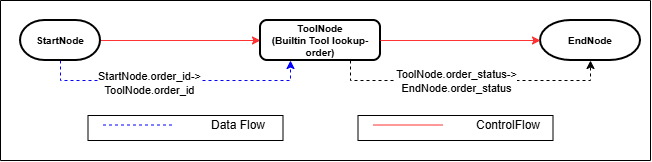
Description of the illustration ToolNode Built-In Tool Invocation
ToolNode Component
The ToolNode defines how the invocation participates in the Flow:
{
  "component_type": "ToolNode",
  "id": "lookup-order",
  "name": "lookup_order",
  "inputs": [
    {
      "title": "order_id",
      "type": "string"
    }
  ],
  "outputs": [
    {
      "title": "order_status",
      "type": "string"
    }
  ],
  "branches": [
    "next"
  ],
  "tool": {
    "$component_ref": "lookup-orders-tool"
  }
}
The fields define the node's Flow-facing contract:
inputsdeclares theorder_idvalue supplied through a data-flow connection.outputsdeclares theorder_statusvalue made available after the Tool completes.branchesdeclares thenextbranch that an outgoing control-flow connection can reference.toolidentifies the Tool invoked by the node. Its$component_refresolves to the Tool whose ID islookup-orders-tool.
The ToolNode does not identify the PL/SQL procedure directly. That configuration belongs to the referenced Tool.
BuiltinTool Component
The referenced BuiltinTool defines the PL/SQL operation:
{
  "component_type": "BuiltinTool",
  "id": "lookup-orders-tool",
  "name": "lookup_order",
  "description": "Return the current status of an order.",
  "inputs": [
    {
      "title": "order_id",
      "type": "string"
    }
  ],
  "outputs": [
    {
      "title": "order_status",
      "type": "string"
    }
  ],
  "requires_confirmation": false,
  "executor_name": "Oracle In-DB Agent Executor",
  "tool_version": "1.0",
  "tool_type": "plsql_exec",
  "configuration": {
    "package_name": "ORDER_TOOLS",
    "procedure_name": "LOOKUP_ORDER"
  }
}
The Tool's id matches the $component_ref in the ToolNode. tool_type identifies a PL/SQL invocation, and configuration identifies ORDER_TOOLS.LOOKUP_ORDER in the current schema. The Tool and ToolNode contracts both declare the order_id input and order_status output.
When the components execute together:
- A data-flow connection transfers
StartNode.order_idtoToolNode.order_id. - When control reaches the
ToolNode, the runtime resolveslookup-orders-tool. - The Tool invokes
ORDER_TOOLS.LOOKUP_ORDERwith the suppliedorder_id. - The procedure's
ORDER_STATUSOUT parameter becomesToolNode.order_status. - A data-flow connection transfers
ToolNode.order_statustoEndNode.order_status. - The outgoing control-flow connection describes the possible continuation from the ToolNode to the EndNode.
Complete Runnable Agent Spec
The following example creates the order-lookup package and executes a complete Flow containing the ToolNode. It does not require an LLM configuration, database credential, or network ACL.
Create the PL/SQL Operations
Connect as the application schema and create the package:
CREATE OR REPLACE PACKAGE ORDER_TOOLS AS
  PROCEDURE LOOKUP_ORDER (
    ORDER_ID     IN  VARCHAR2,
    ORDER_STATUS OUT VARCHAR2
  );
END ORDER_TOOLS;
/

CREATE OR REPLACE PACKAGE BODY ORDER_TOOLS AS
  PROCEDURE LOOKUP_ORDER (
    ORDER_ID     IN  VARCHAR2,
    ORDER_STATUS OUT VARCHAR2
  ) IS
  BEGIN
    CASE ORDER_ID
      WHEN '7812' THEN
        ORDER_STATUS := 'OUT_FOR_DELIVERY';
      WHEN '7930' THEN
        ORDER_STATUS := 'PROCESSING';
      WHEN '8041' THEN
        ORDER_STATUS := 'DELIVERED';
      ELSE
        ORDER_STATUS := 'UNKNOWN';
    END CASE;
  END LOOKUP_ORDER;
END ORDER_TOOLS;
/
Execute the Flow
The caller supplies order_id as a Flow input:
SET SERVEROUTPUT ON SIZE UNLIMITED
SET DEFINE OFF

DECLARE
  L_AGENT_SPEC CLOB := q'~
{
  "component_type": "Flow",
  "agentspec_version": "25.4.1",
  "id": "tool-node-example-flow",
  "name": "tool_node_example_flow",
  "inputs": [
    {
      "title": "order_id",
      "type": "string"
    }
  ],
  "outputs": [
    {
      "title": "order_status",
      "type": "string"
    }
  ],
  "start_node": {
    "$component_ref": "start"
  },
  "nodes": [
    {
      "$component_ref": "start"
    },
    {
      "$component_ref": "lookup-order"
    },
    {
      "$component_ref": "end"
    }
  ],
  "control_flow_connections": [
    {
      "component_type": "ControlFlowEdge",
      "id": "start-to-lookup",
      "name": "start_to_lookup",
      "from_node": {
        "$component_ref": "start"
      },
      "to_node": {
        "$component_ref": "lookup-order"
      }
    },
    {
      "component_type": "ControlFlowEdge",
      "id": "lookup-to-end",
      "name": "lookup_to_end",
      "from_node": {
        "$component_ref": "lookup-order"
      },
      "to_node": {
        "$component_ref": "end"
      }
    }
  ],
  "data_flow_connections": [
    {
      "component_type": "DataFlowEdge",
      "id": "order-id-to-lookup",
      "name": "order_id_to_lookup",
      "source_node": {
        "$component_ref": "start"
      },
      "source_output": "order_id",
      "destination_node": {
        "$component_ref": "lookup-order"
      },
      "destination_input": "order_id"
    },
    {
      "component_type": "DataFlowEdge",
      "id": "order-status-to-end",
      "name": "order_status_to_end",
      "source_node": {
        "$component_ref": "lookup-order"
      },
      "source_output": "order_status",
      "destination_node": {
        "$component_ref": "end"
      },
      "destination_input": "order_status"
    }
  ],
  "$referenced_components": {
    "start": {
      "component_type": "StartNode",
      "id": "start",
      "name": "start",
      "inputs": [
        {
          "title": "order_id",
          "type": "string"
        }
      ],
      "outputs": [
        {
          "title": "order_id",
          "type": "string"
        }
      ],
      "branches": [
        "next"
      ]
    },
    "lookup-order": {
      "component_type": "ToolNode",
      "id": "lookup-order",
      "name": "lookup_order",
      "inputs": [
        {
          "title": "order_id",
          "type": "string"
        }
      ],
      "outputs": [
        {
          "title": "order_status",
          "type": "string"
        }
      ],
      "branches": [
        "next"
      ],
      "tool": {
        "$component_ref": "lookup-orders-tool"
      }
    },
    "end": {
      "component_type": "EndNode",
      "id": "end",
      "name": "end",
      "inputs": [
        {
          "title": "order_status",
          "type": "string"
        }
      ],
      "outputs": [
        {
          "title": "order_status",
          "type": "string"
        }
      ],
      "branches": [],
      "branch_name": "next"
    },
    "lookup-orders-tool": {
      "component_type": "BuiltinTool",
      "id": "lookup-orders-tool",
      "name": "lookup_order",
      "description": "Return the current status of an order.",
      "inputs": [
        {
          "title": "order_id",
          "type": "string"
        }
      ],
      "outputs": [
        {
          "title": "order_status",
          "type": "string"
        }
      ],
      "requires_confirmation": false,
      "executor_name": "Oracle In-DB Agent Executor",
      "tool_version": "1.0",
      "tool_type": "plsql_exec",
      "configuration": {
        "package_name": "ORDER_TOOLS",
        "procedure_name": "LOOKUP_ORDER"
      }
    }
  }
}
~';

  L_INPUTS CLOB := TO_CLOB (
    '[{"name":"order_id","value":"7812"}]'
  );
  L_OUTPUTS CLOB;
BEGIN
  L_OUTPUTS := DBMS_AI_AGENT.EXECUTE_IMMEDIATE (
    AGENT_SPEC => L_AGENT_SPEC,
    INPUTS     => L_INPUTS
  );

  DBMS_OUTPUT.PUT_LINE (
    DBMS_LOB.SUBSTR (L_OUTPUTS, 32767, 1)
  );
END;
/
The returned JSON has the following form:
{
  "order_status": "OUT_FOR_DELIVERY"
}
During Execution
- The caller supplies
order_idwith the value7812through the Flow input contract. - The runtime begins the Flow at
StartNode. The StartNode makes the value available asStartNode.order_id. - A data-flow connection transfers
StartNode.order_idtoToolNode.order_id. - When control reaches
lookup-order, the ToolNode resolves the Tool whose ID islookup-orders-tool. - The Tool configuration identifies
ORDER_TOOLS.LOOKUP_ORDER. The runtime supplies7812to the procedure'sORDER_IDparameter and invokes the
procedure. - The value returned through the
ORDER_STATUSparameter becomesToolNode.order_status. - A data-flow connection transfers
ToolNode.order_statustoEndNode.order_status. The control-flow connection describes the continuation from the ToolNode to the EndNode. - The EndNode maps
order_statusto the Flow output, andDBMS_AI_AGENT.EXECUTE_IMMEDIATEreturns that value to the caller.