Overview of Oracle AI Database Read API for Redis
Oracle AI Database supports Redis server-compatible access for existing and new Redis applications. It returns Redis objects from underlying relational data instead of storing independent Redis values. You can use this feature with a read-write Oracle AI Database, True Cache, or Active Data Guard.
Why Use the Oracle AI Database Read API for Redis
Applications sometimes use Redis clusters in front of databases to accelerate application performance. Applications offload reads that do not require the most current data to Redis. They send writes and current reads to the back-end database, which serves as the system of record.
The challenge is keeping separately stored cache values consistent with the database as business data changes. Developers typically write custom code to load data into the cache and keep it consistent with the database through cache invalidation, while ensuring that cached data is as secure as data in the database. Additionally, they must handle data transformation, as Redis supports only scalar data types.
With the Oracle AI Database Redis Read API, existing and new Redis applications can leverage all the benefits of Oracle AI Database without deploying a separate Redis cluster or writing custom code.
Benefits to Developers
Oracle AI Database lets existing, read-intensive Redis applications use familiar Redis client libraries and commands to retrieve Oracle data through SQL keys. A SQL key is a combination of one or more column values in a table or view that uniquely identifies a single row. For example, the value of a primary key column can serve as the SQL key for a row.
This approach preserves the Redis read experience while giving applications a converged foundation for data consistency, durability, transactions, scalability, availability, and database security rather than introducing a separate data copy.
Applications access data through both Oracle and Redis clients, with Oracle serving as the single source of truth. Direct Oracle DML commits business data, while subsequent Redis reads retrieve the committed representation from the selected Oracle endpoint. This approach reduces the infrastructure, cost, and security footprint of maintaining a separate Redis tier, while providing a practical migration path for applications whose requirements have outgrown a Redis-only design.
Oracle AI Database Capabilities That Enable Redis-Compatible Access
You can configure Redis-compatible access to application objects on a read-write Oracle AI Database, Oracle True Cache, and Oracle Active Data Guard. Together with JSON-relational duality views, these capabilities let applications choose an Oracle deployment that matches their object model, read scale, and availability requirements. At a read-write database endpoint, a Redis read reflects the latest committed state. On True Cache or Active Data Guard, it reflects the latest committed data available to that read service, which may temporarily lag the primary database while newly committed changes are applied from redo.
JSON-Relational Duality
Redis applications are often built around objects. JSON-relational duality views expose normalized relational data as JSON documents, including nested related records. Redis clients can retrieve those application-shaped documents through a Redis SQL key, without duplicating data or writing custom object-relational mapping code to reassemble a complex record.
True Cache
True Cache is especially useful for read-heavy applications. It provides an automatically managed, consistent cache for an Oracle AI Database. Redis-compatible access to application objects works with True Cache, offering a migration path from a separately managed Redis cache to an Oracle-managed cache while preserving the familiar Redis read experience.
Active Data Guard Reader Farm
You can also configure Redis-compatible access to application objects on an Active Data Guard standby. In a Reader Farm deployment, read-only Redis requests can be served from synchronized standby data, offering a Redis-compatible read interface alongside Oracle’s high-availability and read-scale architecture. Because the standby is read-only, application writes continue through the primary database.
The Cache Consistency Gap
In a conventional cache design, the client writes business data to Oracle AI Database and separately manages a cached value in Redis. If an application, batch job, stored procedure, or administrator updates Oracle without also updating or deleting every related Redis key, a later Redis GET can return stale application state from Redis.
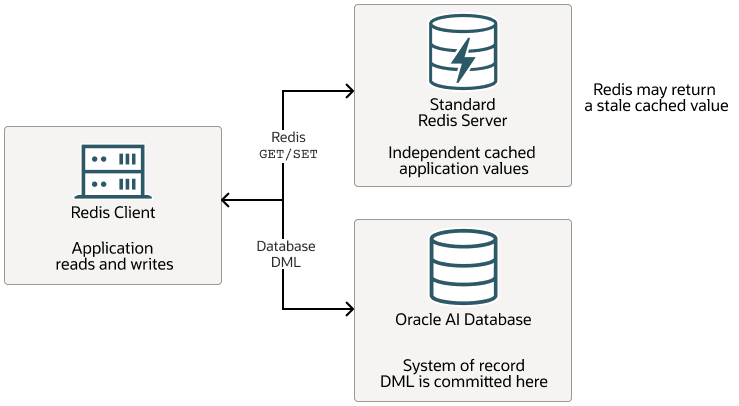
Description of the illustration tc_redis_conventional.png
You can avoid stale reads from a separate Redis cache with Redis-compatible access to an Oracle AI Database.
Example: Avoiding Stale Reads with a “Formula 1 Team” Document
Oracle’s car-racing model is a useful example because a “Formula 1 team” is a real application object. A user interface can retrieve the team’s name and points together with its driver list, while the database keeps teams and drivers normalized.
The example uses a JSON-relational duality view to represent the application object as a JSON document. The document is constructed from normalized relational data. It is not an independent Redis key-value cache. On JSON.GET, Oracle dynamically constructs the document from committed data available at the selected Oracle endpoint.
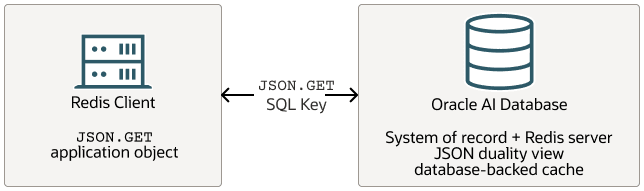
Description of the illustration tc_ai-database_redis.png
1. Use Standard Data Modeling
CREATE TABLE team (team_id NUMBER PRIMARY KEY, name VARCHAR2(255) NOT NULL);

CREATE TABLE driver (driver_id NUMBER PRIMARY KEY, team_id NUMBER NOT NULL,
                     name VARCHAR2(255) NOT NULL, points NUMBER NOT NULL,
       CONSTRAINT driver_team_fk FOREIGN KEY (team_id) REFERENCES team(team_id));

INSERT INTO team VALUES (302, 'Red Bull Racing');
INSERT INTO driver VALUES(1, 302, 'Max Verstappen', 255);
INSERT INTO driver VALUES(2, 302, 'Sergio Perez', 201);
COMMIT;
2. Expose One Team Document
The duality view maps one team row and its related drivers to one document. The SQL form makes the source tables explicit.
CREATE JSON RELATIONAL DUALITY VIEW team_dv AS
  SELECT JSON {
    '_id' : t.team_id,
    'name' : t.name,
    'driver' : [ SELECT JSON {
        'driverId' : d.driver_id,
        'name' : d.name,
        'points' : d.points
      } FROM driver d WHERE d.team_id = t.team_id ]
  }
  FROM team t;

SELECT JSON_SERIALIZE(data PRETTY) json_row FROM app_support.team_dv a
       WHERE a.data."_id" = 302;
JSON_ROW
--------------------------------------------------------------------------------
{
  "_id" : 302,
  "_metadata" :
  {
    "etag" : "B9383D3DB8CFAA0BAF9C150ECC67FBC5",
    "asof" : "0000000000000000"
  },
  "name" : "Red Bull Racing",
  "driver" :
  [
    {
      "driverId" : 1,
      "name" : "Max Verstappen",
      "points" : 255
   },
   {
     "driverId" : 2,
      "name" : "Sergio Perez",
      "points" : 201
   }
  ]
}
3. Read the Document Through Redis
The application uses one stable SQL key. JSON.GET returns the “Formula 1 team” document.
#!/usr/bin/env python

import redis

if __name__ == "__main__":
    """Connect to Oracle Redis server"""
    redis_client = redis.Redis(host="phoenix155218", port=8000, protocol=2)
    try:
     auth_result = redis_client.execute_command("AUTH", "APP_SUPPORT", "app_pwd")
      print(f"Redis AUTH: {auth_result}")

      json_get_result = redis_client.execute_command("JSON.GET",
                                                     "app_support.team_dv:\"_id\"=302")
      print(f"Redis JSON_GET: {json_get_result}")
    finally:
      redis_client.close()

--- OUTPUT ---
Redis AUTH: True
Redis JSON_GET: b'{"DATA":{"_id":302,"name":"Red Bull Racing","driver":
[{"driverId":1,"name":"Max Verstappen","points":255},{"driverId":2,"name":
"Sergio Perez","points":201}],"_metadata":{"etag":"B9383D3DB8CFAA0BAF9C150ECC67FBC5",
"asof":"0000000000000000"}}}'
The Redis JSON object represents Red Bull Racing (team 302), drivers Max Verstappen and Sergio Perez with their individual point totals, and metadata identifying the cached version.
The username specified in the Redis AUTH command must correspond to an Oracle AI Database user. In this example, the database user is APP_SUPPORT. Any Oracle AI Database user with the required SELECT or READ privilege on the JSON-relational duality view TEAM_DV can be used here.
Note that access to the underlying database tables and views is governed by standard Oracle AI Database security mechanisms, including authentication, user profiles, privileges, and roles.
4. Change Oracle Data, Then Read the Same Key
DML can affect more than one row. In a conventional cache, that creates the difficult task of discovering every document key that must be updated or deleted. Here the application still reads the same team key.
#!/usr/bin/env python
import os
import oracledb
import redis
oracledb.init_oracle_client(lib_dir=os.path.join(os.environ["ORACLE_HOME"], "lib"))
def add_driver_points(team_id: int, driver_id: int, points: int) -> int:
    """Connect to Oracle database and execute DML"""
   connection = oracledb.connect(user="app_support", password="app_pwd",
                                  dsn="cdb1_pdb1")
    try:
      with connection.cursor() as cursor:
        cursor.execute("UPDATE driver SET points = points + :points "
                      "WHERE team_id = :team_id AND driver_id = :driver_id",
                        team_id=team_id, driver_id=driver_id, points=points)
        connection.commit()
        return cursor.rowcount
    finally:
       connection.close()


if __name__ == "__main__":
   """Connect to Oracle Redis server"""
    redis_client = redis.Redis(host="phoenix155218", port=8000, protocol=2)
    try:
      auth_result = redis_client.execute_command("AUTH", "APP_SUPPORT", "app_pwd")
      print(f"Redis AUTH: {auth_result}")
      json_get_result = redis_client.execute_command("JSON.GET",
                                                     "app_support.team_dv:\"_id\"=302")
      print(f"Redis JSON_GET: {json_get_result}")
      upd_result = add_driver_points(team_id=302, driver_id=1, points=1)
      print(f"Database DML: {upd_result} row(s) updated")
      json_get_result = redis_client.execute_command("JSON.GET",
                                                     "app_support.team_dv:\"_id\"=302")
      print(f"Redis JSON_GET: {json_get_result}")
    finally:
       redis_client.close()


--- OUTPUT ---
Redis AUTH: True
Redis JSON_GET: b'{"DATA":{"_id":302,"name":"Red Bull Racing","driver"
:[{"driverId":1,"name":"Max Verstappen","points":255},{"driverId":2,"name":
"Sergio Perez","points":201}],"_metadata":{"etag":"B9383D3DB8CFAA0BAF9C150ECC67FBC5",
"asof":"0000000000000000"}}}'
Database DML: 1 row(s) updated
Redis JSON_GET: b'{"DATA":{"_id":302,"name":"Red Bull Racing","driver"
:[{"driverId":1,"name":"Max Verstappen","points":256},{"driverId":2,"name":
"Sergio Perez","points":201}],"_metadata":{"etag":"A9EF2F951C80A58050426591C20626CE",
"asof":"0000000000000000"}}}'
When JSON.GET is served by a read-write Oracle AI Database, it dynamically constructs the team document from the committed team and driver rows, so it contains the latest committed driver points. No cache-delete event, time to live (TTL) policy, or two-write coordination is required for this database-backed document.
Summary of Developer Benefits
Oracle AI Database offers a simplified architecture and new capabilities for existing and new Redis applications.
-
Developers keep a familiar Redis read experience while avoiding TTL tuning, cache invalidation, and two-write coordination for these database-backed objects.
-
A Redis-compatible
JSON.GETcan use a SQL key that identifies a row in a JSON-relational duality view. Oracle constructs the document from committed relational data when it is fetched. -
When a JSON-relational duality view is not needed or not available, Redis clients can fetch information from an ordinary database view or directly from a database table.
-
For this supported SQL-key read pattern, a separate Redis Server tier is not needed.
The result is a simpler boundary: applications read a document-shaped object, and Oracle remains responsible for the committed data that the object represents.
Related Topics
- Oracle True Cache as a Redis Server in Database Development Guide
- Using Oracle Redis Server with Oracle Active Data Guard Standbys in Data Guard Concepts and Administration