OpenTelemetry
Modern computing has seen more distributed systems scaled and more services added, such as with microservices and serverless applications. With this growth, service ownership across the system is allocated to different individuals, or even organizations. It is increasingly difficult to observe how these services depend on each and affect other services without a unified observability framework. This becomes clear after a deployment or during an outage when issue identification requires speed and accuracy.
OpenTelemetry is such a unified observability framework. It is a popular open-source observability framework for instrumenting, generating, collecting, and exporting telemetry data. It provides a common specification and protocol so that multiple services can furnish a unified version of traces, metrics, and logs. OpenTelemetry relies on components that participate in the observability model to be instrumented, which means the code emits traces, metrics, and logs.
Numerous managed ODP.NET and ODP.NET Core APIs have been instrumented to support OpenTelemetry observability and standards. Developers and operators can then customize the ODP.NET metrics collected.
ODP.NET OpenTelemetry Traces
Traces record the request paths taken either by an application or end user as they propagate through a multi-service architecture. Traces in OpenTelemetry are defined implicitly by their spans. A trace can be thought of as a directed acyclic graph of spans where the edges between spans are defined as parent/child relationships.
A span, or activity, represents an instrumented operation, such as an ODP.NET database operation. Each span or activity can include the following information:
-
Display name
-
ODP.NET NuGet version
-
Start timestamp and duration
-
Attributes – list of key-value pairs
-
Events – timestamped events with a name and optional attributes; a span can contain zero or more events
-
The parent span identifier
-
Links to causally related spans through SpanContext; a span can contain zero or more links
ODP.NET spans become child spans when an application span is current before the application calls an ODP.NET-instrumented API.
ODP.NET OpenTelemetry publishes the following activity tags, or attributes.
Table 43 ODP.NET OpenTelemetry activity tags
| Attribute Name | Description |
|---|---|
Activity.DisplayName |
Activity display name or the name of the operation being instrumented. |
db.namespace and db.name (Deprecated) |
Real database unique name associated with the connection. |
oracle.db.connection.id and db.odp.connection.id (Deprecated) |
Gives each connection a unique identifier for diagnostic purposes. This identifier can be prefixed with a custom application generated string by setting the ConnectionIdPrefix property in OracleConnection or OracleCommand. |
db.odp.roundtrip.count |
Number of database server roundtrips the ODP.NET method makes. |
db.odp.roundtrip.duration |
Database server roundtrip time, which includes the time needed for ODP.NET processing, network sending and receiving, and database server processing. |
db.odp.rows_affected |
Row count affected by the SQL DML (INSERT, UPDATE, and DELETE only) when using ExecuteNonQuery*, ExecuteReader*, or ExecuteScalar* methods. Does not return a value for stored procedures and anonymous PL/SQL. |
oracle.db.sql.id and db.odp.sql_id (Deprecated) |
Oracle database SQL statement identifier value, equivalent to SQL_ID |
db.odp.user.statement |
Redacted ODP.NET user-supplied command text which can differ from the database statement being executed, such as for stored procedures and XML commands. This attribute is emitted when the following two conditions are met:
|
db.response.returned_rows |
Number of rows fetched per database round trip. This tag is active for SELECT statements only. |
db.query.text and db.statement (Deprecated) |
Redacted database statement being executed |
db.system.name and db.system (Deprecated) |
Database name. oracle.db is the attribute value for Oracle databases. |
db.user (Deprecated) |
Database user |
exception.message |
Exception message |
exception.stacktrace |
Exception stack trace |
exception.type |
Exception type |
server.address |
Name of the database host |
server.port |
Server Port number |
db.response.status_code |
Oracle response status code, such as ORA-XXXXX, emitted for applicable Oracle or network exceptions when exception recording is enabled |
Activity Status |
ODP.NET sets the activity status to Ok when no exception occurs and to Error when an exception occurs. |
Starting with version 23.26.4, ODP.NET deprecated several tracing tags and introduced replacement tags aligned with the latest OpenTelemetry semantic conventions.
ODP.NET can emit the deprecated tags, the new tags, or both sets of tags. Configure this behavior by using either the OTEL_SEMCONV_STABILITY_OPT_IN environment variable, OpenTelemetrySemconvStabilityOptIn .NET configuration setting,
or the OracleConfiguration.OpenTelemetrySemconvStabilityOptIn property.
The configuration sources support the same values. The OracleConfiguration.OpenTelemetrySemconvStabilityOptIn property takes precedence when it is set, then the .NET configuration setting, and finally the OTEL_SEMCONV_STABILITY_OPT_IN environment variable. The values are interpreted as follows:
• database: emit the new tags only;
• database/dup: emit both the deprecated and new tags;
• any other value, or no value: emit the deprecated tags only.
The environment variable is read lazily when ODP.NET first resolves the semantic-convention mode while creating an activity. After the mode has been resolved for an OracleActivitySource instance, subsequent changes to the environment variable do not affect that instance.
The OracleConfiguration.OpenTelemetrySemconvStabilityOptIn property and .NET configuration setting can be set before the first connection is opened. Its setter does not depend on OpenTelemetry SDK initialization. After ODP.NET has begun opening a connection, attempting to modify the property throws an InvalidOperationException; closing that connection does not make the property writable again.
ODP.NET OpenTelemetry Trace Sample Exporter Visualization:
Activity.TraceId:            2275af4512ff5903478e3102e26fd02e
Activity.SpanId:             3ddf06baf7f54ac7
Activity.TraceFlags:         Recorded
Activity.ParentSpanId:       ded2eecf3fcad227
Activity.DisplayName:        Connect
Activity.Kind:               Client
Activity.StartTime:          2026-10-13T08:15:47.6456720Z
Activity.Duration:           00:00:00.4473325
Activity.Tags:
    db.system: oracle
    db.system.name: oracle.db
    db.user: scott
    db.name: cnfgDB
    db.namespace: cnfgDB
    server.address: <SERVER_ADDRESS>
    server.port: 11111
    db.odp.connection.id: <CONNECTION_ID>
    oracle.db.connection.id: <CONNECTION_ID>
    oracle.db.session.id: <SESSION_ID>
    oracle.db.name: cnfgDB
    oracle.db.domain: myserver.company.com
    oracle.db.instance.name: cnfgDB
    oracle.db.service: cdb1_pdb1.myserver.company.com
StatusCode: Ok
Instrumentation scope (ActivitySource):
    Name: Oracle.ManagedDataAccess.Core
    Version: 23.26.400
Resource associated with Activity:
    service.name: Execute_Service
    service.version: 1.0.0
    service.instance.id: 57769dba-a826-48b8-9bdf-d63247e0d8ff
    telemetry.sdk.name: opentelemetry
    telemetry.sdk.language: dotnet
    telemetry.sdk.version: 1.19.1
    Schema URL: https://opentelemetry.io/schemas/1.44.0

Activity.TraceId:            2275af4512ff5903478e3102e26fd02e
Activity.SpanId:             ded2eecf3fcad227
Activity.TraceFlags:         Recorded
Activity.ParentSpanId:       ded2eecf3fcad227
Activity.DisplayName:        Open
Activity.Kind:               Client
Activity.StartTime:          2026-10-13T08:15:47.5516405Z
Activity.Duration:           00:00:00.6890846
Activity.Tags:
    db.system: oracle
    db.system.name: oracle.db
    db.user: scott
    db.name: cnfgDB
    db.namespace: cnfgDB
    server.address: <SERVER_ADDRESS>
    server.port: 11111
    db.odp.connection.id: <CONNECTION_ID>
    oracle.db.connection.id: <CONNECTION_ID>
    oracle.db.session.id: <SESSION_ID>
    oracle.db.name: cnfgDB
    oracle.db.domain: myserver.company.com
    oracle.db.instance.name: cnfgDB
    oracle.db.service: cdb1_pdb1.myserver.company.com
    db.odp.roundtrip.duration: 00:00:00.4427437
    db.odp.roundtrip.count: 1
StatusCode: Ok
Instrumentation scope (ActivitySource):
    Name: Oracle.ManagedDataAccess.Core
    Version: 23.26.400
Resource associated with Activity:
    service.name: Execute_Service
    service.version: 1.0.0
    service.instance.id: 57769dba-a826-48b8-9bdf-d63247e0d8ff
    telemetry.sdk.name: opentelemetry
    telemetry.sdk.language: dotnet
    telemetry.sdk.version: 1.19.1
    Schema URL: https://opentelemetry.io/schemas/1.44.0

Activity.TraceId:            bca6039d5b4059b0aa5d277c47457ab7
Activity.SpanId:             9878bc598374765c
Activity.TraceFlags:         Recorded
Activity.ParentSpanId:       a9e244bc889c016f
Activity.DisplayName:        SendExecuteRequest
Activity.Kind:               Client
Activity.StartTime:          2026-10-13T08:15:48.5651438Z
Activity.Duration:           00:00:00.0278922
Activity.Tags:
    db.system: oracle
    db.system.name: oracle.db
    server.address: <SERVER_ADDRESS>
    server.port: 11111
    db.name: cnfgDB
    db.namespace: cnfgDB
    oracle.db.name: cnfgDB
    oracle.db.domain: myserver.company.com
    oracle.db.instance.name: cnfgDB
    oracle.db.service: cdb1_pdb1.myserver.company.com
    db.user: scott
    db.odp.connection.id: <CONNECTION_ID>
    oracle.db.connection.id: <CONNECTION_ID>
    oracle.db.session.id: <SESSION_ID>
    db.statement: select first_name from employees
    db.query.text: select first_name from employees
    db.odp.sql_id: 5x406056dmpmy
    oracle.db.sql.id: 5x406056dmpmy
    db.response.returned_rows: 3
StatusCode: Ok
Instrumentation scope (ActivitySource):
    Name: Oracle.ManagedDataAccess.Core
    Version: 23.26.400
Resource associated with Activity:
    service.name: Execute_Service
    service.version: 1.0.0
    service.instance.id: 57769dba-a826-48b8-9bdf-d63247e0d8ff
    telemetry.sdk.name: opentelemetry
    telemetry.sdk.language: dotnet
    telemetry.sdk.version: 1.19.1
    Schema URL: https://opentelemetry.io/schemas/1.44.0

Activity.TraceId:            bca6039d5b4059b0aa5d277c47457ab7
Activity.SpanId:             a9e244bc889c016f
Activity.TraceFlags:         Recorded
Activity.ParentSpanId:       a9e244bc889c016f
Activity.DisplayName:        ExecuteReader
Activity.Kind:               Client
Activity.StartTime:          2026-10-13T08:15:48.5038238Z
Activity.Duration:           00:00:00.4788021
Activity.Tags:
    db.system: oracle
    db.system.name: oracle.db
    server.address: <SERVER_ADDRESS>
    server.port: 11111
    db.name: cnfgDB
    db.namespace: cnfgDB
    oracle.db.name: cnfgDB
    oracle.db.domain: myserver.company.com
    oracle.db.instance.name: cnfgDB
    oracle.db.service: cdb1_pdb1.myserver.company.com
    db.user: scott
    db.odp.connection.id: <CONNECTION_ID>
    oracle.db.connection.id: <CONNECTION_ID>
    oracle.db.session.id: <SESSION_ID>
    db.statement: select first_name from employees
    db.query.text: select first_name from employees
    db.odp.sql_id: 5x406056dmpmy
    oracle.db.sql.id: 5x406056dmpmy
    db.response.returned_rows: 3
    db.odp.roundtrip.duration: 00:00:00.0221701
    db.odp.roundtrip.count: 1
StatusCode: Ok
Instrumentation scope (ActivitySource):
    Name: Oracle.ManagedDataAccess.Core
    Version: 23.26.400
Resource associated with Activity:
    service.name: Execute_Service
    service.version: 1.0.0
    service.instance.id: 57769dba-a826-48b8-9bdf-d63247e0d8ff
    telemetry.sdk.name: opentelemetry
    telemetry.sdk.language: dotnet
    telemetry.sdk.version: 1.19.1
    Schema URL: https://opentelemetry.io/schemas/1.44.0

Activity.TraceId:            f34d2e43045a4c791611ac299bc345cf
Activity.SpanId:             71affc6f150db595
Activity.TraceFlags:         Recorded
Activity.ParentSpanId:       c93f4983be71dd0c
Activity.DisplayName:        SendExecuteRequest
Activity.Kind:               Client
Activity.StartTime:          2026-10-13T08:15:49.2209839Z
Activity.Duration:           00:00:00.0128417
Activity.Tags:
    db.system: oracle
    db.system.name: oracle.db
    server.address: <SERVER_ADDRESS>
    server.port: 11111
    db.name: cnfgDB
    db.namespace: cnfgDB
    oracle.db.name: cnfgDB
    oracle.db.domain: myserver.company.com
    oracle.db.instance.name: cnfgDB
    oracle.db.service: cdb1_pdb1.myserver.company.com
    db.user: scott
    db.odp.connection.id: <CONNECTION_ID>
    oracle.db.connection.id: <CONNECTION_ID>
    oracle.db.session.id: <SESSION_ID>
    db.statement: INSERT INTO MYTABLE (VAL3,VAL4) VALUES (?,?)
    db.query.text: INSERT INTO MYTABLE (VAL3,VAL4) VALUES (?,?)
    db.odp.sql_id: 6v1d0f0tv6jfs
    oracle.db.sql.id: 6v1d0f0tv6jfs
StatusCode: Ok
Instrumentation scope (ActivitySource):
    Name: Oracle.ManagedDataAccess.Core
    Version: 23.26.400
Resource associated with Activity:
    service.name: Execute_Service
    service.version: 1.0.0
    service.instance.id: 57769dba-a826-48b8-9bdf-d63247e0d8ff
    telemetry.sdk.name: opentelemetry
    telemetry.sdk.language: dotnet
    telemetry.sdk.version: 1.19.1
    Schema URL: https://opentelemetry.io/schemas/1.44.0

Activity.TraceId:            f34d2e43045a4c791611ac299bc345cf
Activity.SpanId:             c93f4983be71dd0c
Activity.TraceFlags:         Recorded
Activity.ParentSpanId:       c93f4983be71dd0c
Activity.DisplayName:        ExecuteNonQuery
Activity.Kind:               Client
Activity.StartTime:          2026-10-13T08:15:49.1979128Z
Activity.Duration:           00:00:00.2438486
Activity.Tags:
    db.system: oracle
    db.system.name: oracle.db
    server.address: <SERVER_ADDRESS>
    server.port: 11111
    db.name: cnfgDB
    db.namespace: cnfgDB
    oracle.db.name: cnfgDB
    oracle.db.domain: myserver.company.com
    oracle.db.instance.name: cnfgDB
    oracle.db.service: cdb1_pdb1.myserver.company.com
    db.user: scott
    db.odp.connection.id: <CONNECTION_ID>
    oracle.db.connection.id: <CONNECTION_ID>
    oracle.db.session.id: <SESSION_ID>
    db.statement: INSERT INTO MYTABLE (VAL3,VAL4) VALUES (?,?)
    db.query.text: INSERT INTO MYTABLE (VAL3,VAL4) VALUES (?,?)
    db.odp.sql_id: 6v1d0f0tv6jfs
    oracle.db.sql.id: 6v1d0f0tv6jfs
    db.odp.rows_affected: 1
    db.odp.roundtrip.duration: 00:00:00.0112691
    db.odp.roundtrip.count: 1
StatusCode: Ok
Instrumentation scope (ActivitySource):
    Name: Oracle.ManagedDataAccess.Core
    Version: 23.26.400
Resource associated with Activity:
    service.name: Execute_Service
    service.version: 1.0.0
    service.instance.id: 57769dba-a826-48b8-9bdf-d63247e0d8ff
    telemetry.sdk.name: opentelemetry
    telemetry.sdk.language: dotnet
    telemetry.sdk.version: 1.19.1
    Schema URL: https://opentelemetry.io/schemas/1.44.0

Activity.TraceId:            508735767ea436d0305489d8407349af
Activity.SpanId:             1ceccbd820561f76
Activity.TraceFlags:         Recorded
Activity.ParentSpanId:       1ceccbd820561f76
Activity.DisplayName:        Close
Activity.Kind:               Client
Activity.StartTime:          2026-10-13T08:15:49.7350554Z
Activity.Duration:           00:00:00.0169237
Activity.Tags:
    db.system: oracle
    db.system.name: oracle.db
    server.address: <SERVER_ADDRESS>
    server.port: 11111
    db.name: cnfgDB
    db.namespace: cnfgDB
    oracle.db.name: cnfgDB
    oracle.db.domain: myserver.company.com
    oracle.db.instance.name: cnfgDB
    oracle.db.service: cdb1_pdb1.myserver.company.com
    db.user: scott
    db.odp.connection.id: <CONNECTION_ID>
    oracle.db.connection.id: <CONNECTION_ID>
    oracle.db.session.id: <SESSION_ID>
StatusCode: Ok
Instrumentation scope (ActivitySource):
    Name: Oracle.ManagedDataAccess.Core
    Version: 23.26.400
Resource associated with Activity:
    service.name: Execute_Service
    service.version: 1.0.0
    service.instance.id: 57769dba-a826-48b8-9bdf-d63247e0d8ff
    telemetry.sdk.name: opentelemetry
    telemetry.sdk.language: dotnet
    telemetry.sdk.version: 1.19.1
    Schema URL: https://opentelemetry.io/schemas/1.44.0
ODP.NET OpenTelemetry supports both dynamic and manual instrumentation. The next section describes how to set up each instrumentation method.
Dynamic and Manual Instrumentation
ODP.NET OpenTelemetry requires an exporter, such Jaeger or Zipkin, to visualize and analyze traces. These exporters are available as NuGet packages and will also include the OpenTelemetry SDK as a NuGet dependency.
ODP.NET OpenTelemetry manual instrumentation has the following requirements:
-
Oracle.ManagedDataAccess.OpenTelemetrypackage available from NuGet Gallery. -
Exporter NuGet package, such as Console or Zipkin, which is used for instrumentation visualization.
-
OpenTelemetry SDK, which will be installed automatically with an exporter NuGet package.
Once the ODP.Net OpenTelemetry nuget package is installed, ODP.NET OpenTelemetry is enabled by invoking the TracerProviderBuilder AddOracleDataProviderInstrumentation extension method upon application startup. It accepts various options for configuring OpenTelemetry instrumentation.
Code sample: Enabling ODP.NET OpenTelemetry instrumentation with default options
using OpenTelemetry.Trace;

Sdk.CreateTracerProviderBuilder()
.AddOracleDataProviderInstrumentation()  // ODP.NET extension method
.AddConsoleExporter()
.Build();
Code sample: Enabling ODP.NET OpenTelemetry instrumentation with all options enabled
using OpenTelemetry.Trace;

Sdk.CreateTracerProviderBuilder()
.AddOracleDataProviderInstrumentation(o =>
        {
          o.EnableConnectionLevelAttributes = true;
          o.RecordException = true;
          o.InstrumentOracleDataReaderRead = true;
          o.SetDbStatementForText = true;
        })
.AddConsoleExporter()
.Build();
After enabling ODP.NET OpenTelemetry, whenever a provider instrumented API is called, OpenTelemetry traces will be generated and sent to the configured exporter.
By default, instrumentation for potentially sensitive data is disabled, such as for SQL statements.
A second manual instrumentation method allows enabling ODP.NET OpenTelemetry without adding the ODP.NET OpenTelemetry NuGet package and without calling the AddOracleDataProviderInstrumentation() extension method. It requires adding the TracerProviderBuilder call AddSource("Oracle.ManagedDataAccess.Core") for ODP.NET Core or AddSource("Oracle.ManagedDataAccess") for managed ODP.NET.
ODP.NET OpenTelemetry instrumentation will then be enabled using default options. The defaults must be used as there is no way to modify option values. Changing these values require using ODP.NET OpenTelemetry NuGet package directly.
OpenTelemetry.Api NuGet package is installed automatically if the application adds any OpenTelemetry exporter NuGet packages, such as OpenTelemetry.Exporter.Console or OpenTelemetry.Exporter.Zipkin. OpenTelemetry.Api is necessary to call the AddSource() method.
Code sample: Enabling ODP.NET OpenTelemetry manual instrumentation via AddSource
Sdk.CreateTracerProviderBuilder()
         **.AddSource("Oracle.ManagedDataAccess.Core")**
         .AddConsoleExporter()
         .Build();
Through this instrumentation method, it is possible to enable and disable ODP.NET OpenTelemetry tracing programmatically at runtime dynamically. To enable, set OpenTelemetryTracing to true (default). To disable, set it to false. The OpenTelemetryTracing property can be set on the OracleConfiguration, OracleConnection, OracleDataSource, or OracleDataSourceBuilder class.
OpenTelemetryTracing is available as a managed ODP.NET .NET configuration file setting as well. As a .NET config setting, it is read upon app startup only. Changes to this setting’s value after startup are ignored.
Automatic Instrumentation
OpenTelemetry automatic instrumentation enables ODP.NET tracing without requiring code changes. Existing .NET apps can turn on tracing without having to recompile.
To use it, add the OpenTelemetry.AutoInstrumentation 1.7.0 NuGet package or higher to your project. Older package versions require setting environment variables to enable ODP.NET tracing. For example, the following environment variable settings turn on ODP.NET Core tracing using the console exporter.
OTEL_DOTNET_AUTO_TRACES_ADDITIONAL_SOURCES=Oracle.ManagedDataAccess.Core
OTEL_DOTNET_AUTO_TRACES_CONSOLE_EXPORTER_ENABLED=true
ODP.NET automatic instrumentation is on by default when using a newer OpenTelemetry.AutoInstrumentation NuGet package.
Instrumented ODP.NET APIs
The list of managed ODP.NET and ODP.NET Core APIs that are instrumented to support OpenTelemetry is as follows. Every ODP.NET database round trip originating from one of these APIs is instrumented as well.
-
OracleCommand-
ExecuteNonQuery() -
All
ExecuteNonQueryAsyncoverloads -
All
ExecuteReaderoverloads -
All
ExecuteReaderAsyncoverloads -
ExecuteScalar() -
All
ExecuteScalarAsyncoverloads -
ExecuteStream() -
ExecuteToStream(Stream) -
ExecuteXmlReader() -
All
ExecuteXmlReaderAsyncoverloads
-
-
OracleConnection-
Close() -
Open() -
All
OpenAsync()overloads
-
-
OracleDataAdapter- All
Filloverloads
- All
-
OracleDataReader-
Read() -
All
ReadAsyncoverloads
-
Oracle Database OpenTelemetry and ODP.NET
Starting with version 23.26.2, ODP.NET OpenTelemetry integrates directly with database OpenTelemetry to enable end-to-end application tracing. Administrators can then monitor app requests through their lifetime from client to server and back.
The following ODP.NET OpenTelemetry trace scenarios are supported with their configuration setup shown.
| OpenTelemetry Trace Output | ODP.NET Public Span Enabled | ODP.NET Internal Span Enabled | Database OpenTelemetry Enabled |
|---|---|---|---|
| ODP.NET internal span with a database child span | Yes | Yes | Yes |
| ODP.NET public span with a database child span | Yes | No | Yes |
| App-created ODP.NET span with a database child span | No | No | Yes |
To incorporate these database child spans in OpenTelemetry traces, ODP.NET must pass the client application context to the database. Apps can enable this capability by setting the DatabaseOpenTelemetryTracing property to true.
The DatabaseOpenTelemetryTracing property can be set on the .NET configuration file, OracleConfiguration, OracleConnection, OracleDataSource, or OracleDataSourceBuilder object.
The database then uses the client-passed trace parent as a parent of its own spans.
Database OpenTelemetry can be enabled or disabled anytime during an ODP.NET connection’s lifetime. It doesn’t necessarily need to occur before or after the connection is open.
To configure the parent ODP.NET span, use the OracleDataProviderInstrumentationOptions EnableDBRoundTripTracing property. When EnableDBRoundTripTracing is set to true, the ODP.NET internal span generates the child database span. When EnableDBRoundTripTracing is set to false, the ODP.NET public API span generates the database span.
Exporters must be OpenTelemetry Protocol (OTLP) compliant for Oracle Database OpenTelemetry. Both ODP.NET and the database must use the same exporter to enable ODP.NET spans and database spans to appear together in a unified trace.
Database OpenTelemetry spans are generated for the following ODP.NET methods that perform a database round-trip:
-
OracleCommand.ExecuteNonQuery() -
OracleCommand.ExecuteReader() -
OracleCommand.ExecuteReader(CommandBehavior) -
OracleCommand.ExecuteScalar() -
OracleCommand.ExecuteStream() -
OracleCommand.ExecuteToStream(Stream outputStream) -
OracleCommand.ExecuteXmlReader() -
OracleCommand.ExecuteNonQueryAsync(CancellationToken cancellationToken) -
OracleCommand.ExecuteReaderAsync() -
OracleCommand.ExecuteReaderAsync(CommandBehavior behavior) -
OracleCommand.ExecuteReaderAsync(CancellationToken cancellationToken) -
OracleCommand.ExecuteReaderAsync(CommandBehavior behavior, CancellationToken cancellationToken) -
OracleCommand.ExecuteScalarAsync(CancellationToken cancellationToken) -
OracleCommand.ExecuteXmlReaderAsync() -
OracleCommand.ExecuteXmlReaderAsync(CancellationToken cancellationToken) -
OracleDataReader.Read() -
OracleDataReader.ReadAsync() -
OracleDataAdapter.Fill(All overloaded versions)
Enabling ODP.NET Database OpenTelemetry on a Connection Level Code Sample
var tracerProvider = Sdk.CreateTracerProviderBuilder()
      .AddOracleDataProviderInstrumentation(o =>
      {
        o.RecordException = true;
        o.EnableConnectionLevelAttributes = true;
        o.SetDbStatementForText = true;
        o.InstrumentOracleDataReaderRead = true;
        o.EnableDBRoundTripTracing = true;
      })
      .SetResourceBuilder(
          ResourceBuilder.CreateDefault()
              .AddService("Execute_Service", serviceVersion: "1.0.0"))
      .AddSource("Oracle.ManagedDataAccess.Core")
      .AddConsoleExporter()
      .AddOtlpExporter()
      .Build();


string connectString = "<CONNECTION STRING>";

using (OracleConnection con = new OracleConnection(connectString))
{

  con.DatabaseOpenTelemetryTracing = true;  //enable database traces
  con.Open();

  OracleCommand cmd = con.CreateCommand();

  cmd.CommandText = "select first_name from employees";
  OracleDataReader reader = cmd.ExecuteReader();
  //consume the result

  con.DatabaseOpenTelemetryTracing = false; //disable database traces

  cmd.CommandText = $"INSERT INTO MYTABLE VALUES ('<val3>', <val4>)";
  cmd.ExecuteNonQuery();

  con.Close();
}
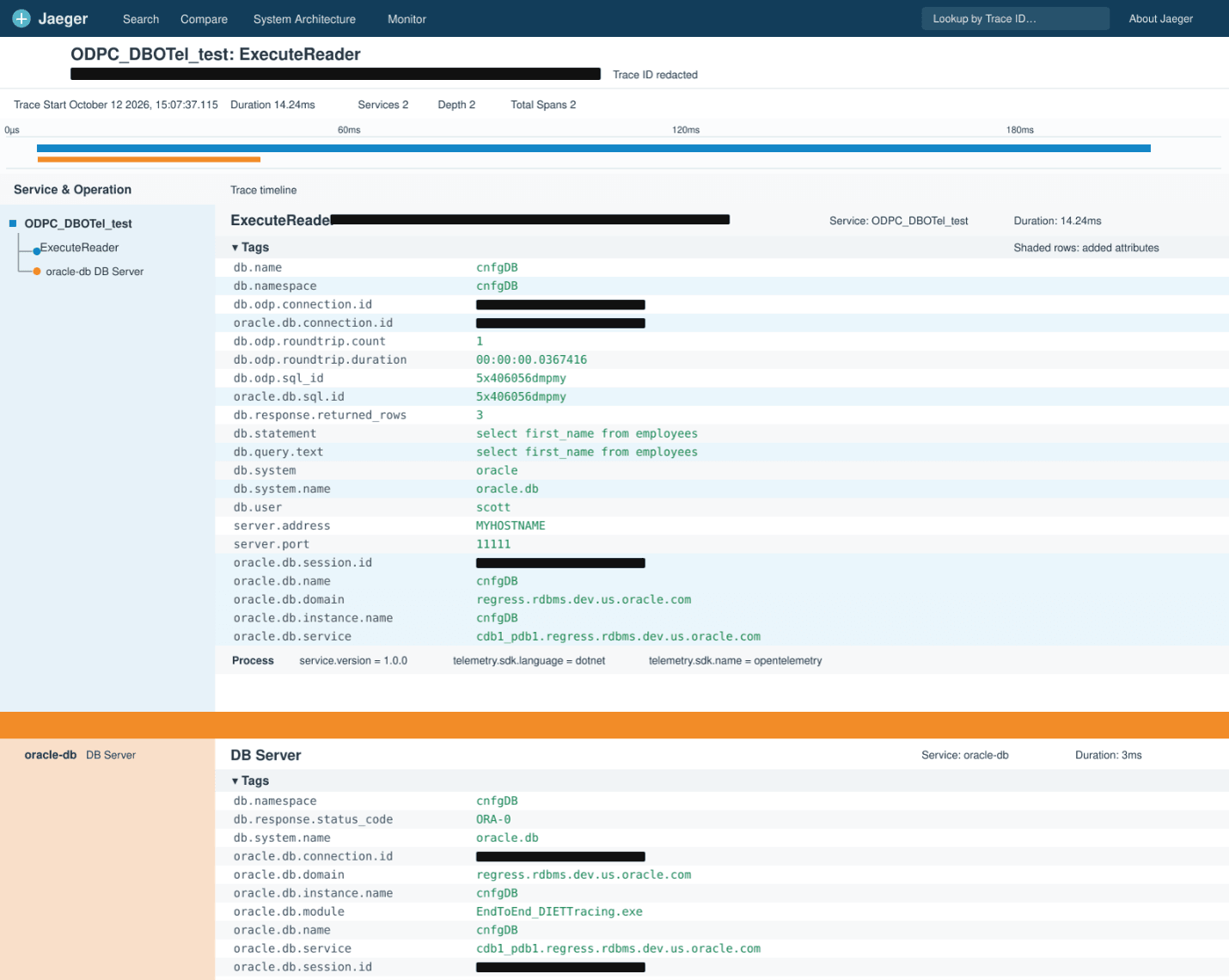
ODP.NET Database OpenTelemetry Sample Trace
This trace shows a sample ODP.NET database OpenTelemetry trace.