Overview

Oracle Trusted Answer Search maps natural-language questions to curated search targets that applications can use to render approved reports, URLs, or SQL-driven views. This overview describes the product approach, architecture, core concepts, and search flow.

What Is Trusted Answer Search?

Oracle Trusted Answer Search is a purpose-built language-to-target mapping system for enterprise applications. It maps natural-language user questions to curated, application-defined search targets, such as reports, URLs, or SQL-driven views.

Trusted Answer Search is designed for scenarios where accuracy, speed, security, and repeatability are required. Instead of generating free-form responses, the platform returns curated, structured results that the application can use to render the appropriate report or direct the user to the right page.

Trusted Answer Search combines Oracle AI Vector Search, lexical search, re-ranking techniques, and optional LLM-assisted re-ranking to improve relevance. It also incorporates feedback-assisted multi-vector search so administrators can incorporate human feedback and continuously improve quality over time.

The platform includes operational controls for enterprise deployment, including change management, versioning, query regression analysis, and staged testing.

The Trusted Answer Search platform is intended to be integrated into applications that want to expose a natural language interface to their users to access the application’s functionality and reports.

Trusted Search Versus Agentic AI

The Enterprise Requirement

Many application experiences require deterministic and auditable outcomes. Users expect the same question to produce the same result, and organizations must ensure confidential data is never exposed.

Limits of General Agentic Patterns for Bounded Tasks

General-purpose Large-Language Model (LLM) and Retrieval-Augmented Generation (RAG) approaches are effective for broad, open-ended questions. However, for bounded, application-specific questions, they can introduce the following issues:

Trusted Answer Search Approach

Trusted Answer Search addresses these issues by using constrained retrieval and controlled outputs:

The result is a practical, enterprise pattern for trusted, repeatable language interfaces.

Architecture and Concepts

Architecture

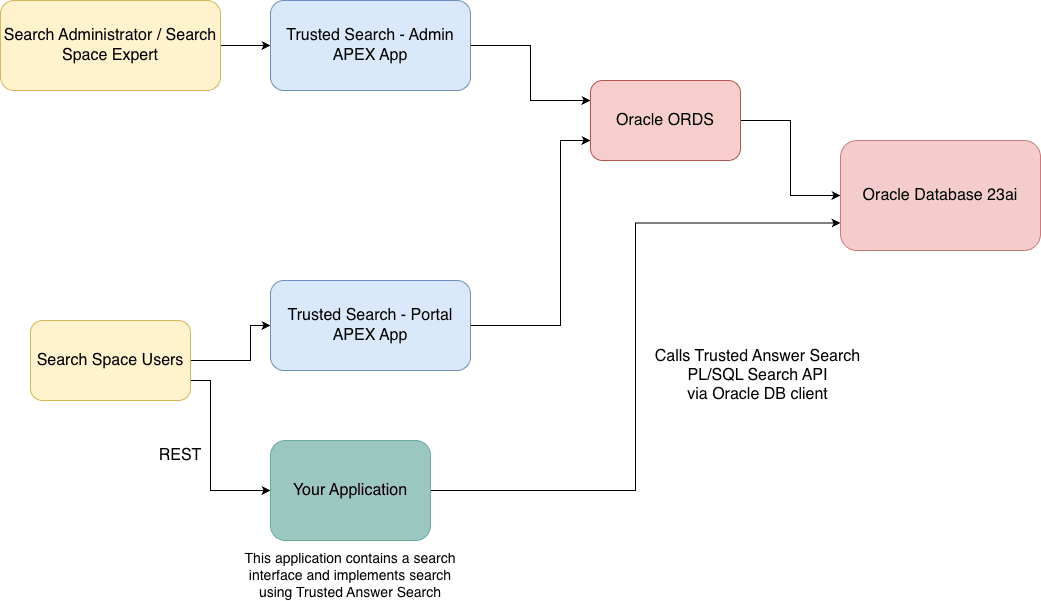
Trusted Answer Search includes five components:

Personas and Access


Trusted Answer Search Architecture

Core Concepts

Search Target

A Search Target is a curated asset, such as a URL to a report, chart, or SQL-generated view. It is defined by descriptions and sample queries, and is what the system retrieves in response to user questions. Trusted Answer Search does not store or index the reports or URLs in any way. It simply returns the target to the application that uses Trusted Answer Search, along with any parameters contained in the natural language query. The application is free to take action (such as sending the user to the URL) based on the target returned.

Consider a Wikimedia Insights application that helps users find readership, editor participation, edit activity, and media usage reports. If a user searches for italian page views, Trusted Answer Search can return targets such as Page Views by Country Map, Top Viewed Articles, and Total Page Views, along with resolved target inputs such as language: it.

Following is a list of examples spanning diverse application domains:

Target Action

A Target Action is metadata associated with a Search Target. It is usually one of the following:

Trusted Answer Search returns action metadata to the client; execution is handled by the client application.

For example, the Total Page Views - All Projects target can publish a URL action that opens a Wikimedia Statistics page with target inputs substituted into the URL:

https://stats.wikimedia.org/#/all-projects/reading/total-page-views/normal|bar|:period|~total|:frequency

When the user asks for monthly page views, Trusted Answer Search can resolve :frequency to monthly, and the application can open the resulting report URL.

Additional examples illustrate how applications consume target actions:

SELECT shift_id,
       start_time,
       end_time,
       required_headcount,
       scheduled_headcount
  FROM workforce_shifts
 WHERE region_code = :REGION_CODE
   AND start_time BETWEEN SYSDATE AND SYSDATE + 7
   AND scheduled_headcount < required_headcount
 ORDER BY start_time;

Target Inputs

Target Inputs make URL and SQL actions dynamic. Placeholders in an action template are populated from values extracted from user queries.

Example URL template:

https://stats.wikimedia.org/#/:language.wikipedia.org/reading/page-views-by-country/normal|map|:period|~total|:frequency

In this example, if the user query includes a language such as italian, :language is replaced with the canonical value it. Configured defaults can also supply values such as :period and :frequency.

For example, Trusted Answer Search would return:

The Target Input :language is linked to a Target Value Set that contains supported language codes and synonyms so that Trusted Answer Search only substitutes approved values or synonyms. Target value sets are described later in this section.

Target Value Sets

Target Value Sets define values used for extracting target inputs from a user query and substituting those extracted values into target actions. Three Target Value Set sources are supported:

Synonyms can improve matching, while canonical values are used for action substitution.

In the Wikimedia example, a LANGUAGE Target Value Set might define canonical values such as it, fr, and de with synonyms such as italian, french, and german. A FREQUENCY Target Value Set might define values such as monthly with synonyms such as by month or month. Target Inputs reference these value sets so that user-friendly words can be resolved to the values required by the report URL.

Search Space

A Search Space is a versioned collection of search targets for a specific application domain. Teams can isolate changes, collaborate, compare versions, and promote approved updates. LLM re-ranking is optional and can be enabled or turned off for each search space.

In the Wikimedia example, the Search Space Expert maintains the WIKIMEDIA search space that groups targets such as Total Page Views, Top Viewed Articles, Page Views by Country Map, and editor activity reports. Experts can stage updates, review diffs, and promote a tested configuration to production once approvals are complete.

How It Works

Trusted Answer Search uses a hybrid retrieval pipeline that returns curated search targets rather than free-form generated answers. If LLM support is configured and LLM re-ranking is enabled for a search space, the system can use the configured LLM profile to re-rank candidate targets returned by hybrid retrieval. A Search Administrator controls how many hybrid retrieval candidates are passed to the LLM re-ranking step. If a search space uses LLM-backed Target Value Sets, the configured LLM profile can also extract target input values according to the Target Value Set instruction.

1. Query Normalization

The system normalizes user input before retrieval:

This produces normalized tokens and normalized query text.

2. Dual Retrieval

Semantic Retrieval

Vector similarity retrieval using Oracle AI Vector Search embeds query and corpus text to identify intent-level similarity. Corpus text includes target descriptions, target sample queries, and expert upvoted/downvoted user queries in search targets.

Semantic retrieval provides strong recall when wording differs.

Lexical Retrieval

Keyword-based matching retrieves targets from an inverted index built from:

Lexical retrieval provides high precision when terminology aligns.

3. Re-ranking and Fusion

Ranked lexical and semantic result lists are fused into a single ordered list using a re-ranking algorithm. This balances exact token match with semantic intent match.

If LLM support is enabled for the deployment and LLM re-ranking is selected for the search space, Trusted Answer Search can apply an LLM re-ranking step after hybrid retrieval. This step evaluates the configured number of candidate targets returned by lexical and semantic retrieval and adjusts their ordering to improve relevance. The system still returns curated search target metadata to the application rather than a free-form generated answer.

4. Target Input Extraction

For targets with dynamic actions, the system extracts target input values using the configured Target Value Set. For static and table-column value sets, it matches normalized query terms against values and synonyms, then substitutes canonical values into URL or SQL templates. For LLM-backed value sets, it sends the query and extraction instruction to the configured LLM profile, parses the extracted value, and substitutes that value into the target action.

Example Walkthrough

User query:

italian page views

  1. Normalize the query.

    • Spelling correction: No typos detected.
    • Morphology handling: Normalize “views” to “view” for matching. Normalized text: “italian page view”
    • Stop-word filtering: No low-value words need to be removed. Normalized keywords: italian, page, view.
  2. Run dual retrieval.

    Lexical search:

    • Matches detected: “page” and “views” across target descriptions and sample queries.
    • Target Value Set matches: italian resolves to language value it.
    • Ranked lexical results:
      • Rank 1: “Page Views by Country Map”
      • Rank 2: “Total Page Views”
      • Rank 3: “Top Viewed Articles”

    Semantic search:

    • Ranked semantic results:
      • Rank 1: “Page Views by Country Map” (strong match for page-view analysis by country/language)
      • Rank 2: “Top Viewed Articles”
      • Rank 3: “Total Page Views”
  3. Re-rank and fuse the lexical and semantic lists.

    • Rank 1: “Page Views by Country Map” — combines strong lexical matches for page views with semantic relevance to the country/language-oriented query.
    • Rank 2: “Top Viewed Articles” — remains relevant because it also answers page-view questions for the resolved language.
    • Rank 3: “Total Page Views” — remains in the result set because it covers overall page-view volume.

    If LLM re-ranking is enabled for the search space, the configured number of candidates from the fused list can be passed to the LLM profile for an additional relevance ordering step before the final ranked targets are returned.

  4. Extract target inputs.

    For the “Page Views by Country Map” target, Trusted Answer Search resolves and displays target input values for the returned target:

    • language resolves to it from “italian”.
    • period uses the configured value 2-year.
    • project uses the configured value wikipedia.
    • frequency uses the configured value monthly where applicable.

The resulting URL opens the Wikimedia Statistics report with the resolved language and configured defaults, for example:

https://stats.wikimedia.org/#/it.wikipedia.org/reading/page-views-by-country/normal|map|2-year|~total|monthly

Portal results for italian page views showing extracted Wikimedia target inputs

This hybrid approach ensures users get fast, consistent, and trustworthy results while keeping the returned actions tied to curated search targets.

Feedback-Aware Relevance

Trusted Answer Search incorporates feedback from the Search Space Expert to improve retrieval quality:

Reliability Characteristics