Understanding Application Continuity
Application Continuity can be used to mask outages from clients and recover in-flight transactions that would otherwise be lost.
About Application Continuity
Application Continuity provides high availability for your application workloads.
Application Continuity is a high availability feature that masks many recoverable Oracle AI Database outages (when replay is successful) from applications and users by restoring the database session: the full session, including all states, cursors, variables, and the last transaction if there is one. Application Continuity addresses the problem that arises when an application is trying to access the database and the database instance becomes unavailable due to an unplanned outage or planned maintenance (such as timeout, network outage, instance failure, repair, configuration change, and patch apply). Without Application Continuity in place, database recovery does not mask outages to applications and end users. In such scenarios, developers and users must handle the exception conditions, and users can be left not knowing what happened to their funds transfers, time sheets, orders, and bill payments. Users might lose screens of uncommitted data, and must log in again and reenter that data. In the worst cases, the administrator might be forced to restart the middle tier to recover from an overwhelming number of logins.
With Application Continuity, if the database instance becomes unavailable, then Application Continuity attempts to rebuild the session and any open transactions using the correct states; and if the transaction committed and need not be resubmitted, then the successful return status is returned to the application. If replay is successful, then the request can continue safely without risk of duplication. If replay cannot restore data that the application has already processed and potentially made decisions on, then the database rejects the replay and the application receives the original error.
Client requests can contain transactional and non-transactional work. After a successful replay on Oracle AI Database, the application can continue where that database session left off, instead of having users left in doubt, not knowing what happened to their transactions. Recovering these client requests also helps to avoid the need to reboot mid-tier servers to recover from an overload of logins when the application comes back online. With Application Continuity, the end-user experience is improved by masking many outages, planned and unplanned, without the application developer needing to attempt to recover the request.
Application Continuity performs the recovery of in-flight transactions and database session state, while ensuring the transaction idempotence provided by Transaction Guard. Each database session is tagged with a logical transaction ID (LTXID), so the database recognizes whether each replay committed any transactions, and if it did commit any transactions, whether the work also ran to completion. While Application Continuity attempts to replay, the replay appears to the application as a delayed processing, or the application receives the commit response for the original transaction (if the last transaction had completed before the outage).
Application Continuity is supported for Oracle RAC, Oracle Active Data Guard, and DBMS_ROLLING. It is supported for Oracle AI Database using the multitenant architecture (with failover at the Pluggable Database level). It is not currently supported for Oracle GoldenGate, Logical Standby, third-party replication solutions, or DML redirection if using Oracle Active Data Guard.
Related Topics
Key Concepts for Application Continuity
This section describes several terms and concepts that you must understand to use Application Continuity.
The following terms are used throughout this chapter:
Database request
A database request is a unit of work submitted to the database from the application, such as a transaction. A request typically corresponds to the SQL and PL/SQL, and other database calls, of a single web request on a single database connection. A request is generally demarcated by the calls made to check-out and check-in the database connection from a connection pool.
Request Boundaries
Request Boundaries demarcate where applications and application servers borrow and return connections from their connection pools. Request Boundaries indicate when a session is not in use. When request boundaries are visible to the database, it enables functionality such as draining for planned maintenance, load balancing, and multiplexing to be isolated at the database layer. Sessions can be re-established with no visible disruption to the application layers above.
Recoverable error
A recoverable error is an error that arises due to an external system failure, independent of the application session logic that is running, such as a lost or invalid connection. Recoverable errors occur following planned and unplanned outages of foregrounds, networks, nodes, storage, and databases. The application receives an error code that can leave the application not knowing the status of the last operation submitted. Application Continuity reestablishes database sessions and resubmits the pending work for the class of recoverable errors.
Application Continuity does not resubmit work following call failures due to nonrecoverable errors. An example of a nonrecoverable error that would not be replayed is submission of invalid data values.
Commit outcome
A transaction is committed by updating its entry in the transaction table. Oracle AI Database generates a redo-log record corresponding to this update and writes out this redo-log record. Once this redo-log record is written out to the redo log on disk, the transaction is considered committed at the database. From the client perspective, the transaction is considered committed when an Oracle message (called the commit outcome), generated after that redo is written, is received by the client. However, if a COMMIT has been issued, then the COMMIT failure message cannot be retrieved if it is not received by the client or the application.
Restoring original function results
Restoring original function results are non-deterministic that can obtain a new value every time they are called, and thus their results can change frequently. Restoring original function results cause a problem for replay because the results can change at replay. Consider sequence.NEXTVAL and SYSDATE, often used in key values. If a primary key is built with values from these function calls, and is used in later foreign keys or other binds, at replay the same function result must be returned.
Support for keeping the original results of Oracle functions is provided for SYSDATE, SYSTIMESTAMP, SYS_GUID, sequence.NEXTVAL, CURRENT_TIMESTAMP, and LOCALTIMESTAMP. Identity sequences are supported for owned sequences in SQL.
Application Continuity keeps the original values for SQL automatically. If you are using PL/SQL, then grant KEEP for application users, and the KEEP clause for a sequence owner.
Session state consistency
After a COMMIT statement has processed, if state was changed in that transaction, it is not possible to replay the transaction to reestablish that state if the session is lost. Transparent Application Continuity creates a new checkpoint of the session state to reestablish a new starting point for replay. When configuring Transparent Application Continuity, use session state consistency set to AUTO.
- A session has dynamic state if the session state changes during the request. When using Application Continuity, failover is internally disabled until the next request begins.
- With Transparent Application Continuity, the state is managed for you when you set the session state consistency service attribute to
AUTO. The session states are tracked and verified at failover. After a disable, when session state consistency service attribute is set toAUTO, failover is re-enabled automatically when possible. - Use session state
AUTOso that the session state is managed as the application evolves. Session stateAUTOis available with TAC. When using TAC, both the client visible and server visible session states must match for a successful failover or session migration. When there is an unrestorable session state at the beginning of a request, TAC does not enable because the state cannot be proven at the beginning of the request. Use ACCHK and the protection statistics to report unrestorable session state at the beginning of the request. UseRESET_STATEto clean session state automatically by Oracle AI Database between requests.
Note:
The service attribute values FAILOVER_TYPE = TRANSACTION with SESSION_STATE_CONSISTENCY = STATIC are no longer a supported service attribute combination.
Stateless applications
A stateless application is an application program that does not use session state in one request - such as context and PL/SQL states that were set by a prior usage of that session by another web request or similar usage. The necessary state to handle the request is contained within the request itself, whether as part of the URL, query-string parameters, body, or headers. In a cloud environment, it is preferable that applications be stateless for the sake of scalability and portability. Statelessness enables greater scalability because the server does not have to maintain, update, or communicate that session state. Additionally, load balancers do not have to consider session affinity for stateless systems. Most modern Java Web applications are stateless. The service attribute RESET_STATE is recommended for all stateless applications to prevent leakage of session state to later reuses.
How Application Continuity Works for Applications
If a recoverable error occurs and if you enabled replay, then Application Continuity attempts recovery of the database session.
The following figure is a graphical representation of how Application Continuity works.
Figure 6-1: Application Continuity
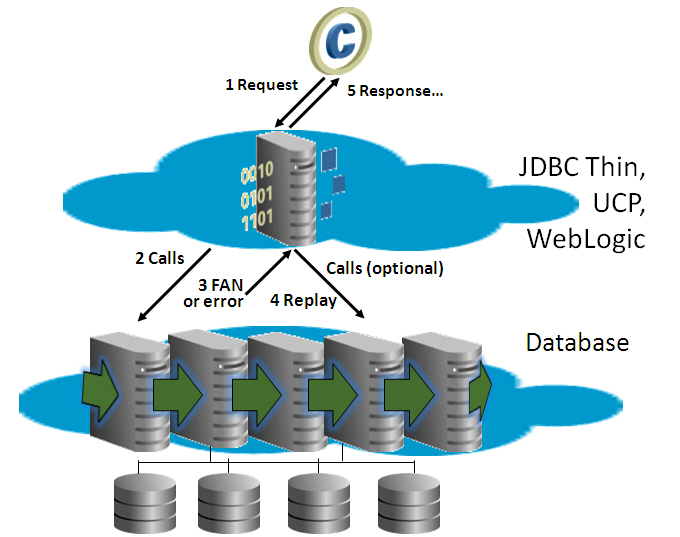
To attempt to recover a database session following a recoverable error, Application Continuity performs the following steps:
Note:
The steps to recover a database session apply for both unplanned and planned outages, although specific steps vary depending on the type of outage.
- The client application makes a request, which is passed to a middle tier (such as the Universal Connection Pool (UCP), ODP.NET, WebLogic Server, OCI session pool, Tuxedo, or third-party pool using UCP) and forwarded to the database. The application could also make a request directly to the database using the JDBC replay driver or ODP.NET managed provider 23ai.
- The middle tier, or Oracle drivers (JDBC replay driver, OSI, or ODPM 23ai).
- A planned or unplanned
DOWNFast Application Notification (FAN) event or recoverable error is received. The driver stops the terminated session. - Application Continuity begins the replay and does the following:
- Replaces the terminated physical session with a new clean session.
- Prepares for replay by using Transaction Guard to determine the outcome of the in-flight transaction, if one was open.
- If
FAILOVER_RESTORE=LEVEL2,FAILOVER_RESTORE=LEVEL1, orFAILOVER_TYPE=AUTO, then Application Continuity restores the initial session state. Use Wallets withFAILOVER_RESTOREto restore all modifiable parameters. Application Continuity uses a label callback or initial callback if an application also sets session states that are not provided byFAILOVER_RESTOREin the callback - Rebuilds the database session, recovering the transactional and non-transactional states, and validating at each step that the data and messages seen by the client driver are the same as those that the client may have seen and used to make a decision.
- Ends the replay and returns to run-time mode.
- Submits the last queued call.
This is the last call made when the outage was discovered. During replay, only this call can run a COMMIT. A COMMIT midway through rebuilding the session terminates replay (excluding autonomous transactions).
5. The response is returned to the application.
If replay succeeded, then the application can continue with the problem masked. If not, then the application must handle the original error.
The behavior of Application Continuity after a communication failure depends on the Oracle products and technologies involved. For example:
- If you use Oracle RAC or an Oracle Active Data Guard farm, then, after the connection is reestablished on another running instance, Application Continuity attempts to rebuild the session and replay the last transaction if there is one in flight.
- If you use Oracle Active Data Guard and fail over to a standby site, then Application Continuity connects to the failover instance and attempts to rebuild the session and replay the last transaction there, if a transaction was in-flight. Application Continuity does not replay if the Oracle Active Data Guard switchover or failover has lost data.
- If you are using Oracle RAC or Oracle RAC One Node and not using Oracle Active Data Guard, and if an outage causes a break in all public networks or causes the database or database session to shut down briefly, then Application Continuity attempts to rebuild the session and replay the last transaction (if a transaction was in flight) against the database after connectivity is restored.
Related Topics
Support for Oracle Application Continuity and Transparent Application Continuity
Support for Application Continuity (AC) is integrated into many Oracle applications.
Application Continuity is available for general use with the following Oracle technologies:
- Pro_C/C++ and Pro_COBOL 23.9 or later, when used with embedded SQL request boundaries.
- Oracle JDBC Replay Driver 12c or later. This is a JDBC driver feature provided with Oracle Database 12c for Application Continuity.
- The Oracle Database 21c or later JDBC Consolidated Data Source automatically enables replay when Application Continuity is enabled. There is no longer a need to choose the replay driver.
- Oracle Universal Connection Pool (UCP) 12c or later
- Oracle WebLogic Server Active GridLink or third-party JDBC application servers using UCP with Oracle JDBC Replay Driver 19c or later, or JDBC Consolidated Data Source.
- Java connection pools or standalone Java applications using Oracle JDBC Replay Driver 12c or later with Request Boundaries.
- Applications and language drivers using the session pool with Oracle Call Interface (OCI) 12c Release 2 (12.2) or later, including Python with thick mode.
- SQL*Plus 19c or later.
- ODP.NET Unmanaged Provider 12c Release 2 (12.2) or later (Set "
pooling=true" and "Application Continuity=true" as default in 12.2 and later). - Oracle Data Provider for .NET (ODP.NET), Managed Driver 23ai and later.
Transparent Application Continuity (TAC) is available for general use with the following Oracle technologies:
- Pro_C/C++ and Pro_COBOL 23.9 or later.
- Oracle JDBC Replay Driver 19c or later. This is a JDBC driver feature provided with Oracle Database 19c for Application Continuity
- The Oracle Database 21c or later JDBC Consolidated Data Source automatically enables replay when Application Continuity is enabled. There is no longer a need to choose the replay driver.
- Oracle Universal Connection Pool (UCP) 19c or later with Oracle JDBC Replay Driver 19c or later
- Oracle WebLogic Server Active GridLink or third-party JDBC application servers using UCP with Oracle JDBC Replay Driver 19c or later, or JDBC Consolidated Data Source.
- Java connection pools or standalone Java applications using Oracle JDBC Replay Driver 19c or later
- Oracle Call Interface (OCI) 19c or later
- Python (
python-oracledb) and Node.js (node-oracledb) drivers in thick mode - SQL*Plus 19.3 or later
- ODP.NET pooled, Unmanaged Driver 18c or later (Set "
pooling=true" as default in 12.2 and later) - OCI-based applications using OCI 19c or later
- Oracle Data Provider for .NET (ODP.NET), Managed Driver 23ai and later
Application Continuity for Java is embedded in the Universal Connection Pool, WebLogic data sources, including non-XA and XA data sources, and is available with the thin JDBC replay driver, standalone (which is a JDBC replay driver without Oracle connection pools, such as Apache Tomcat or a custom Java connection pool). Application Continuity for OCI is embedded in SQL*Plus, OCI 12.2 or later, ODP.NET, Unmanaged Provider including Python with thick mode, (ODP.NET), Managed Provider 23ai and later, and Python when using thick mode. With AC and TAC, JDBC applications auto enable starting with Oracle Database 21c, and OCI applications starting with Oracle Database 19c (19.3).
If a connection pool or container does not use an Oracle connection pool, then many third-party applications fully support replacing the connection pool with the Universal Connection Pool. This includes IBM WebSphere and Apache Tomcat. C applications that implement their own pooling can use OCIRequestBegin and OCIRequestEnd calls. Alternatively-for Java applications, only-an application can add its own request boundaries.
Request Boundaries
Request boundaries are embedded in Oracle connection pools. Request boundaries are also embedded for third party Java Application Servers that are standard with JDK9 or later. When you use the Oracle connection pools, request boundaries are marked explicitly at check-out and check-in, delimiting the size of each replay. When using third-party connection pools, use UCP if Java, or use Transparent Application Continuity, or add request boundaries, or use third party Java Application Servers that are standard with JDK9 or later. Request boundaries are discovered using state tracking when using Transparent Application Continuity. This type of request boundary is called an implicit request boundary. This functionality is available starting with the Oracle Database 19c Java replay driver, and the Oracle Database 19c OCI driver, which includes open source and ODP.NET Unmanaged Provider.
Related Topics
Restrictions and Other Considerations for Application Continuity
Be aware of these restrictions and considerations when using Application Continuity.
Application Continuity is not supported for:
- JDBC OCI driver (type 2)
- OLE DB
- ODBC
- OCCI
- Pro*FORTRAN
- XA
- python-oracledb in thin mode
- node-oracledb in thin mode
Note:
If applications in these environments require support for planned maintenance, then consider draining using connection tests.
Note:
Oracle Data Provider for .NET (ODP.NET), Unmanaged Driver is deprecated in Oracle AI Database 26ai.
ODP.NET provides ADO.NET-based data access to Oracle AI Database. There are two primary Oracle data access drivers for Microsoft .NET Framework: ODP.NET, Managed Driver and ODP.NET, Unmanaged Driver. In Oracle AI Database 26ai, ODP.NET, Managed Driver supports all major features available in ODP.NET, Unmanaged Driver with the same application programming interfaces and configuration settings. Code migration from unmanaged ODP.NET to managed ODP.NET is straightforward for the vast majority of existing .NET applications. Oracle recommends that you migrate existing unmanaged ODP.NET applications to ODP.NET, Managed Driver. The ODP.NET, Unmanaged Driver can be desupported in a future release.
- For OCI and ODP.NET Unmanaged drivers, Application Continuity does not work for ADTs, Advanced Queues (AQ), and some LOB APIs. These exclusions do not apply to Java.
- Scrollable cursors are not fully supported by Application Continuity replay when using the Oracle Call Interface (OCI) driver.
- For applications using JDBC, there is no support for
oracle.sqldeprecated concrete classes:OPAQUE,ANYDATA, orSTRUCT.
If a statement cache at the application server level is enabled (for example, the WebLogic or third-party application server statement cache), this cache must be disabled when replay is used. Instead, configure the JDBC statement cache, which supports Application Continuity and is optimized for JDBC and Oracle AI Database (oracle.jdbc.implicitstatementcachesize=nnn).
Note the following restrictions when replay of transactions can occur:
- Replay is disabled intentionally if a request issues an
ALTER SYSTEMorALTER DATABASEstatement. - Replay is disabled at a request level for
ALTER SESSIONstatements that are deemed unsafe to rebuild the session. This includesSERIALIZABLEmode. Starting with Oracle AI Database 26ai, statements for events and disabling and enablingCOMMIT IN PROCEDUREandGUARDare supported.Note that other
ALTER SESSIONstatements at an application level are supported for replay. These include statements for globalization support (NLS) settings, stored and private outlines, setting the container (CDB/PDB), SQL trace, and PL/SQL warnings. - The replay target database must be in the same database cluster (Oracle RAC, Oracle Data Guard, Oracle Active Data Guard, or Oracle Multitenant) as the source database. To protect the integrity of business transactions, Application Continuity does not replay if the target is a different database. Application Continuity also does not replay if the target database is the same as the source database (or Pluggable Database) but with data loss, such as one flashed back, recovered incompletely by media recovery, or opened by Oracle Data Guard to an earlier point in time.
- For streams arguments, replay is on a "best effort" basis. For example, if the application is using physical addresses, the address has gone with the outage and cannot be repositioned. JDBC stream setters (such as
setBinaryStream), for example, cause replay to be disabled. - Application Continuity is not currently supported for Oracle GoldenGate, Logical Standby, third-party replication solutions, or DML redirection if using Oracle Active Data Guard.
- Replay does not support
ISOLATION_LEVEL=SERIALIZABLE.
Note:
If you are creating clones of databases by splitting disk images (for example, BCVs) or by cloning so it is a "different" database for the purpose of making a logical standby or logical copy that is not a physical or Oracle Active Data Guard database, then the nid utility must be used to change the DBID to differentiate the databases.
Related Topics
- When Application Continuity in OCI Can Fail Over
- How to Change the DBID, DBNAME Using NID Utility (My Oracle Support Knowledge Article KB135723)
Application Continuity for Various Applications
Transparent Application Continuity covers applications that belong to three different groups, automatically tracked by the state tracking system.
Applications That Use Containers with Request Boundaries
Applications that use containers with request boundaries enable Application Continuity to manage replay between explicit boundaries.
A request boundary is a tag that marks the beginning and end of a database request. Connection pools that embed request boundaries include Oracle Universal Connection Pool, all WebLogic server data sources, Tuxedo, Oracle Call Interface, ODP.NET Unmanaged Provider, and standard third-party application servers and standalone Java pools that use the JDBC drivers PooledConnection interface, in addition to SQL*Plus.
When Oracle AI Database is aware of request boundaries:
- The database can process web requests effectively and with no performance overhead, including when to attach and release connections. It can multiplex, drain, rebalance, shed, and allow complex states inside requests. Without request boundaries, the lower layers of the database are not aware of web requests. Subsequently, the database relies on Oracle Client actions, advisory methods and heuristics, such as fast connection failover, connection validation, and state advice.
- The length of replay is limited to the initial state, followed by the user calls in that request less those that are purged by Application Continuity. Request boundaries enable you to control the length of replay. You can also determine where to drain for planned maintenance (at the end of the request), and where to fail over for planned maintenance (at the beginning of the request).
- When using Application Continuity, the replay driver detects safe places to move the request boundaries forward automatically. This feature is available when
FAILOVER_TYPEis set toAUTO. - Applications deployed using middle-tier containers that set request boundaries have access to the full set of transparency features that the database server provides. The database detects when a client sets request boundaries and uses the boundaries to mark safe points for draining, failover, concentration, and throughput measures.
Request boundaries enable an application to use all complex, non-transactional session states within a request. The request boundary specification requires that these states are not dependent across boundaries.
Applications that are Database Agnostic
Database-agnostic applications set a state when the connection is established, and do not change non-transactional session states again, or change it rarely.
Database-agnostic applications (applications with no request boundaries) set basic, non-transactional states. These applications do not use features or sequences proprietary to Oracle AI Database. For these applications, Application Continuity identifies implicit boundaries. These applications often set state once when a connection is created, and then do not change state again, or change the state infrequently. This category of applications includes those applications that use anonymous PL/SQL that does not create server-side session states.
When using Transparent Application Continuity with Oracle AI Database, explicit request boundaries are not required, but they are recommended. (For Oracle Database 18c ONLY: Java requires an initial beginRequest.) This allows support for SQL*Plus and third-party connection pools. When explicit request boundaries are present, they are used. Explicit request boundaries continue to be needed for Application Continuity. Oracle recommends that you return your connections to the connection pools, when not in use.