Raft Witness Node and Witness Replica
Introduction
Oracle Globally Distributed AI Database supports Raft replication in witness mode, in which each replication unit (RU) consists of two full replicas and one witness replica.
In a standard RF=3 topology, all three replicas store a full copy of the table partition. In witness mode, the witness replica retains the Raft consensus module but stores only a portion of the Raft log and does not contain a table partition. This reduces storage requirements while allowing the witness to participate in Raft consensus.
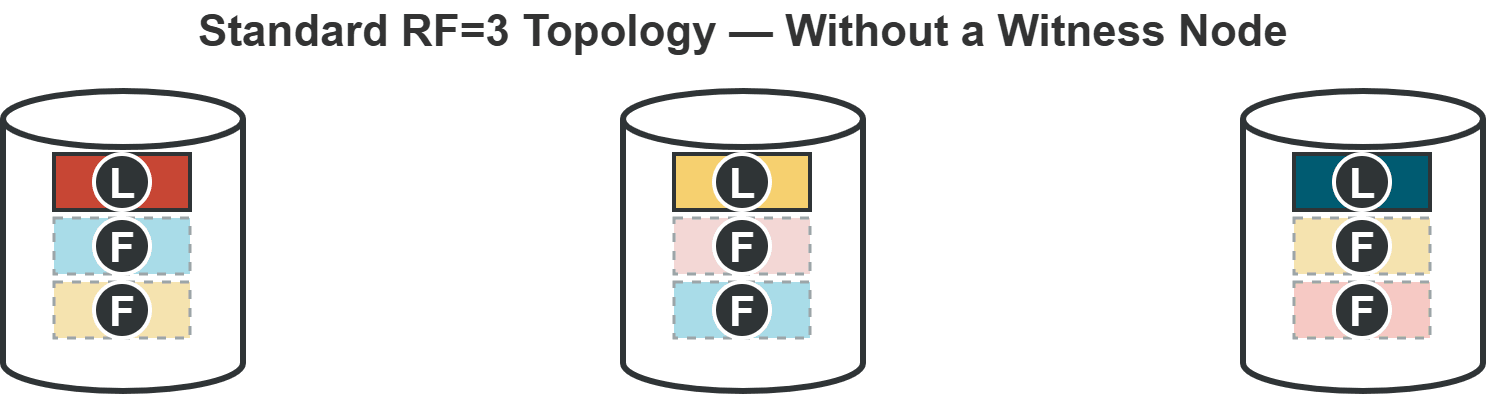
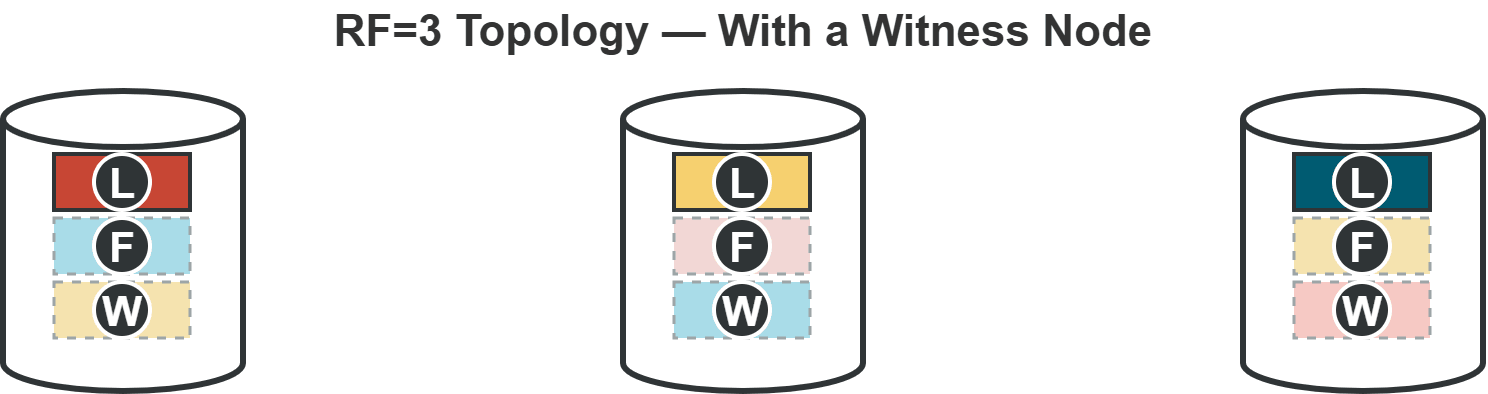
Witness replicas:
- Store log entries and acknowledge the persisted log index, contributing to write consensus.
- Participate in leader election by casting votes.
- Depending on implementation choices, may be elected as temporary leaders to facilitate log transfer to a surviving full replica that is behind in apply operations.
A witness replica:
- Does not store a full copy of the data.
- Does not serve user requests, including reads and writes.
- Cannot act as a final failover destination.
Supported Failure Scenarios
For a topology with two full replicas and one witness:
- If the witness is unavailable, the two full replicas remain and can form a quorum.
- If one full replica is unavailable, the remaining full replica and the witness can form a quorum, but only one full data copy remains.
- If two members are unavailable, the remaining member cannot form a quorum. A witness alone cannot provide the table data.
Benefits and Use Cases
- Reduced storage requirements: A witness replica stores Raft log information instead of a full copy of the table partition, reducing the storage required for a third Raft member.
- Quorum participation: If one full replica fails, the remaining full replica and the witness can form a quorum. However, only one full data copy remains.
- Use case: Use witness mode when a three-member Raft group is needed for quorum and storage constraints make a third full data copy undesirable.
A witness replica cannot serve application requests, add read capacity, or provide an independent full data copy for recovery.
Adding Witness Replicas
Witness replicas are added to the distributed database when shard groups are added to the topology. For example:
GDSCTL> add shardgroup -shardgroup shgrp1 -repfactor 2 -witnesses 1Note the following:
- The
-witnessesoption can be specified only when the-reploption inCREATE SHARDCATALOGis set tonative. - The sum of
-repfactorand-witnessesmust equal 3.
The following example shows a full topology configuration:
GDSCTL> create shardcatalog -database cataloghost.example.com:1521/catalogpdb.example.com -user mysdbadmin/gsmcatuser_password -region dc1 -repl native -chunks 30
GDSCTL> add gsm -gsm gsm1 -listener 1540 -catalog cataloghost.example.com:1521/catalogpdb.example.com -region dc1 -pwd gsmcatuser_password
GDSCTL> start gsm -gsm gsm1
GDSCTL> add shardgroup -shardgroup shgrp1 -region dc1 -repfactor 2 -witnesses 1
GDSCTL> add cdb -connect shardhost1.example.com:1521/cdb1.example.com -pwd gsmrootuser_password
GDSCTL> add shard -cdb cdb1 -shardgroup shgrp1 -connect shardhost1.example.com:1521/pdb1.example.com -pwd gsmuser_password
GDSCTL> add cdb -connect shardhost2.example.com:1521/cdb2.example.com -pwd gsmrootuser_password
GDSCTL> add shard -cdb cdb2 -shardgroup shgrp1 -connect shardhost2.example.com:1521/pdb2.example.com -pwd gsmuser_password
GDSCTL> add cdb -connect shardhost3.example.com:1521/cdb3.example.com -pwd gsmrootuser_password
GDSCTL> add shard -cdb cdb3 -shardgroup shgrp1 -connect shardhost3.example.com:1521/pdb3.example.com -pwd gsmuser_password
GDSCTL> deploy
After deployment, the topology contains leader (L), follower (F), and witness (W) replicas. The source document includes diagrams for the standard RF=3 topology and the resulting topology with a witness replica.