CALENDAR
Syntax
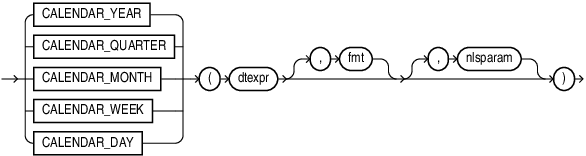
Description of the illustration calendar_fn.gif
Purpose
Calendar functions accept a DATE expression, or any expression that may be implicitly converted to DATE as input. They return a formatted string representing the date, with default formats explicitly defined for each function.
Semantics
Each of the calendar , fiscal , and retail functions returns a VARCHAR2 value that uniquely identifies a member in an implicit hierarchy at a particular level. For this reason, the NLS_DATE_FORMAT, NLS_TIMESTAMP_FORMAT, and NLS_TIMESTAMP_TZ_FORMAT do not apply to these functions. They each have their own default formats. These functions respect the setting of NLS_DATE_LANGUAGE.
-
dtexpr is a datetime expression with one of the following types (or any value that can be implicitly converted to
DATE):DATE,TIMESTAMP,TIMESTAMP WITH TIME ZONE,TIMESTAMP WITH LOCAL TIME ZONE. -
fmt is a text expression representing a format string. In all cases, the case-sensitivity of the format specifiers follows the same behavior as
TO_CHAR. For example,MONspecifies an abbreviated month in upper-case (e.g.JAN),monspecifies an abbreviated month name in lower-case (e.g.jan), andMonspecifies an abbreviated month name in title-case (e.g.Jan). -
nlsparam is a text expression representing an NLS parameter setting. The only currently supported parameter is
NLS_DATE_LANGUAGE, and is specified in the same manner as forTO_CHARandTO_DATE.
Formats for Calendar Functions
The calendar functions return a VARCHAR2 value that uniquely identifies a member in the specified level within the standard Gregorian calendar. The required formats must appear somewhere in the format string, and an error will be raised if not present. The optional formats may appear in the format string. All other format specifiers are prohibited and an error will be raised if included.
Punctuation and quoted text (using double-quotes) are allowed in the same manner as TO_CHAR. The format specifiers are a subset of the datetime format specifiers used for TO_CHAR.
The following table describes the format strings for each of the functions.
Table 1 Formats for calendar functions
| Function | Required Formats | Optional Formats | Default Format String |
|---|---|---|---|
CALENDAR_YEAR |
YYYY or SYYYY |
None |
Example: |
CALENDAR_QUARTER |
|
None |
Example: |
CALENDAR_MONTH |
One of |
Q |
Example: |
CALENDAR_WEEK |
|
None |
Example: |
CALENDAR_DAY |
|
Q |
Example: |
Format Descriptions for Calendar Functions
The following table describes the interpretation of the format specifiers for calendar hierarchies, which is consistent with the definition for TO_CHAR and TO_DATE, but are included here for completeness. The capitalization rules for MON, MONTH, DY, and DAY all follow the usage elsewhere (i.e. TO_CHAR) with regard to lower-case (e.g. month => june), upper-case (e.g. MONTH => JUNE), and title-case (e.g. Month => June).
Table 2 Format descriptions for calendar functions
| Format Specifier | Description |
|---|---|
YYYY |
4-digit year (only positive years supported) |
SYYYY |
4-digit year, with BC years as negative |
Q |
Quarter of year (1-4) |
MM |
Month of year (1-12), 2-digits |
MON |
Abbreviated name of month |
MONTH |
Name of month |
WW |
Week number (1-53), 2-digits |
DY |
Abbreviated name of day |
DAY |
Name of day |
D |
Day number (1-7). Depends on the NLS_TERRITORY |
DD |
Day of month (1-31), 2-digits |
DDD |
Day of year (1-366), 3-digits |