CREATE DIRECTIVE (NOTIFY)
Purpose
Use CREATE DIRECTIVE to create a notification directive that records changes made to a table or JSON-relational duality view by database transactions. Notification directives can be used to replicate application objects, maintain application caches, or generate change notification events for microservices. Notification actions are transactional and are consistent as of the commit of a transaction.
Prerequisites
- To create a notification directive in your own schema on a table or JSON-relational duality view in your own schema, you must have the
CREATE NOTIFICATION DIRECTIVEsystem privilege. - To create a notification directive in any schema on a table or JSON-relational duality view in any schema, you must have the
CREATE ANY NOTIFICATION DIRECTIVEsystem privilege. - The notification table and notification view are created in the directive schema. If you create a directive in another user’s schema, you can query the notification table and notification view only if you have the required object privileges on those objects.
Syntax
create_directive::=

Description of the illustration create_directive_notify.gif
table_notification_clause::=

Description of the illustration table_notification_clause.gif
json_relational_duality_view_clause::=

Description of the illustration json_relational_duality_view_clause.gif
notification_using_clause::=

Description of the illustration notification_using_clause.png
notification_columns_clause::=

Description of the illustration notification_columns_clause.gif
logged_columns_list::=
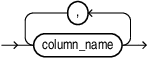
Description of the illustration logged_columns_list.png
key_columns_list::=
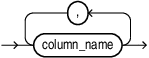
Description of the illustration key_columns_list.png
sys_context_clause::=

Description of the illustration sys_context_clause.png
namespace_parameters_list::=

Description of the illustration namespace_parameters_list.png
retention_clause::=
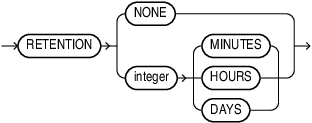
Description of the illustration retention_clause.gif
For information about the syntax, semantics, and notification behavior, see Creating Notification Directives.
Semantics
Notification rows are visible after the transaction commits. For a table, the notification history can include intermediate row versions produced by a transaction. For a JSON-relational duality view, Oracle records only the final committed object for each affected object.
Only one notification directive can be created on a table or duality view. Notification directives cannot be created on temporary tables, sharded tables, or remote tables specified through a database link. Notification directives are not editionable.
action_list
The action_list specifies which DML operations to track. You can specify INSERT, UPDATE, and DELETE. If you omit the ON clause, the directive tracks all three operations.
using_notification_table_clause
The using_notification_table_clause specifies the notification table and notification view. Oracle creates both objects in the schema that owns the directive. If the directive is in another user’s schema, you must have the object privileges required to query the notification table and view. The notification view exposes committed changes, including the commit SCN.
The TABLESPACE clause specifies the tablespace for the notification table. If you omit it, Oracle uses the directive owner’s default tablespace. The notification table tablespace cannot be a temporary tablespace.
You cannot use CREATE OR REPLACE for a notification directive. To change the notification table, notification view, or notification table tablespace, drop the directive and create it again.
with_clause
The with_clause applies only to table notification directives. You must specify the KEY columns. The key columns do not need to be primary-key or unique-key columns, but they must be included in the logged columns. Oracle creates a non-unique index on the key columns.
If you omit LOGGED COLUMNS, Oracle logs all columns of the table. If you specify it, Oracle logs only the listed columns.
INCLUDING OLD VALUES adds an OLD$column_name column for each logged column. For an insert, an old-value column is null. For an update, it contains the value before the update. EXCLUDING OLD VALUES does not add old-value columns.
context_namespace_clause
The context_namespace_clause specifies SYS_CONTEXT attributes to log with each notification. The context must exist, and its attributes must be set using DBMS_SESSION.SET_CONTEXT.
The namespace must be a valid identifier. Attribute names are not case-sensitive and cannot exceed 30 bytes. An attribute length defaults to 64 bytes and can range from 1 to 4000 bytes.
enable_or_disable_clause
The enable_or_disable_clause specifies whether the directive tracks changes when it is created. The default is ENABLE. A disabled directive does not track changes until it is enabled using ALTER DIRECTIVE.
retention_clause
The retention_clause specifies how long notification history is retained before it becomes eligible for automatic purge. You can specify a retention value in minutes, hours, or days. The minimum value is 1 minute and the maximum is 100 years. A value of 0 or mixed units is not allowed.
If you omit the retention_clause or specify RETENTION NONE, Oracle does not purge notification history automatically. Use DBMS_DIRECTIVES.PURGE_NOTIFICATION_TABLE to purge it manually. Automatic and manual purges are asynchronous.