CREATE END USER CONTEXT
Purpose
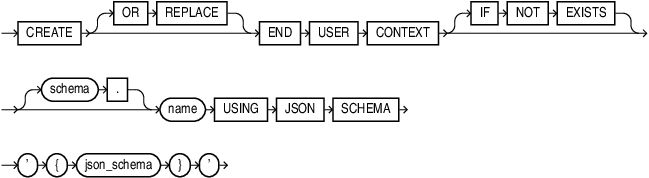
Use CREATE END USER CONTEXT to define a new, custom end-user context object in the database. The context definition specifies a set of named attributes, their data types, default values, and optional PL/SQL event handlers. The definition acts as a template that the database instantiates at runtime within each end-user security context. You can assign each attribute a default value or associate it with a PL/SQL handler function for lazy loading on first read.
Prerequisites
You must have the CREATE END USER CONTEXT system privilege in order to create an end-user context in your own schema.
You must have the CREATE ANY END USER CONTEXT system privilege in order to create an end-user context in a schema other than your own.
Syntax
Description of the illustration create_end_user_context.gif
json_schema::=

Description of the illustration json_schema.gif
context_properties::=

Description of the illustration context_properties.gif
attribute::=
Description of the illustration attribute.gif
regular_attribute::=

Description of the illustration regular_attribute.gif
attr_details::=

Description of the illustration attr_details.gif
attr_type::=
Description of the illustration attr_type.gif
property_name_value::=

Description of the illustration property_name_value.gif
nested_attribute::=

Description of the illustration nested_attribute.gif
Semantics
-
OR REPLACE: WhenOR REPLACEis specified, and the end user context does not exist, it will be created. If the end user context already exists, the end user context will be replaced.When
OR REPLACEis not specified, and the end user context does not exist, it will be created. If the end user context already exists, then an error will be thrown. -
IF NOT EXISTS: If you specifyIF NOT EXISTSand the end user context already exists, no error is raised. If the end user context does not exist, then it will be created.If you do not specify
IF NOT EXISTSand the end user context already exists, an error is raised. If the end user context does not exist, then it will be created. -
Note that only one of
OR REPLACEorIF NOT EXISTSis allowed in the same statement at a time. Using bothOR REPLACEandIF NOT EXISTSin the same statement results in an error. -
schema: The schema (owner) name of the end-user context definition. If omitted, the current schema is used.
-
name: The name of the end-user context definition
-
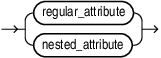
attr_name: The name of the attribute within the context. The name must be less than or equal to 128 characters long.
-
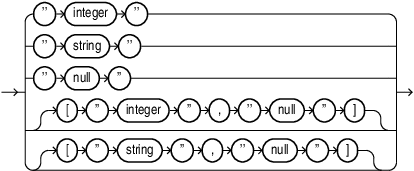
attr_type: The data type of the attribute. Supported types are
integer,string, andobject. Useobjectfor nested attributes. -
value: The default value of the attribute. A JSON number for integer attributes. A double-quoted JSON string for string attributes.
-
hdlowner: The schema that owns the PL/SQL handler function for the attribute.
-
package: The PL/SQL package that contains the handler function.
-
function: The PL/SQL function name that is executed when the specified event (
o:onFirstRead) occurs on the attribute. -
For each attribute, you can either specify its default value or, associated events for lazy loading. If the default value is specified, it can either be a JSON number or JSON string (double-quoted). The attribute is initialized with the default value when the context is loaded in the application session.
-
For events, event name can be onFirstRead. onFirstRead specifies to call the handler function when an attribute is read for the first time.
Example
The following SQL statement creates an end user context object called hcm in hr schema:
CREATE END USER CONTEXT hr.hcm USING JSON SCHEMA '{
  "type": "object",
  "properties": {
    "emp_id": {
      "type": "integer",
      "o:onFirstRead": "hr.hcm_core.init_user_context"
    },
    "service_center_id": {
      "type": "integer",
      "default": 1
    }
  }
}';
This namespace contains two attributes, emp_id and service_center_id. service_center_id default value is 1. The value of emp_id is not set at this time. When the attribute is read for the first time, the handler function hr.hcm_core.init_user_context will be invoked which should set the value for this attribute.
Note that one context can have at most one unique handler PL/SQL function specified. If the context has multiple attributes associated with PL/SQL handler function, they must reference the same schema.package.function, otherwise an error will be thrown for invalid input.