CREATE ICEBERG TABLE
Purpose
Use CREATE ICEBERG TABLE to create an Iceberg table in an Iceberg catalog that has no representation in the database.
Prerequisites
You must install the Data Studio package for your on-premises database. See Oracle Data Studio Family of Packages of Database Utilities.
You must set up the ACL to be able to reach the Iceberg catalog server and object storage endpoints.
You must have the ADPUSER role, which is part of the Data Studio installation.
You must use functions and procedures offered by Data Studio’s DBMS_CATALOG package to access Iceberg tables and catalogs. For example, the Iceberg catalog needs to be mounted to your database using dbms_catalog.mount_iceberg.
See Also:
-
The Data Studio Overview Page of Using Oracle Autonomous AI Database Serverless
-
Manage Catalogs with DBMS_CATALOG of Using Oracle Autonomous AI Database Serverless
-
Manage Catalogs Using Data Studio DBMS_CATALOG of Database Actions.
Syntax
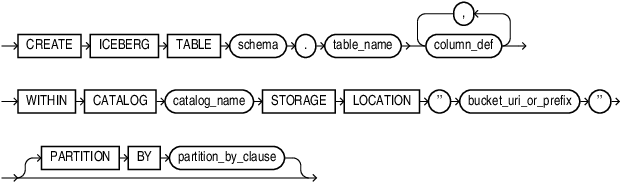
Description of the illustration create_iceberg_table.gif
partition_by_clause::=
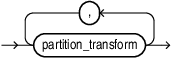
Description of the illustration partition_by_clause.gif
partition_transform::=
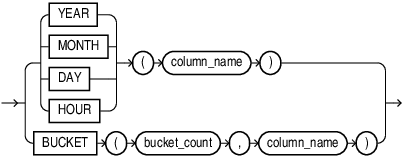
Description of the illustration partition_transform.gif
bucket_count::=
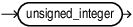
Description of the illustration bucket_count.gif
Semantics
Native iceberg table creation will support the same data types as DMLs, including decimal, float, double, string, date, and timestamp.
-
catalog_name must be an Iceberg REST catalog that is mounted using the ` DBMS_CATALOG` package
bucket_uri_or_prefix must be an S3-compatible endpoint
partition_transform
Iceberg tables use partition transforms to create at-will partitions based on the data being ingested. The partitions transforms supported by Iceberg tabels are :
-
YEAR: Input columns can be ofdate,timestamp,timestamptz. Output is of typeint. -
MONTH: Inputs can be on one ofdate,timestamp,timestamptz,timestamp_ns,timestamptz_ns. Output is of typeint. -
DAY: Inputs can be on one ofdate,timestamp,timestamptz,timestamp_ns,timestamptz_ns. Output is of typeint. -
HOUR: Inputs can be on one oftimestamp,timestamptz,timestamp_ns,timestamptz_ns. Output is of typeint. -
BUCKET: Inputs can be on one ofint,long,decimal,string,date,timestamp,timestamptz,timestamp_ns,timestamptz_ns. Output is of typeint.
Restrictions
-
Must comply with the
ICEBERG V2specification. -
Only the following Iceberg table column data types are supported:
-
INT -
LONG -
DECIMAL -
FLOAT -
DOUBLE -
STRING(maximum length of the string that can be read is 4000CHAR) -
DATE -
TIMESTAMP -
TIMESTAMPTZ
-
-
If there is an open transaction, issuing an Iceberg ITAS statement will raise an error.
-
After you issue an Iceberg ITAS statement, you must issue a commit or rollback. Before commit or rollback is finished,
-
DMLs on any Oracle table or Iceberg table are not allowed.
-
Queries on the Iceberg table that was the insertion target are not allowed.
-
Queries on other Oracle or Iceberg tables are allowed.
-
-
Select query result in ITAS must have the same schema as Iceberg table.
-
The database must have
AL32UTF8NLS_CHARACTERSET. -
Parquet compression level =
ZSTD Level 3 -
Constraints are not supported for Iceberg table creation DDL.
-
$and#symbols are not supported in the Iceberg table name. -
Iceberg table column names must be <= 128
ASCIIcharacters for supporting ITAS. -
A reference to the table (
schema_name.table_name@catalog_name) should appear only once in the SQL statement.
Troubleshooting
To access the table after creation run the following command, if the catalog’s Oracle Database representation does not identify the table:
EXEC DBMS_CATALOG.FLUSH_CATALOG_CACHE('<catalog name>');