CREATE MLE ENV
Purpose
MLE Environments are first-class schema objects that can be managed on their own and reused across multiple execution contexts.
MLE uses execution contexts to execute MLE language code and MLE environments allow you configure properties for these execution contexts. You can set language options to customize the runtime of the MLE language and you can enable specific MLE modules to be imported to an execution context and manage dependencies.
Use CREATE MLE ENV to create a new MLE environment in the database in one of three ways:
You can create an MLE environment in one of three ways :
-
As a fresh empty environment.
-
As an environment with a list of imports and a language option string.
-
By by cloning an existing environment. Cloning an environment creates an independent copy that is not affected by subsequent changes to the original environment.
MLE environments use the same namespace as tables and procedures.
Prerequisites
Users must have the CREATE MLE privilege to create an environment in their own schema, and the CREATE ANY MLE privilege to create an environment in other schemas. The user creating the environment must either own the environment being cloned or should have the EXECUTE privilege on it.
Syntax
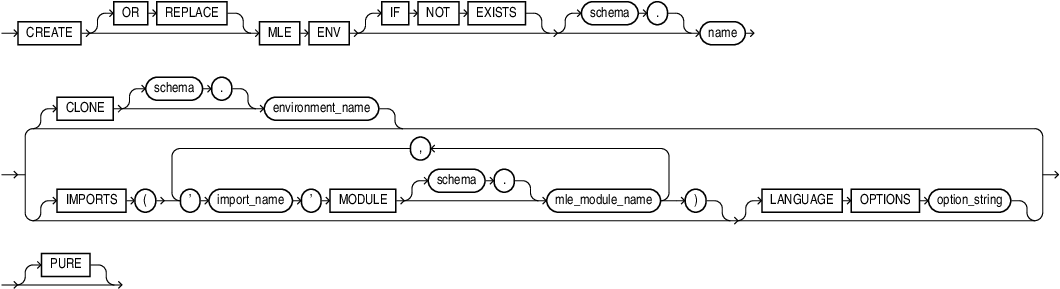
Description of the illustration create_mle_env.gif
Semantics
OR REPLACE
Specify OR REPLACE to re-create the environment, if it already exists. You can use this clause to change the definition of an existing environment without dropping, re-creating, and regranting object privileges previously granted on it.
IF NOT EXISTS
Specifying IF NOT EXISTS has the following effects:
-
If the MLE environment does not exist, a new MLE environment is created at the end of the statement.
-
If the MLE environment, this is the MLE environment you have at the end of the statement. A new one is not created because the older one is detected.
You can have one of OR REPLACE or IF NOT EXISTS in a statement at a time. Using both OR REPLACE with IF NOT EXISTS in the very same statement results in the error: ` REPLACE and IF NOT EXISTS cannot coexist in the same DDL statement`.
PURE
Specify PURE on MLE MLE environments and JavaScript inline call specifications create restricted JavaScript execution contexts.
For more see About Restricted Execution Contexts of the JavaScript Developer’s Guide.
Examples
The following example creates an empty MLE environment myenv.
CREATE MLE ENV scott."myenv";The following example clones an existing MLE environment:
CREATE MLE ENV scott."myenv" CLONE "other_env";See Also: