DATEADD
Syntax

Description of the illustration dateadd.gif
time_unit::=
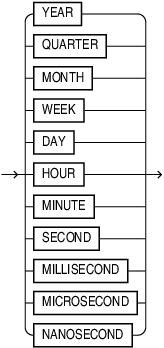
Description of the illustration time_unit.gif
Purpose
DATEADD adds or subtracts a specified time interval from a date or timestamp value.
Semantics
DATEADD takes three arguments:
-
time_unit: refers to the time unit you want to add, one of
YEAR,MONTH,DAY,WEEK,QUARTER,HOUR,MINUTE,SECOND,MILLISECOND,MICROSECOND,NANOSECOND. It is either a keyword from the list or a run-timeCHARvalue that evaluates to one of these keywords. -
value: refers to the number of units of time that you want to add. value can be an integer or an expression that yields an integer value, or one that can be implicitly converted to an integer. If the number has fractional parts it is rounded up.
-
datetime: can be one of
DATE,TIMESTAMP,TIMESTAMP WITH TIME ZONE,TIMESTAMP WITH LOCAL TIME ZONE. It can also be an expression that evaluates to one of the valid input types listed.
The return type of the output matches the input type of datetime.
Note, if the input is of type DATE, and value evaluates to a number less than a SECOND (for example, 1 MILLISECOND, 9 MICROSECOND, 10 NANOSECOND), the added integer is ignored, because DATE does not store fractional seconds.
Examples
Examples : When Time Unit is MONTH
The following example subtracts one month from the timestamp. It keeps the same time and time zone offset, and moves the date from April 30, 2023 back to March 30, 2023.
SELECT DATEADD(MONTH, -1, TIMESTAMP '2023-04-30 11:24:54 +01:00');Result:
2023-03-30 11:24:54 +01:00The following example adds one month to the timestamp. Because May has a 30th day, the day stays 30. The time and timezone offset stay the same.
SELECT DATEADD(MONTH, 1, TIMESTAMP '2023-04-30 11:24:54 +01:00');Result:
2023-05-30 11:24:54 +01:00The following example adds one month to February 28 2023.
SELECT DATEADD(MONTH, 1, TIMESTAMP '2023-02-28 11:24:54 +01:00');Result:
2023-03-28 11:24:54 +01:00Example 2: DATEADD behavior for Non_Existent Time
The timestamp is just before the 2025 spring Daylight Savings Time jump in America/Los Angeles. So adding one real hour to 01:59:59 lands at 03:59:59 because the 02:00 hour does not exist locally on that day.
SELECT DATEADD(
  HOUR,
  1,
  TO_TIMESTAMP_TZ(
     '09-MAR-2025 01:59:59 AMERICA/LOS_ANGELES PST',
     'DD-MON-YYYY HH24:MI:SS TZR TZD'
    )
 );
Result:
2025-03-09 03:59:59 America/Los_Angeles PDTExample 3: When Integer has Fractional Parts
The 1.9 value is rounded up to 2, so 2 years are added.
SELECT DATEADD(YEAR, 1.9, DATE '2023-02-02');Result:
2023-02-02