DATEDIFF
Syntax
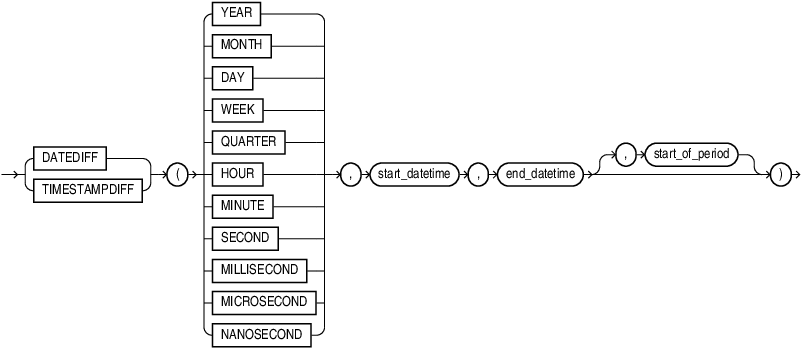
Description of the illustration datediff.gif
Purpose
DATEDIFF computes the difference between two datetime values in years, months, days, weeks, and other time units.
TIMESTAMPDIFF is a synonym of DATEDIFF.
Semantics
The function takes three arguments, time_unit, start_datetime, end_datetime, and returns a number that represents the number of time unit boundaries between start and end datetimes. The return value is an integer that is positive when the end datetime is later than the start datetime and negative when the end datetime is earlier than start datetime.
The first argument time_unit, is one of YEAR, MONTH,DAY, WEEK, QUARTER, HOUR, MINUTE, SECOND, MILLISECOND, MICROSECOND, and NANOSECOND, or a run-time CHAR value that evaluates to one of these types.
The second and third arguments, start_datetime, end_datetime, must be expressions evaluating to values of the data type DATE, TIMESTAMP, TIMESTAMP WITH TIME ZONE, TIMESTAMP WITH LOCAL TIME ZONE.
The optional fourth argument start_of_period can be specified when the time unit is WEEK, QUARTER, or YEAR and means the following:
-
When time unit is
WEEK, start_of_period means “start of week”. The allowed values are 0, 1, 2, 3, 4, 5, 6, and 7. The default value is 0, which means that the first day of the week is determined by theNLS_TERRITORYparameter. The value 1 means Monday, 2 means Tuesday, 3 means Wednesday, 4 means Thursday, 5 means Friday, 6 means Saturday, and 7 means Sunday. -
When time unit is
QUARTER, start_of_period means “start of quarter”. The allowed values are 1, 2, 3, 4, 5, 6, 7, 8, 9, 10, 11, and 12. The default value is 1. The values 1, 4, 7, and 10 mean that quarters start on the first days of January, April, July, and October. All four values are equivalent. The values 2, 5, 8, and 11 mean that quarters start on first days of February, May, August, and November. These four values are also equivalent. The values 3, 6, 9, and 12 mean that quarters start on first days of March, June, September, and December. Again, these four values are equivalent. -
When time unit is
YEAR, start_of_period means “start month of year”. The allowed values are 1, 2, 3, 4, 5, 6, 7, 8, 9, 10, 11, and 12. The default value is 1. The value 1 means that the year starts on the first day of January, 2 means that it starts on the first day of February, and so on until 12, which means that the year starts on the first day of December.
Non-default values for the start of the quarter and the start of the year are useful in calculations pertaining to fiscal quarters and years when the fiscal year does not begin on January 1st.
DATEDIFF does not support non-Gregorian calendars. The calculations are always performed in the Gregorian calendar even if the value of the corresponding NLS_CALENDAR setting is not GREGORIAN.
Use Oracle Locale Builder to check the first day of calendar week for particular values of NLS_TERRITORY.
Specifying start_of_period if time unit is not WEEK, QUARTER, or YEAR is a syntax error.
Time Unit Boundaries
Time units begin with the following datetime values.
| Time Unit | First Datetime of the Unit |
|---|---|
YEAR |
Each midnight of the first day of the month determined by the start_of_period parameter or of January if the parameter is not specified |
QUARTER |
Each midnight of the first day of one of the months determined by the start_of_period parameter or of January, April, July, or October if the parameter is not specified |
MONTH |
Each midnight of the first day of a month |
WEEK |
Each midnight of the first day of a week as determined by the start_of_period parameter (see the previous section) or by the value of NLS_TERRITORY if the parameter is not specified |
DAY |
Each midnight |
HOUR |
Each value that has zero as minutes, seconds, and fractional seconds |
MINUTE |
Each datetime value that has zero as seconds and fractional seconds |
SECOND |
Each value that has zero as fractional seconds |
MILLISECOND |
Each value that has zero as fourth to ninth fraction digits |
MICROSECOND |
Each value that has zero as seventh to ninth fraction digits |
NANOSECOND |
Each datetime value |
The midnight is the time 00:00:00.000000000. A time unit begins with one of the values defined above and ends with a value that is one nanosecond earlier than the next suitable start value for this unit.
If the start and end datetime does not have fractional second part at a given precision, for example, TIMESTAMP(6)does not have nanoseconds, the calculation assumes that the missing part is 0.
Time passing between two datetime values crosses a unit boundary if the start value is earlier than and the end value is equal to or later than a beginning datetime of the unit.
Converting Start Datetime and End Datetime to UTC
If both start_datetime and end_datetime after data type coercion are of DATE or TIMESTAMP data type, DATEDIFF performs calculations without taking any time zone into consideration.
Otherwise, both start_datetime and end_datetime are converted to the UTC time zone before performing any calculations are performed.
For example, in the below query, the start_datetime is 2024/04/08 06:00:00 AM UTC time. The end_datetime is 2024/04/08 07:00:00 AM UTC time. Although the start_datetime and end_datetime are in different days in Pacific time, they belong to the same day if converted to UTC time.
SELECT DATEDIFF (DAY, TIMESTAMP '2024-04-07 23:00:00 -07:00', TIMESTAMP '2024-04-08 00:00:00 -07:00');Result: 0 In below example, start_datetime and end_datetime seems to belong to the same day in PDT time, but they belong to different days in UTC time.
SELECT DATEDIFF (DAY, TIMESTAMP '2023-04-08 16:00:00 -07:00', TIMESTAMP '2023-04-08 17:00:00 -07:00');Result: 1 The above query is equivalent to:
SELECT DATEDIFF (DAY, TIMESTAMP '2023-04-08 23:00:00 +00:00', TIMESTAMP '2023-04-09 00:00:00 +00:00');Result: 1
Examples
Example 1: Start of Week
When start_of_period is 7, Sunday is the first day of the week. Although the start_datetime and end_datetime below are adjacent and differ in time by only 1 nanosecond, the former is a Saturday and latter is a Sunday. Therefore, the time crosses the week boundary between the start_datetime and end_datetime so the query returns 1.
SELECT DATEDIFF (WEEK, TIMESTAMP '2005-12-31 23:59:59.9999999', TIMESTAMP '2006-01-01 00:00:00.0000000', 7);Result: 1
Example 2: Start of Quarter
A calendar year consists of four quarters. By default, the first quarter is January 1st to March 31st, the second quarter is April 1st to June 30th, the third quarter is July 1st to September 30th, the fourth quarter is October 1st to December 31st. In the two examples below, the result is based on these default quarter boundaries.
SELECT DATEDIFF (QUARTER, DATE '2023-03-31', DATE '2023-04-01');Result: 1
SELECT DATEDIFF (QUARTER, DATE '2023-04-01', DATE '2023-06-30');Result: 0
Example 3: Start of Year
A calendar year always starts from Jan 1st. Similar to fiscal quarter, users can specify the start of fiscal year by leveraging the start_of_period parameter when time unit is YEAR.
The following example calculates the number of fiscal year boundaries between two timestamps with the fiscal year starting on June 1st.
SELECT DATEDIFF (YEAR, TIMESTAMP '2005-05-31 23:59:59.9999999', TIMESTAMP '2006-06-01 00:00:00.0000000', 6);Result: 2
Example 4: MILLISECOND/MICROSECOND/NANOSECOND
Time Unit: SECOND
When the time unit is SECOND, the result only calculates the difference between '1996-11-09 09:26:50' to '1996-11-09 10:26:51'
SELECT DATEDIFF (SECOND, TIMESTAMP '1996-11-09 09:26:50.13', TIMESTAMP '1996-11-09 10:26:50.12');Result: 3601
Time Unit: MILLISECOND
When time unit is MILLISECOND, the first three digits of the fractional seconds are kept.
SELECT DATEDIFF (MILLISECOND, TIMESTAMP '1996-11-09 09:26:50.13', TIMESTAMP '1996-11-09 10:26:51.12');Result: 3600990
Time Unit: MICROSECOND
When time unit is MICROSECOND, the first 6 digits of the fractional seconds are kept.
SELECT DATEDIFF (MICROSECOND, TIMESTAMP '1996-11-09 10:26:51.13', TIMESTAMP '1996-11-09 10:26:51.12');Result: -10000
Time Unit: NANOSECOND
When time unit is NANOSECOND, all 9 digits of the fractional seconds are kept.
SELECT DATEDIFF (NANOSECOND, TIMESTAMP '1996-11-09 10:26:51.13', TIMESTAMP '1996-11-09 10:26:51.12');Result: -10000000