GRANT DATA ROLE
Purpose
Use GRANT DATA ROLE to grant one or more data roles to end users, data roles, or application identities.
Prerequisites
To execute this command, you must have the GRANT ANY DATA ROLE system privilege.
You can use the DBA_DATA_ROLE_GRANTS data dictionary view to query existing data role grants together with their properties, like start time and end time.
Note that data roles that are externally mapped cannot be granted to other end users or data roles within the database. They should be granted to application users or roles through the external identity provider.
Note that there are two distinct usages for data role grants:
-
Grant data role to data role or end user so that the grantee can inherit the privileges from the granted data role.
-
Grant data role to application identity so that the data role can be enabled by an application during an application session.
You can use the same GRANT DATA ROLE statement for one usage or the other. Both usages may not be combined in a single statement. That is, the list of grantees can either be all application identities or no application identities. If a mixture of application identities and data roles or end users are specified, an error is raised (as data roles granted to application identity cannot be granted to other data roles or end users).
Syntax
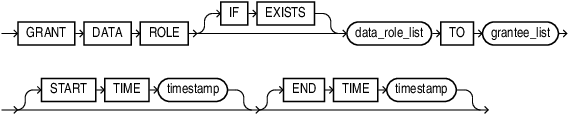
Description of the illustration grant_data_role.gif
data_role_list
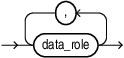
Description of the illustration data_role_list.gif
grantee_list
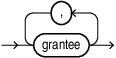
Description of the illustration grantee_list.gif
grantee
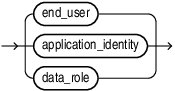
Description of the illustration grantee.gif
Semantics
-
IF EXISTS: If you specifyIF EXISTSand the data role exists, then it will be granted to the grantee(s) specified. If the data role does not exist, no error is thrown.If you do not specify
IF EXISTS, and the data role exists, then it will be granted to the grantee(s) specified. If the data role does not exist, an error is thrown. -
data_role_list: Refers to the names of data roles to be granted. Only local data roles may be granted. A data role granted to a local end user or data role cannot be granted to an application identity.
-
grantee_list: Refers to the names of the grantees to which the data roles are granted. A grantee can be an end user, an application identity, or a local data role.
-
START TIME: Refers to the time from which the grant becomes effective, inTIMESTAMP WITH TIME ZONEformat. This is optional. Not applicable if granting to application identity. -
END TIME: Refers to the time on which the grant becomes ineffective, inTIMESTAMP WITH TIME ZONEformat. This is optional. Not applicable if granting to application identity.
Example
The following SQL statement illustrates granting of the data role manager_role to the end user marvin:
GRANT DATA ROLE manager_role TO marvin;The following SQL statement illustrates granting of the data role employee_role to the data role manager_role:
GRANT DATA ROLE employee_role TO manager_role;