Creating a Repeating Baseline
A repeating baseline is a baseline that repeats during a time interval over a specific period. For example, a repeating baseline may repeat every Monday from 1:00 p.m. to 3:00 p.m. from February 7, 2012 to February 7, 2013.
To create a repeating baseline:
-
Access the AWR Baselines page, as explained in “Creating a Single Baseline”.
-
Click Create.
The Create Baseline: Baseline Interval Type page appears.
-
Select Repeating and then click Continue.
The Create Baseline: Repeating Baseline Template page appears.
-
In the Baseline Name Prefix field, enter a name prefix for the baseline.
-
Under Baseline Time Period, specify the time of the day that you want the baseline to begin collecting AWR data and the duration of the baseline collection.
-
Under Frequency, do one of the following:
-
Select Daily if you want the baseline to repeat on a daily basis.
-
Select Weekly if you want the baseline to repeat on a weekly basis, and then select the day of the week on which the baseline repeats.
-
-
Under Interval of Baseline Creation, complete the following steps:
-
In the Start Time fields, select a date and time in the future when the data collection should begin.
-
In the End Time fields, select a date and time in the future when the data collection should end.
-
-
Under Purge Policy, enter the number of days to retain captured baselines.
-
Click Finish.
A baseline template with the same name as the baseline name prefix is created. A baseline template is a specification that enables Oracle Database to automatically generate a baseline for a future time period.
This example creates a baseline that repeats weekly on Mondays from 8:00 a.m. to 10:00 a.m. from February 6, 2009 to February 6, 2010. Every captured baseline expires after 30 days.
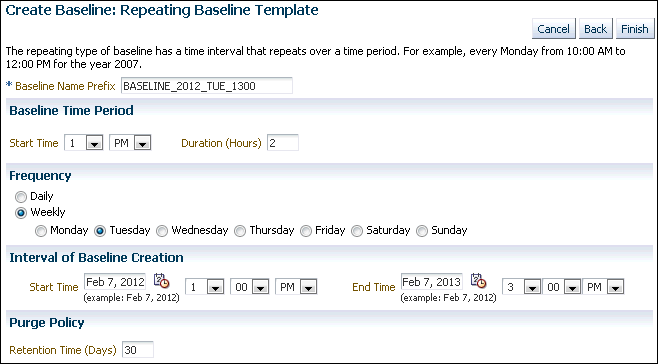
Description of the illustration create_baseline_repeating.gif