Understand Approximate Similarity Search Using Vector Indexes
For faster search speeds with large vector spaces, you can use approximate similarity search using vector indexes.
Using vector indexes for a similarity search is called an approximate search. Approximate searches use vector indexes , which trade off accuracy for performance.
Approximate search for large vector spaces
When search quality is your high priority and search speed is less important, Exact Similarity search is a good option. Search speed can be irrelevant for smaller vector spaces, or when you perform searches with high performance servers. However, ML algorithms often perform similarity searches on vector spaces with billions of embeddings. For example, the Deep1B data-set contains 1B images generated by a Convolutional Neural Network (CNN). Computing vector distances with every vector in the corpus to find Top-K matches at 100 percent accuracy is very slow.
Fortunately, there are many types of approximate searches that you can perform using vector indexes. Vector indexes can be less accurate, but they can consume less resources, and can be more efficient. Unlike traditional database indexes, vector indexes are constructed and perform searches using heuristic-based algorithms.
Because 100 percent accuracy cannot be guaranteed by heuristics, vector index searches use target accuracy. Internally, the algorithms used for both index creation and index search are doing their best to be as accurate as possible. However, you have the possibility to influence those algorithms by specifying a target accuracy. When creating the index or searching it, you can specify non-default target accuracy values either by specifying a percentage value, or by specifying internal parameters values, depending on the index type you are using.
Target accuracy example
To better understand what is meant by target accuracy look at the following diagrams. The first diagram illustrate a vector space where each vector is represented by a small cross. The one in red represents your query vector.
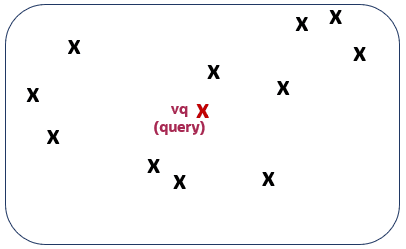
Description of the illustration accuracy1.png
Running a top-5 exact similarity search in that context would return the five vectors shown on the second diagram:
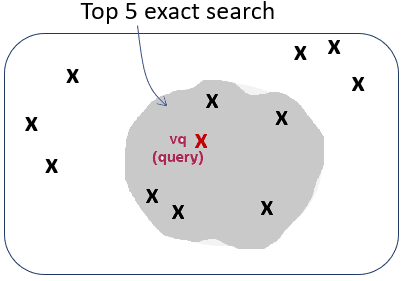
Description of the illustration accuracy2.png
Depending on how your vector index was constructed, running a top-5 approximate similarity search in that context could return the five vectors shown on the third diagram. This is because the index creation process is using heuristics. So searching through the vector index may lead to different results compared to an exact search:
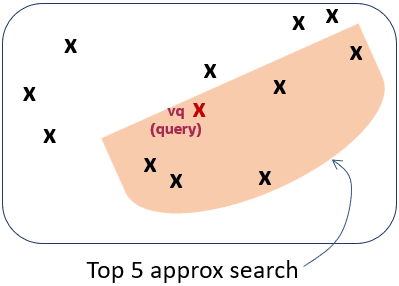
Description of the illustration accuracy3.png
As you can see, the retrieved vectors are different and, in this case, they differ by one vector. This means that, compared to the exact search, the similarity search retrieved 4 out of 5 vectors correctly. The similarity search has 80% accuracy compared to the exact similarity search. This is illustrated on the fourth diagram:
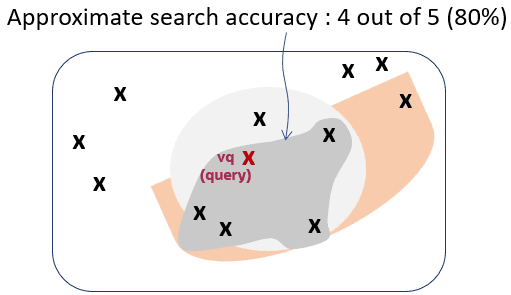
Description of the illustration accuracy4.png
Due to the nature of vector indexes being approximate search structures, it’s possible that fewer than K rows are returned in a top-K similarity search.
For information on how to set up your vector indexes, see Create Vector Indexes.