
 Connect
to the Target Database
Connect
to the Target Database Before You Begin
This 10-minute tutorial shows you how to invoke RMAN and connect to the target database to perform backup and recovery operations, or to configure backup and recovery settings.
Select the Oracle Database release:
Background
Oracle Recovery Manager (RMAN), a command-line tool, is the method preferred by Oracle for efficiently backing up and recovering your Oracle database. The files protected by the backup and recovery facilities built into RMAN include data files, control files, server parameter files, and archived redo log files. With these files you can reconstruct your database.
What Do You Need?
- Oracle Database 18c19c
Note:Starting with Oracle Database 19c, Oracle EM Express, the default management option for Oracle Database, is based on Java JET technology. Currently, only the Performance menu is available in the 19c JET version. Therefore, we are using the 18c Flash Oracle EM Express in our tutorials. Use the following command to revert to Flash Oracle EM Express:
SQL> @?/rdbms/admin/execemx emx
To return to 19c JET Oracle EM Express, use the following command:
SQL> @?/rdbms/admin/execemx omx
- Installed the sample schemas in the pluggable database
 Unlock
the SYSBACKUP User Account
Unlock
the SYSBACKUP User Account
In this section you connect to the target database as the SYSBACKUP user. If your SYSBACKUP user account is locked, perform the following steps to unlock it:
- Launch Enterprise Manager Database Express for CDB. Login in
as the SYSTEM user.
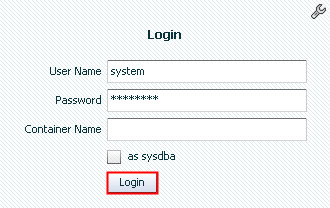
Description of the illustration a1 - In the Enterprise Manager page, click the Security menu and select Users.
- From the Users list, select the SYSBACKUP
user. Then, click the Actions
menu and select Alter
Account.
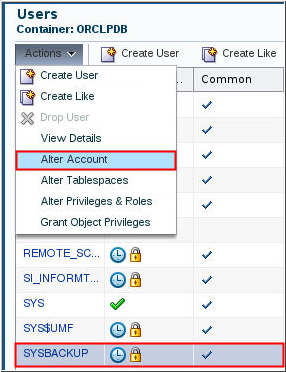
Description of the illustration a3 - Enter a password for the SYSBACKUP user in the Password and
Confirm Password fields. Deselect Account
Locked and click OK.
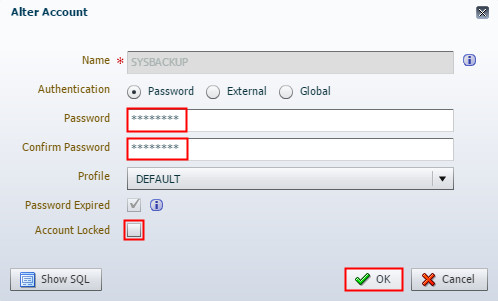
Description of the illustration a4 - Click OK on the Confirmation page.
- The Users page shows that the SYSBACKUP user account is now
unlocked.
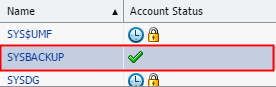
Description of the illustration a6
 Invoke
RMAN
Invoke
RMAN
- Open a terminal window. Execute the oraenv utility to set
the environment variables for the orcl database.
$ . oraenv
ORACLE_SID = [oracle] ? orcl
The Oracle base has been set to /scratch/u01/app/oracle
- Log in to RMAN as
the SYSBACKUP user by
entering the following command. Enter the password for the
SYSBACKUP user when prompted.
$ rman target sysbackup

Recovery Manager: Release 18.0.0.0.0 - Production on Thu Mar 28 02:55:06 2019
Version 18.3.0.0.0

Copyright (c) 1982, 2018, Oracle and/or its affiliates.  All rights reserved.

target database Password: <enter password>
connected to target database: ORCL (DBID=1530541453)

RMAN> Recovery Manager: Release 19.0.0.0.0 - Production on Fri Jul 19 01:15:08 2019
Version 19.3.0.0.0

Copyright (c) 1982, 2019, Oracle and/or its affiliates.  All rights reserved.

target database Password: <enter password>
connected to target database: ORCL (DBID=1530541453)

RMAN>