4.9 Graph Schema Visualization
You can visualize the underlying database schema for your property graph using the Graph Visualization library.
The following shows an example JSON configuration for a schema view:
const schema = {
  "vertices": [
    {
      "labels": [
        "COMPANY"
      ],
      "properties": [
        {
          "name": "ID",
          "dataType": "number",
          "limits": [],
          "mandatory": false
        },
        {
          "name": "NAME",
          "dataType": "string",
          "limits": [
            15
          ],
          "mandatory": false
        }
      ]
    },
    {
      "labels": [
          "PERSON"
      ],
      "properties": [
        {
          "name": "ID",
          "dataType": "number",
          "limits": [],
          "mandatory": false
        },
        {
          "name": "NAME",
          "dataType": "string",
          "limits": [
            15
          ],
          "mandatory": false
        },
        {
          "name": "AMOUNT",
          "dataType": "number",
          "limits": [],
          "mandatory": false
        }
      ]
    },
    {
      "labels": [
          "ACCOUNT"
      ],
      "properties": [
        {
          "name": "NUMBER",
          "dataType": "number",
          "limits": [],
          "mandatory": false
        }
      ]
    }
  ],
  "edges": [
    {
      "sourceVertexLabels": [
        "ACCOUNT"
      ],
      "targetVertexLabels": [
        "ACCOUNT"
      ],
      "labels": [
        "TRANSACTION"
      ],
      "properties": [
        {
          "name": "AMOUNT",
          "dataType": "number",
          "limits": [],
          "mandatory": false
        }
      ]
    },
    {
      "sourceVertexLabels": [
        "ACCOUNT"
      ],
      "targetVertexLabels": [
        "PERSON"
      ],
      "labels": [
        "OWNER"
      ],
      "properties": []
    },
    {
      "sourceVertexLabels": [
        "ACCOUNT"
      ],
      "targetVertexLabels": [
        "COMPANY"
      ],
      "labels": [
        "OWNER"
      ],
      "properties": []
    },
    {
      "sourceVertexLabels": [
        "PERSON"
      ],
      "targetVertexLabels": [
        "COMPANY"
      ],
      "labels": [
        "WORKSFOR"
      ],
      "properties": []
    }
  ]
}

const instance = new GraphVisualization({
  target: vizContainer,
  props: {
    schemaSettings: { layout: "force" }
  }
});

return instance;
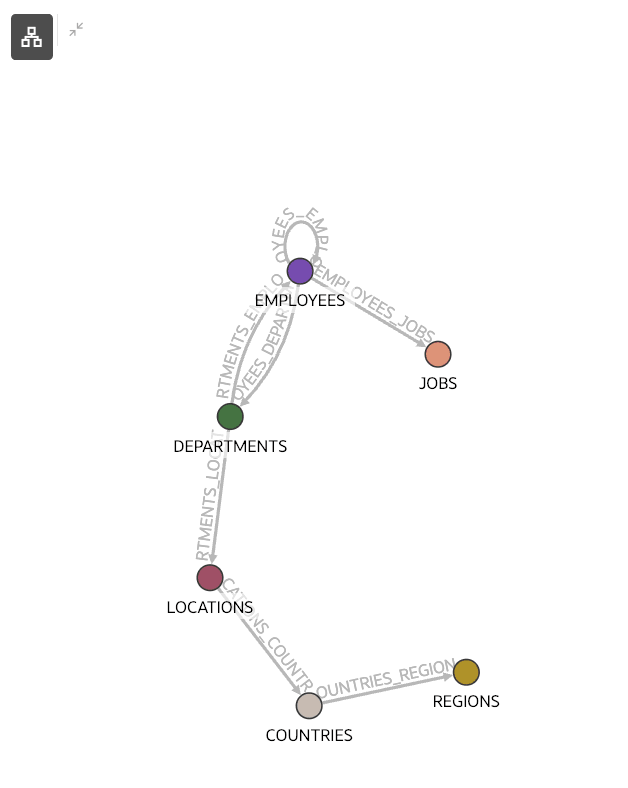
The corresponding schema visualization is as shown:
Figure 4-13 Visualizing Database Schema for the Property Graph
Parent topic: Usage Examples