Captions
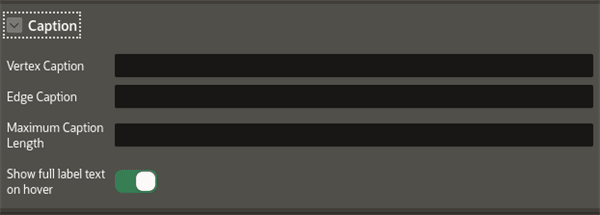
The Captions panel appears as shown:
Figure: Captions
Description of the illustration apex_caption.png
The following table describes the attributes in the Caption panel:
Table: Caption Attributes
| Attribute | Description |
|---|---|
| Vertex Caption | Specify the property to be displayed as the vertex label. If a vertex has a property named caption or title, then the value of that property is automatically used as the caption text to be displayed for that vertex in your graph visualization. |
| Edge Caption | Specify the property to be displayed as the edge label. |
| Maximum Caption Length | Specify the maximum length of the caption. |
| Show full label text on hover | Enable this toggle if you wish to display the vertex and edge caption when hovering over a specific vertex or edge. |
Tip: You can use the AS keyword in the PROPERTY clause of the CREATE PROPERTY GRAPH DDL statement to rename a vertex property as caption or title. This ensures that the property value is used as the default caption for that vertex in the graph visualization.