Expand Callback
You can expand a selected vertex in the graph and fetch the adjacent vertices using the Expand callback in the Property Editor of the Page Designer.
-
Switch to the Processing tab on the left pane of the Page Designer and navigate to the After Submit node.
-
Right-click and select Create Process from the context menu.
-
Enter the process Name.
-
Specify Type as Execute Code.
-
Select the source Location as Local Database.
-
Select the source Language as PL/SQL and enter the following code in the PL/SQL input box.
DECLARE
    data clob;
    ids sys.dbms_sql.varchar2a :=  APEX_APPLICATION.G_F01;
    graph VARCHAR2(100) := 'BANK_GRAPH';

    hops NUMBER := TO_NUMBER(APEX_APPLICATION.G_x01);
    n NUMBER := hops - 1;
    id_strings VARCHAR2(32767) := ' (';

    query VARCHAR2(32767);
    incur    sys_refcursor;
    l_cur    number;

BEGIN
    for i in ids.FIRST..ids.LAST LOOP
        IF i = ids.LAST THEN
            id_strings := id_strings || apex_exec.enquote_literal(ids(i)) || ') ';
        ELSE
            id_strings := id_strings || apex_exec.enquote_literal(ids(i)) || ', ';
        END IF;
    END LOOP;

    if hops > 1 then
        query  := 'SELECT id_x, id_e, id_z
        FROM GRAPH_TABLE (' || graph || ' MATCH (x) ->{,' || n || '} (y) -[e]-> (z)
        WHERE JSON_value(vertex_id(x), ''$.ELEM_TABLE'') || json_query(vertex_id(x),
          ''$.KEY_VALUE'' returning varchar2) IN ' || id_strings ||'

        COLUMNS (vertex_id(x) as id_x, edge_id(e) as id_e, vertex_id(z) as id_z))';
    else
        query  := 'SELECT id_x, id_e, id_z
        FROM GRAPH_TABLE (' || graph || ' MATCH (x) -[e]-> (z)
        WHERE JSON_value(vertex_id(x), ''$.ELEM_TABLE'') || json_query(vertex_id(x),
          ''$.KEY_VALUE'' returning varchar2) IN ' || id_strings ||'

        COLUMNS (vertex_id(x) as id_x, edge_id(e) as id_e, vertex_id(z) as id_z))';

    end if;

    open incur for query;
    l_cur := dbms_sql.to_cursor_number(incur);
    data := ora_sqlgraph_to_json(l_cur);

    dbms_sql.close_cursor(l_cur);
    apex_util.prn(data, false);
END;
In the preceding code, <graph_name> denotes the name of the graph. Note that the process takes the vertex
idto be expanded as input and returns the resulting output as JSON. -
Select the execution Point as Ajax Callback.
-
Switch to the Rendering tab on the left pane of the Page Designer and select the graph visualization component.
-
Switch to the Attributes tab on the right pane and enter the following code in the Expand input box in the Callbacks panel.
const data = await apex.server.process('<process_name>', {
    f01: ids,
    x01: hops
}, { dataType: 'text' });
try {
    return JSON.parse(data);
} catch (error) {
    return [];
}
In the preceding code, <process_name> refers to the name of process that was provided at step-3.
-
Click Save.
-
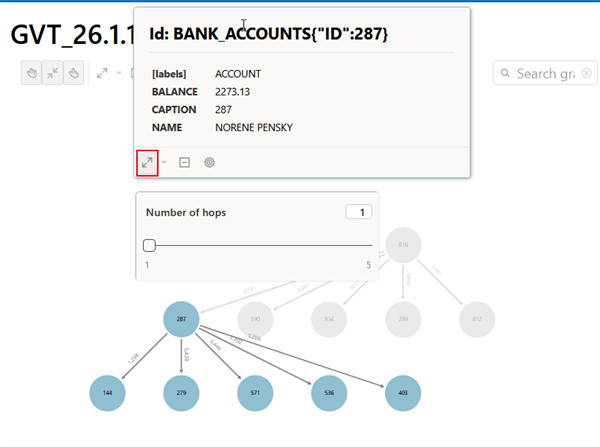
Run the application page and you can now click expand (as shown highlighted in the following figure) on any specific vertex in the graph.
The following figure shows the 1-hop neighbors after expanding from vertex
CAPTION: 287. A hop count slider is displayed, allowing you to select a value between one and five to determine how many n-hop neighbors are fetched.Figure: Expanding on a Specific Graph Vertex