Expand
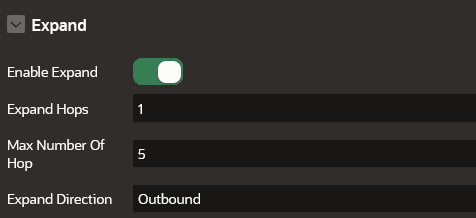
The Expand panel appears as shown:
Figure: Expand
Description of the illustration apex_expand_settings.png
The following table describes the attributes in the Expand panel:
Table: Expand Attributes
| Attribute | Description |
|---|---|
| Enable Expand | Switch on this toggle to enable expanding a graph vertex in the graph visualization. |
| Expand Hops | Specify the number of hops to expand. This configuration is to retrieve n-hops neighbors of specified vertices. The expand hop value should be equal to or greater than 1. |
| Max Number of Hop | Specify the maximum number of possible hops while performing expand and focus actions. Default is 5. |
| Expand Direction | Specify the direction of the edges to be traversed when expanding to neighboring vertices. Supported values are:
|
See Graph Interaction Options in Property Graph Visualization Developer’s Guide and Reference for more information.