Rule-Based Styles
Rule-based style expressions are used to specify the target element into which the given style must be applied. The applied custom style is reflected in the legend panel as well. See Rule Expressions in Property Graph Visualization Developer’s Guide and Reference for more information.
For instance, the following JSON example creates a custom color style for employee IDs ranging from 100 to 110:
[
  {
    "_id": 1,
    "component": "vertex",
    "stylingEnabled": true,
    "target": "vertex",
    "visibilityEnabled": true,
    "conditions": {
      "operator": "and",
      "conditions": [
        {
          "property": "EMPLOYEE_ID",
          "operator": ">=",
          "value": "100"
        },
        {
          "property": "EMPLOYEE_ID",
          "operator": "<=",
          "value": "110"
        }
      ]
    },
    "legendTitle": "Rule-Based Style",
    "style": {
      "color": "red"
    }
  }
]
The corresponding graph visualization is as shown:
Figure: Graph Visualization Using Rule-Based Styling Configuration
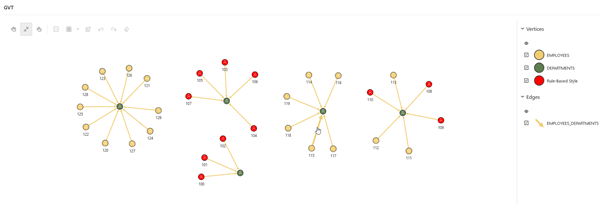
Description of the illustration apex_rule_based_style.png
For more examples, see Rules Based Styles Usage in Property Graph Visualization Developer’s Guide and Reference.