Viewing Query Results in a Table
You can view your query results in tabular format in Graph Explorer.
-
Enter a graph query (SQL or PGQL) or any SQL statement in the query editor.
-
Select the appropriate driver in the query actions panel at the top of the query editor.
-
SQL: Select to run SQL graph queries on SQL property graphs or to execute any SQL statements.
-
PGQL: Select to run PGQL queries on PGQL property graphs.
-
Graph Server: Select to run PGQL queries on graphs loaded into the graph server (PGX).
-
-
Click Run (Table Result).
The results are displayed in the Table Result tab.
Example: Viewing a SQL Query Output In a Table
The following example shows running a SQL SELECT table query using the SQL driver in Graph Explorer.
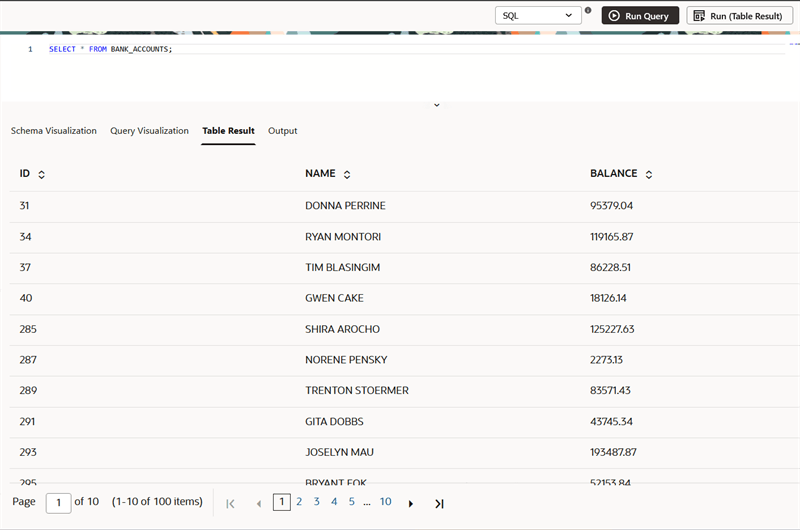
Description of the illustration explorer_sql_table_output.png
Example: Viewing a PGQL Query Output In a Table
The following example queries a PGQL property graph and returns the output in tabular format.
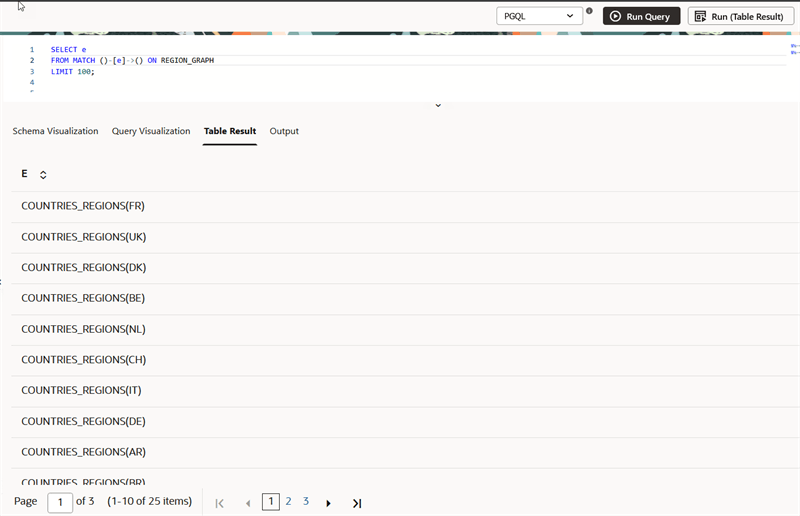
Description of the illustration explorer_pgql_table_output.png