Managing Vertex and Edge Details
You can update the keys, labels, references, and properties for the vertices and edges in a property graph.
Note the following when managing vertices and edges:
-
Every vertex table must have a vertex key, and every edge table must have an edge key.
-
By default, the Modeler uses the primary key of the underlying database table as the vertex or edge key.
-
For an edge, the source key and destination key are automatically mapped to the corresponding foreign keys that reference the source and destination vertex tables, when suitable relationships exist.
The Modeler validates the graph element configuration and reports any errors or warnings. See Handling Errors and Warnings While Creating a Graph for more information.
Perform the following steps to inspect and update the vertex and edge tables (or views) details:
-
Select a vertex or edge in the visual editor.
The graph element details are displayed in the element pane on the right.
-
Modify the selected graph element details.
- Edit Vertex Details
Figure: Editing Vertex Details
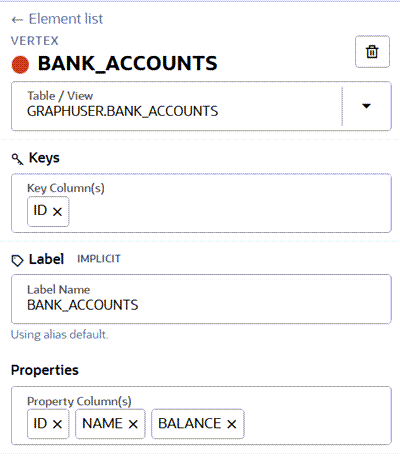
Description of the illustration modeler_edit_vertex.png
-
Select a different Table/View, if required.
-
Add or remove Key Column(s).
-
Modify the Label Name.
-
Add or remove Property Column(s).
-
- Edit Edge Details
Figure: Editing Edge Details
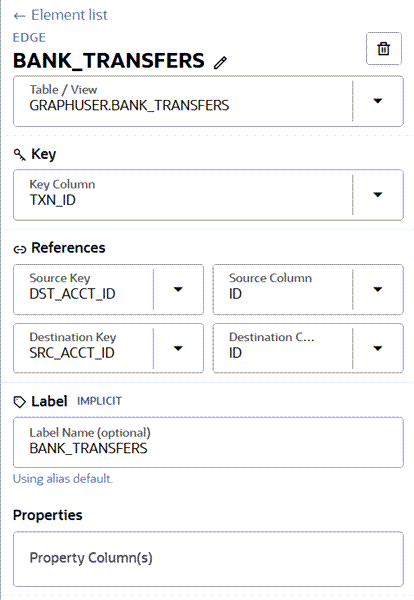
Description of the illustration modeler_edit_edge.png
-
Select a different Table/View, if required.
-
Select the Key Column.
-
Configure the Source Key and Source Column.
-
Configure the Destination Key and Destination Column.
-
Modify the Label Name.
-
Add or remove Property Columns.
-
- Edit Vertex Details
Figure: Editing Vertex Details
-
Click Update Graph on the top right of the page.