Migrating PGQL Property Graphs to SQL Property Graphs
You can migrate a PGQL property graph to a SQL property graph using Graph Explorer.
Before you begin, ensure that you are using Oracle AI Database 26ai. SQL property graphs are supported only on Oracle AI Database 26ai.
To migrate a PGQL property graph:
-
Expand PGQL Property Graphs in the left navigation pane.
-
Expand the desired schema to view the list of PGQL property graphs to which you have access.
-
Right click a specific graph and click Migrate to SQL graph in the context menu.
-
Review the migration confirmation dialog.
-
Click Confirm.
A confirmation dialog opens as shown:
Figure: Migrating a PGQL Property Graph to SQL Property Graph
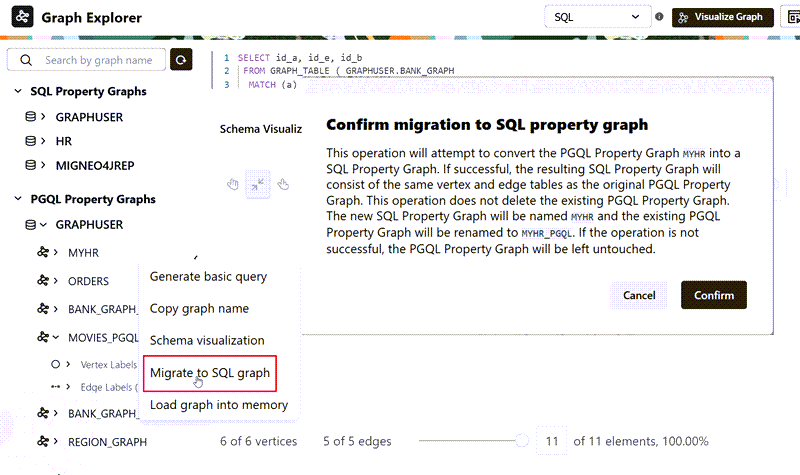
Description of the illustration pgql_sql_migration_confirm.png
During migration
-
A SQL property graph is created using the same vertex and edge tables as the original PGQL property graph.
-
The original PGQL property graph is preserved.
-
The new SQL property graph is assigned the original graph name.
-
The original PGQL property graph is renamed by appending
_PGQLto its name.
If migration is successful, the newly created SQL property graph is displayed under SQL Property Graphs. Otherwise, the original PGQL property graph remains unchanged.
-