Querying and Visualizing SQL Property Graphs
You can query and visualize SQL property graphs in Graph Explorer.
-
Expand SQL Property Graphs in the left navigation pane.
-
Expand the desired schema to view the list of SQL property graphs to which you have access.
-
Right click on a specific graph and click Generate Basic Query in the context menu.
The basic SQL graph query is auto-generated in the query editor for the selected graph. You can edit the query, if required. Alternatively, you can directly enter the graph query in the query editor.
Also, note the following:
-
Graph Explorer supports only
SELECTqueries for SQL property graphs. -
The name of the graph must be provided in the SQL graph query.
To copy it, right click on the graph and select Copy Graph Name from the context menu.
-
To visualize
GRAPH_TABLEquery results in Graph Explorer, the query must return the vertex ID, the edge ID, or both.
-
-
Select SQL driver in the query actions panel at the top of the query editor.
-
Click Visualize Graph.
Example: Visualizing a SQL Property Graph Query
The following example shows the visualization of a
GRAPH_TABLEquery on a SQL property graph. Note that theCOLUMNSclause uses theVERTEX_IDandEDGE_IDfunctions.Figure: SQL Graph Query Visualization
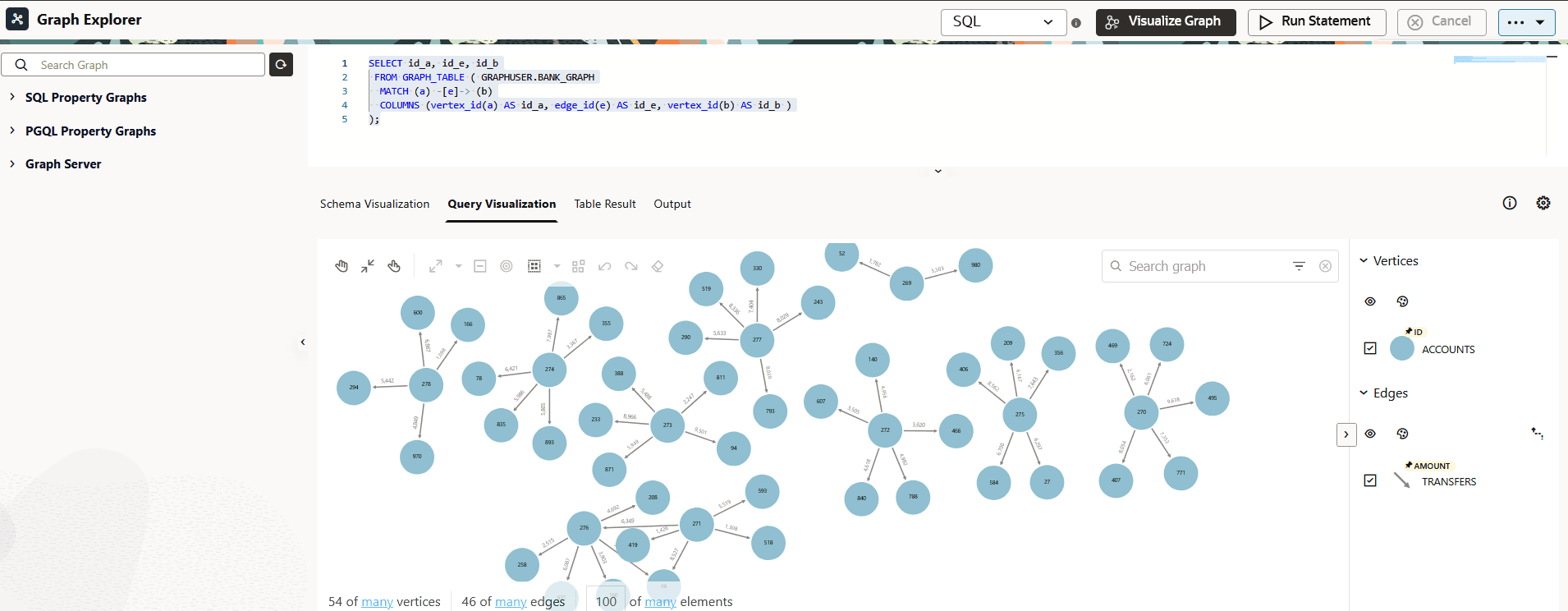
Description of the illustration explorer_sql_select_query.png