Exploration Modes
The Graph Visualization library supports three different modes for graph exploration.
Figure: Graph Exploration Modes
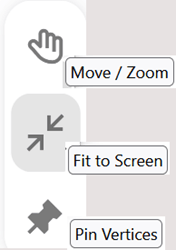
Description of the illustration exploration_modes.png
The supported modes are:
-
Move / Zoom
-
If Move / Zoom mode is enabled, you can select and move multiple vertices and edges simultaneously within the visualization.
-
If Move / Zoom mode is disabled, you can freely explore the visualization by panning and zooming, focussing on specific groups of vertices and edges.
-
-
Fit to Screen
-
If Fit to Screen mode is enabled, the visualization automatically adjusts to fit all vertices and edges within the available space, providing a complete view of the entire graph.
-
If Fit to Screen is disabled, the available space for visualization dynamically expands as required.
-
-
Sticky Mode (Pin vertices)
- Sticky Mode controls vertex pinning. When Sticky Mode is off, a moved vertex returns to its layout-managed position when the drag ends.
- When Sticky Mode is on, moving a vertex pins it at the new position. The position is retained until you remove the pin or reset pinned positions.
- Sticky Mode is not available for geographical layouts.
Using a combination of modes
The following describes various scenarios for using a combination of exploration modes:
-
All modes switched off
This provides a full view of the graph, where the positions of the vertices are fixed. You can navigate around the visualization and zoom in or out as required.
-
Move / Zoom mode on, Fit to Screen and Sticky mode off
This allows you to select one or multiple vertices, and is useful for actions like grouping or expanding. However, the positions of the vertices remain fixed since Sticky mode is switched off.
-
Move / Zoom mode and Fit to Screen on, Sticky mode off
This mode behaves similarly to the previous case. However, when an action like expand generates a new set of vertices, the component automatically adjusts its size to fit all new vertices and edges.
-
Move / Zoom mode and Fit to Screen off, Sticky mode on
You can navigate the visualization, zoom in and out, and reposition the vertices. These changes will be retained until the Sticky mode is turned off.
-
Move / Zoom mode and Sticky mode on, Fit to Screen off
You can select multiple vertices and move them around, with their positions retained. Vertices can also be moved outside the visible region since Fit to Screen mode is switched off.
-
All modes switched on
You can select multiple vertices and move them around, with their new positions retained. The visualization region will dynamically expand as needed to accommodate these changes.