Assigning Multiple Labels to a Vertex or an Edge
You can assign multiple labels to a vertex or an edge element of a SQL property graph.
Multiple labels let you represent different classifications on the same graph element. Each label has its own name and property set. Properties retain their physical table-column source and can optionally use a different property alias.
Note: Multiple labels for a graph element are supported only for SQL property graphs.
Perform the following steps to assign multiple labels for a graph element:
-
Navigate to the Modeler and select a vertex or an edge in the visual editor.
The graph element details are displayed in the element pane on the right.
-
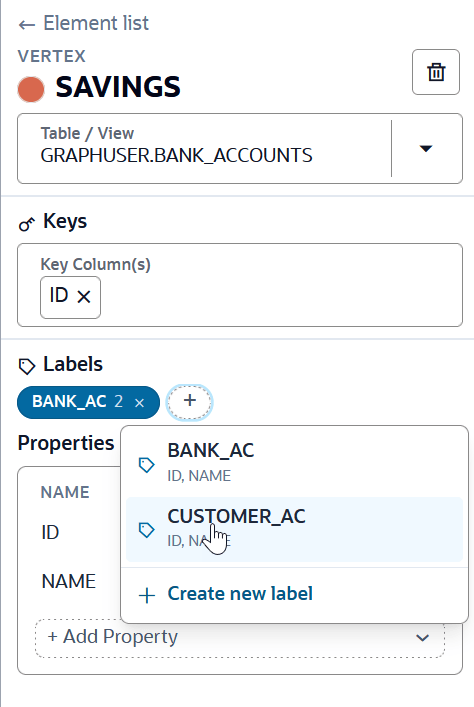
Locate the Labels section and select +.
The label picker displays labels already defined for other graph elements that are compatible with the selected vertex or edge. A label is available for reuse only if its source columns and data types match those of the selected element.
-
Select an existing compatible label or select Create new label.
Note: A reused label is shared across all graph elements that use it. Any changes you make to the label, including its name or properties, apply to every element that uses that label.
-
Confirm or edit the proposed label name.
Figure: Assigning Multiple Labels
-
Select the physical table column for each property.
-
Optionally, double-click a property name to add or edit its alias. The alias is displayed as the property’s name in the graph.
You can also rename or remove a label, add or remove properties for a label in the Labels section. The complete label structure is retained when graphs are saved and reopened.