Configuring Graph Options in Modeler
When creating or updating a SQL property graph, you can set Graph options in Modeler to control graph validation and property datatype handling for a SQL property graph. This helps to prevent invalid graph definitions and unexpected query response.
Modeler provides a collapsible Graph options section for SQL Property Graphs which allows you to select one of the following modes:
- Mode: TRUSTED (default) or ENFORCED
- Mixed property types: DISALLOW (default) or ALLOW
These selections are retained with the graph and included in the generated SQL property graph DDL statement.
Note: Graph options are displayed in the Modeler only for SQL property graphs.
Perform the following steps to configure the supported graph options while creating or updating a SQL property graph:
-
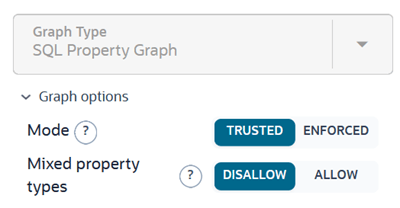
Expand Graph options in the right panel.
Figure: Configuring Graph Options
- Set Mode as required.
-
Trusted: This is the default mode. It assumes vertex keys are unique and edge references are valid. Modeler does not verify them against primary or foreign-key constraints.
-
Enforced: This mode requires valid primary or unique keys on element tables and valid foreign keys from edge tables to referenced vertex tables.
-
-
Optionally, resolve any blocking validation errors if displayed for enforced mode.
When ENFORCED mode is selected, Modeler reports blocking errors for element tables without primary keys, required endpoint foreign keys that are missing, and referenced views. For example:
Figure: Enforced Mode Error
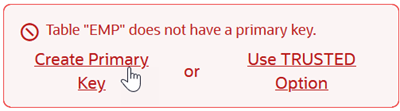
Description of the illustration resolve_enforced_mode_errors.png
To resolve the error, select the action provided in the error message. If the required constraints cannot be provided for any reason, change Mode to TRUSTED.
-
Set Mixed property types as required.
-
Disallow: This is the default option. It requires a property name to use the same datatype across all labels.
-
Allow: This allows a property name to use different data types across labels.
-
Alternatively, you can also directly edit the SQL property graph DDL statement to include the options for modes and mixed property types. The following values are supported in the OPTIONS clause:
TRUSTED MODEENFORCED MODEDISALLOW MIXED PROPERTY TYPESALLOW MIXED PROPERTY TYPES
For instance, the OPTIONS clause appears as follows when using the default graph options:
OPTIONS(TRUSTED MODE, DISALLOW MIXED PROPERTY TYPES)