Loading or Unloading a Database Property Graph Into or From the Graph Server (PGX) Memory
You can load an existing SQL or PGQL property graph into graph server (PGX) memory, or unload the graph from memory.
-
Expand SQL Property Graphs or PGQL Property Graphs in the left navigation pane.
-
Expand the schema that contains the property graph that you want to load.
-
Right-click a specific graph and select Load graph into memory from the context menu.
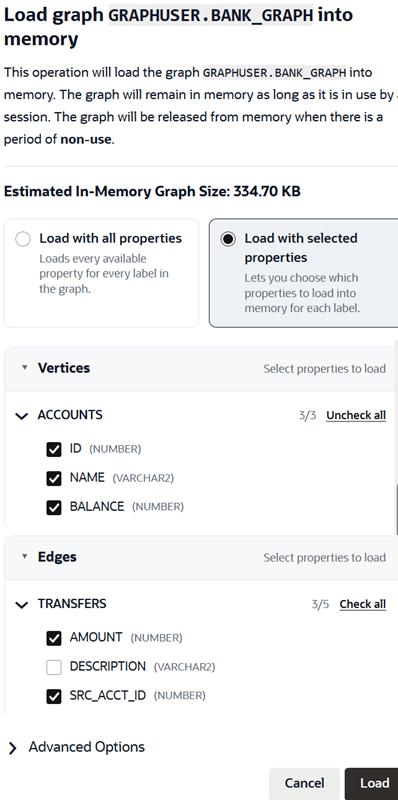
The confirmation slider for loading the graph into memory opens.
Figure: Loading a Graph Into the Graph Server (PGX)
 ”
”Description of the illustration graph_explorer_confirm_load_into_gs.png
-
Select to load the graph with either all properties or selected properties.
- Load with all properties: This option loads all properties for every graph label.
-
Load with selected properties: This option allows you to select the vertex and edge properties that you wish to load into memory for each label.
Note that the Estimated In-Memory Graph Size value shown in the preceding image changes when you select or deselect properties.
-
Optionally, expand Advanced Options.
You can configure the following advanced options:
-
Ignore Invalid Edges Errors: Switch ON this toggle to ignore all edges that do not connect to a vertex.
-
Synchronizable: Switch ON this toggle to verify that the graph can be synchronized.
-
Optimized For: Select one of the following graph optimization strategies:
-
READ: Optimizes for read-intensive scenarios.
-
UPDATE: Optimizes for update-intensive scenarios.
-
-
Parallelism: Specify the degree of parallelism.
-
-
Select Load.
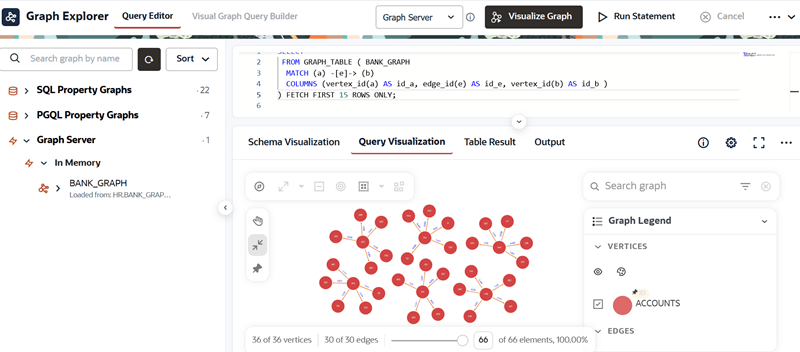
The Load In Progress status next to the graph indicates that the graph loading process has been initiated. Once the graph is successfully loaded into memory, it is displayed under the Graph Server tab.
You can then run and visualize the graph queries for the graph loaded into graph server memory.
Figure: SQL Property Graph Loaded into Memory
Description of the illustration explorer_load_sql_graph_into_memory.png
-
Optionally, if you wish to unload the graph from memory, then right-click the graph in the Graph Server tab and select Unload graph from memory from the context menu.
The graph is unloaded from memory.