Comparing with an APEX Application
Use Compare with APEX Application to compare the APEXlang files in your local project with the target application in APEX. The comparison shows differences between the local file system and the remote APEX application, and lets you decide whether to copy selected remote changes into the local project.
Perform the following steps to compare local APEXlang files with an APEX application:
-
Open an APEXlang application file, such as
all-restaurants.apx, in the editor. -
Verify that the editor is attached to the database connection for the target APEX application.
If the editor is not connected, you are prompted to connect.
-
In the editor toolbar, click Compare with APEX Application
 .
.The APEXlang Differences panel opens and lists the files that are different between the local APEXlang project and the target APEX application.

-
Select a file in the APEXlang Differences panel.
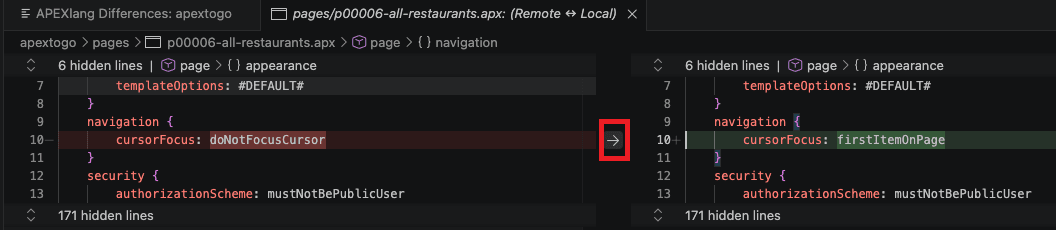
The diff editor opens and shows the differences between the local file and the remote APEX application definition.
-
Review the changes.
Differences can include updates made locally in the APEXlang files and updates made remotely in the APEX application.
-
To copy a change from the remote APEX application into the local file, click the right arrow for that change in the diff editor.
Note: If a file exists only in the remote APEX application, it is shown in the APEXlang Differences panel. Select the file to review it. To add the remote file to the local APEXlang project, click the right arrow in the diff editor.