Debugging a PL/SQL Object
This section covers the steps to debug a PL/SQL object.
-
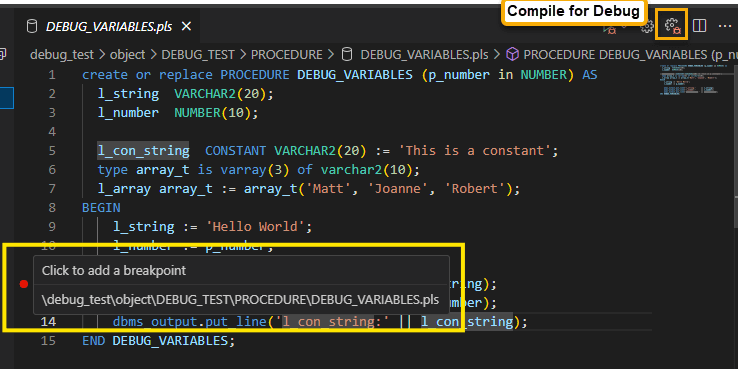
Before debugging a PL/SQL object, it must be compiled with debug symbols that have been generated. Open the PL/SQL object in the PL/SQL editor and click the Compile for Debug icon in the PL/SQL Editor toolbar.
-
After a PL/SQL object has been compiled for debugging, you can set breakpoints on any executable line in the PL/SQL object. To configure a breakpoint, in the gutter to the left of the line number, hover till you see a red dot and then click to set the breakpoint.
-
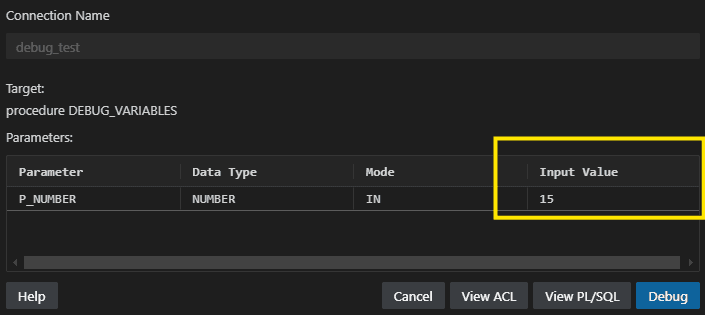
To debug the PL/SQL object, expand the Execute icon and then click Debug. In the editor pane that appears, provide values for the arguments required (if any) to invoke the PL/SQL object.
-
Click Debug.
If prompted, confirm the IP address that the database should use to connect to the SQL Developer extension.
The execution of the PL/SQL object pauses on the first breakpoint encountered.
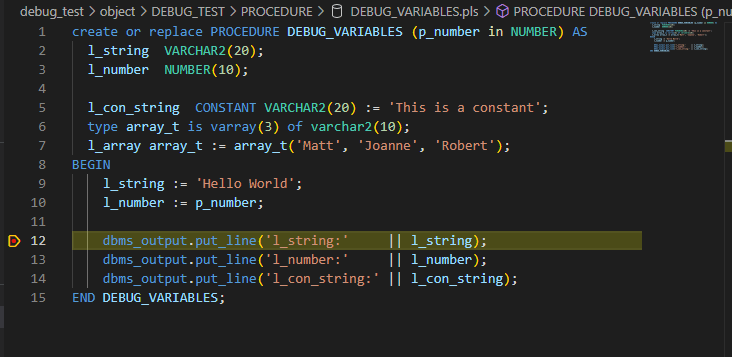
Using the icons in the Debug toolbar, you can:
-
Step Over: To move to the next statement.
-
Step Into: To open and debug the current statement.
-
Continue: To resume execution.
-
Stop: To stop debugging,
-