Exporting AI Enrichment Data to JSON
Use Export to JSON to export selected AI enrichment metadata for a schema, table groups, tables, and columns. Exporting annotations to a JSON file enables you to version-control, programmatically analyze, and share your schema annotations.
The exported annotation metadata includes the label, value, identifier type, and identifier name. When applicable, it also includes the table name and column name.
Perform the following steps to export AI enrichment data:
-
In the AI Enrichment dashboard, locate the Actions section.
-
click Export to JSON.
The Export to JSON slider appears.
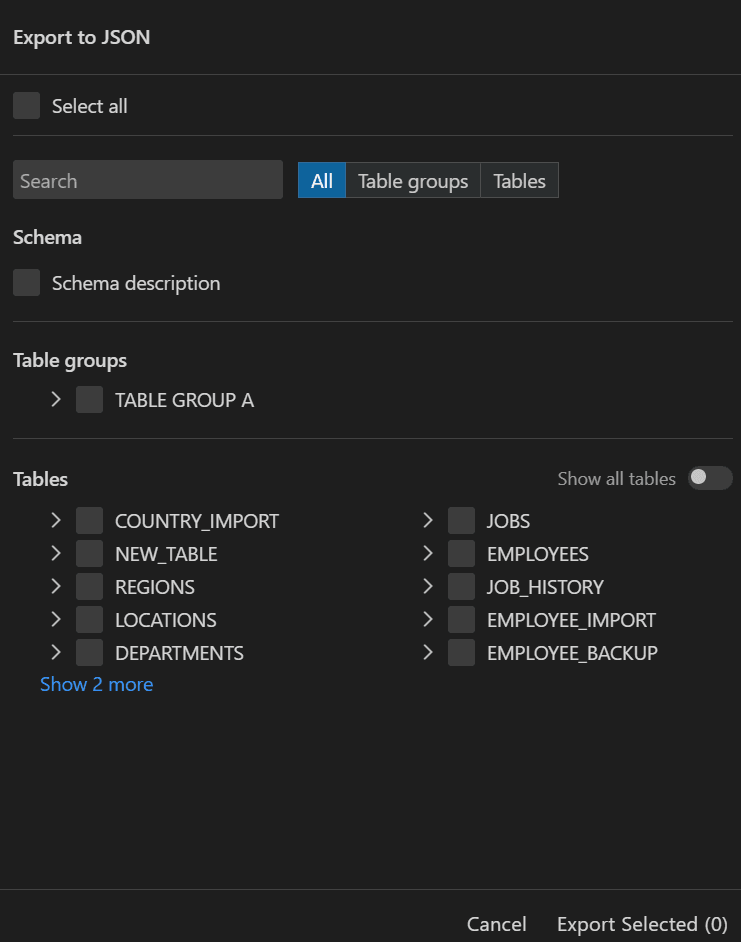
Description of the illustration ai_enrichment_export_to_json.png
-
Select the enrichment data to export.
You can use the following options:
-
Select all: Selects all available enrichment metadata.
-
Search: Filters the available schema objects.
-
All: Shows schema, table groups, and tables.
-
Table groups: Shows only table groups.
-
Tables: Shows only tables.
-
Schema description: Exports the schema description.
-
-
Expand Table groups or Tables to select specific child objects.
Table groups: You can expand a table group to view its tables. Expand a table to view its columns. Select the check box for a table group, table, or column to include it in the export.
Tables: You can select individual tables or expand a table to select specific columns. By default, a limited number of tables is displayed. Turn on Show all tables to display the full table list, including tables that are part of table groups.
-
Click Export Selected to export the selected AI enrichment data.
-
In the file save dialog, select a location and save the JSON file.
The default file name uses the schema name, for example,
HR_AIEnrichedData.json