Filtering Object Folders
Use the Object Folders Filter to control which object folders are displayed in the Connections panel. This filter helps reduce clutter in the connection tree and makes it easier to focus on the database object categories that are relevant to your task.
The Object Folders filter is a global tree customization option. It is opened from the Connections panel and applies to the object folders displayed in the connection tree. It does not delete database objects, change database privileges, or modify the database.
Perform the following steps to filter the object folders:
-
In the Connections panel, click the Filter
 icon in the toolbar.
The Object Folder Filter opens.
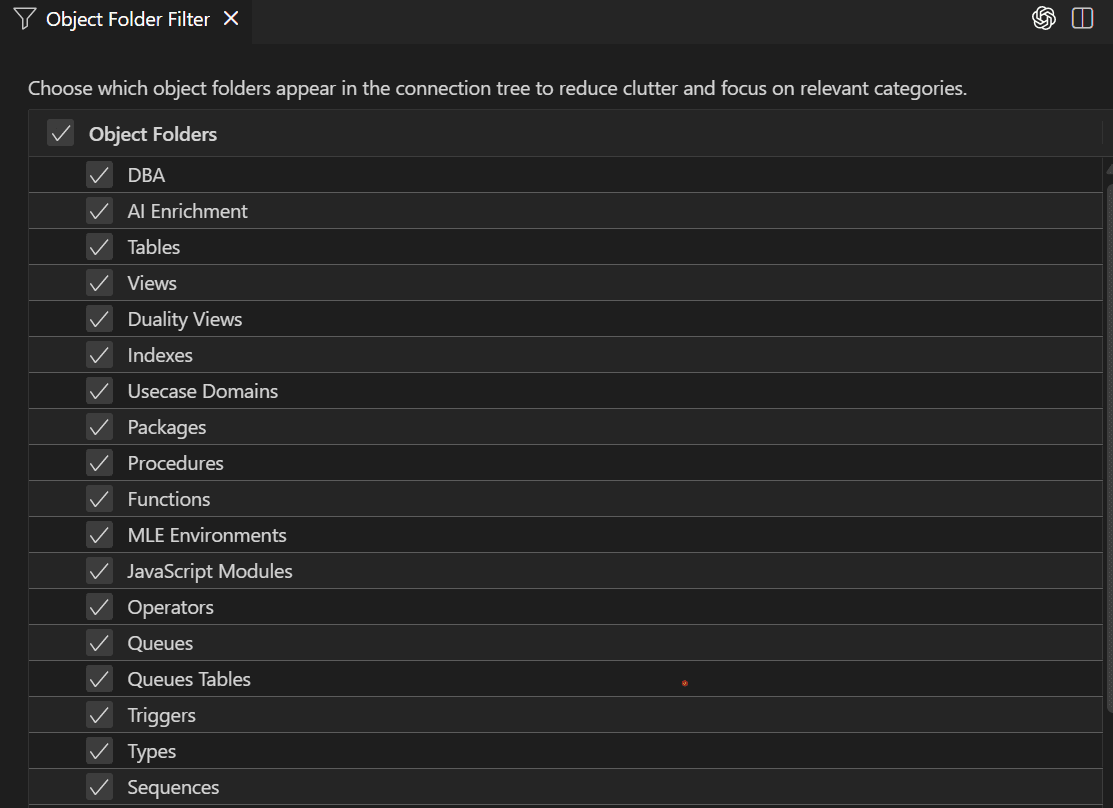
Description of the illustration object_folders_filter_screen.png
-
Select the object folders that you want to display in the connection tree, such as Tables, Views, Duality Views, Indexes, Packages, Procedures, Functions, and so on.
-
Clear the check box for any object folder that you want to hide.
-
To show or hide all object folders, select or clear Object Folders.
-
Click Apply.
The Connections panel refreshes and displays only the selected object folders.