Generating an APEX Application
Generate creates a new APEXlang application project by running the SQLcl generate command, producing a ready-to-edit folder structure (including an application.apx file and related deployment files) in the location you specify.
Perform the following steps to generate an APEX application:
-
In the Connections navigator, expand your database connection.
-
Right-click the APEX application node and select Generate....
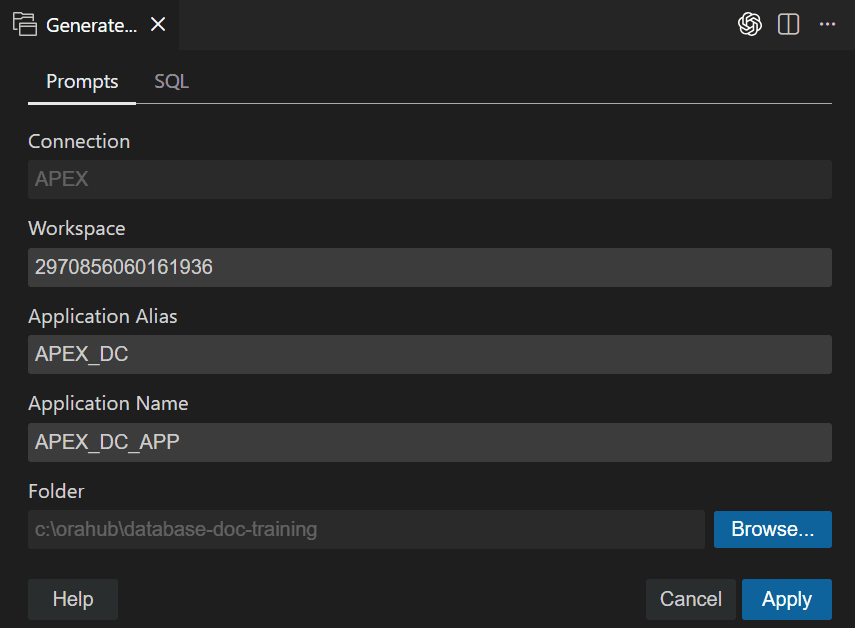
-
In the Generate dialog, review the selected Connection.
-
In the Workspace field, enter or select the target workspace.
-
In the Application Alias field, enter an alias for the application.
-
In the Application Name field, enter a name for the application.
-
In the Folder field, enter the target folder path, or click Browse… to select a folder.
-
(Optional) Click the SQL tab to review the SQLcl command that will be executed.
-
Click Apply.
After the operation completes, the generated
application.apxfile is opened in the editor with the database connection already established. On subsequent invocations of Generate, the Folder field defaults to the last value used.