Generate Java Code for Database Objects
When you drag a database object, such as a table, view, duality view, materialized views, and columns from the Connections panel and drop it into a Java file, the feature will automatically generate the corresponding Java code. This includes all necessary logic required to execute queries on the Oracle database, streamlining the integration of database operations within your Java application.
Perform the following steps to generate Java code for database objects:
-
Open a SQL worksheet and set the language to Java, or open an existing Java file.
-
In the Connections panel, locate the desired database object.
-
Drag the selected database object and drop it into your open Java file.
You can select and drag multiple database objects at once to generate comprehensive code for all selected items simultaneously.
-
Select the code generation option as
JDBC. -
Select the type of statement to be generated.
The following options are available:
-
Object name: Generates the name of the object.
-
Insert:Generates Java code for inserting records into the object.
-
Delete: Generates Java code for deleting records from the object.
-
Update: Generates Java code for updating records in the object.
-
Select: Generates Java code for retrieving records from the object.
-
Drop: Generates Java code for removing (dropping) the database object.
-
Join: Generate Java code for queries that retrieve data by combining rows from two or more database objects based on related columns. This option is available only when you select multiple database objects.
-
-
Select columns from the selected object to be included in the generated SQL or Java code for operations, such as,
SELECT,INSERT,UPDATE,DELETE, orJOIN, and then click OK.
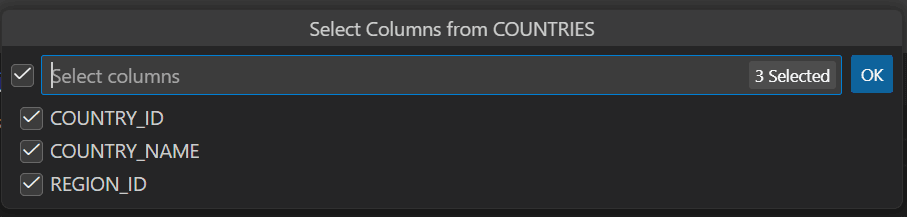
Description of the illustration code_generation_select_columns.png
The Java code for the selected database object is generated.
Example 3-1 Generating Java code for inserting data into a table
When you drag and drop the COUNTRIES table while selecting all the columns and choose the INSERT statement option, the following code is generated:
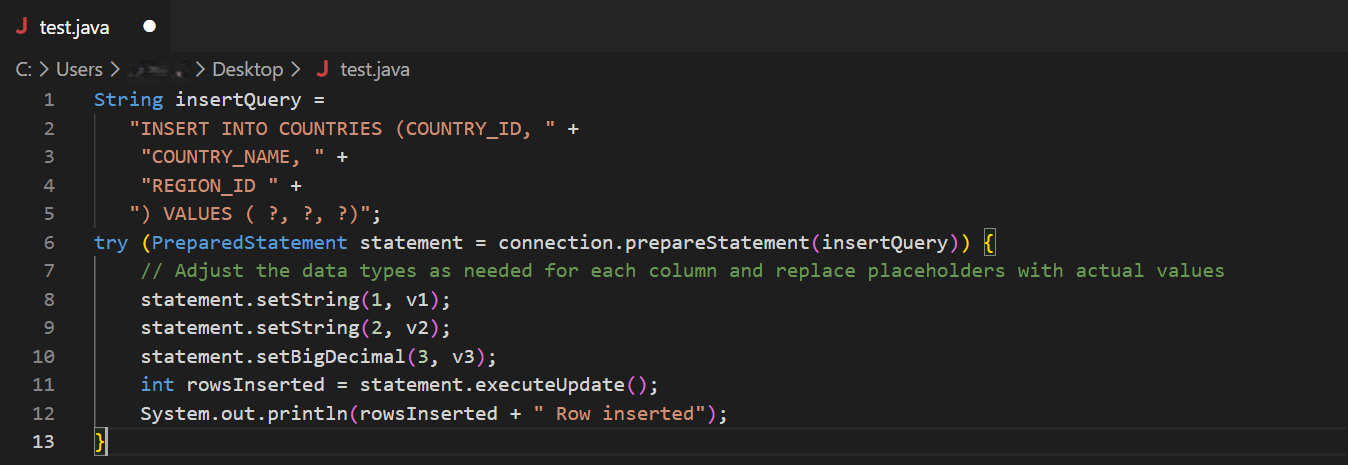
Description of the illustration code_generation_insert.png
This Java code snippet demonstrates that data is inserted into a database table named COUNTRIES using a PreparedStatement for safe and efficient database operations. This code inserts values into the COUNTRY_ID, COUNTRY_NAME, and REGION_ID columns. The question marks (?) are placeholders for the values that will be supplied later. The actual values for the placeholders are set using the .setString() and .setBigDecimal() methods.
Example 3-2 Generating Java code for retriving data spanning multiple related tables
When you drag and drop the COUNTRIES, DEPARTMENTS, and EMPLOYEES tables, select a few columns from each, and choose the JOIN statement option, the following code is generated:
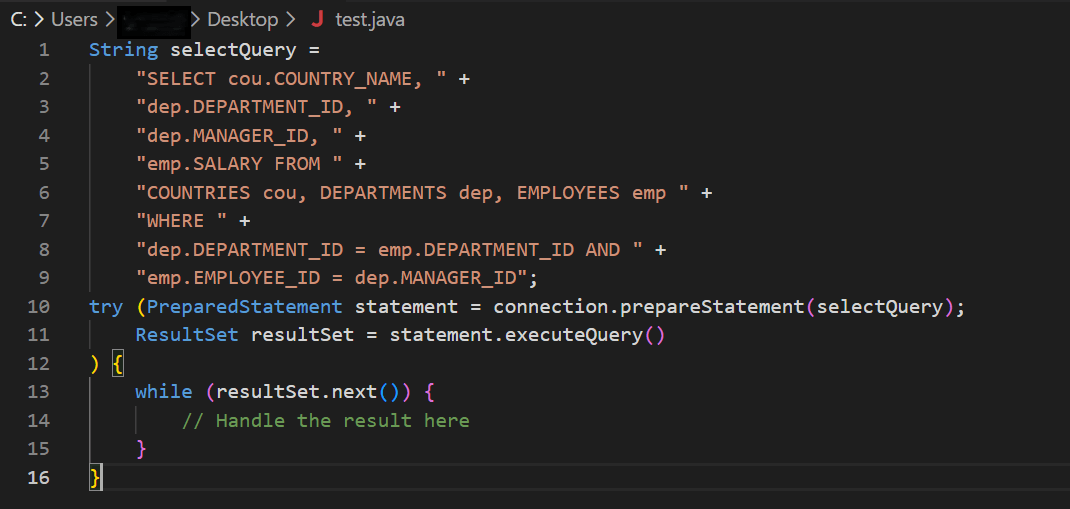
Description of the illustration code_generation_join.png
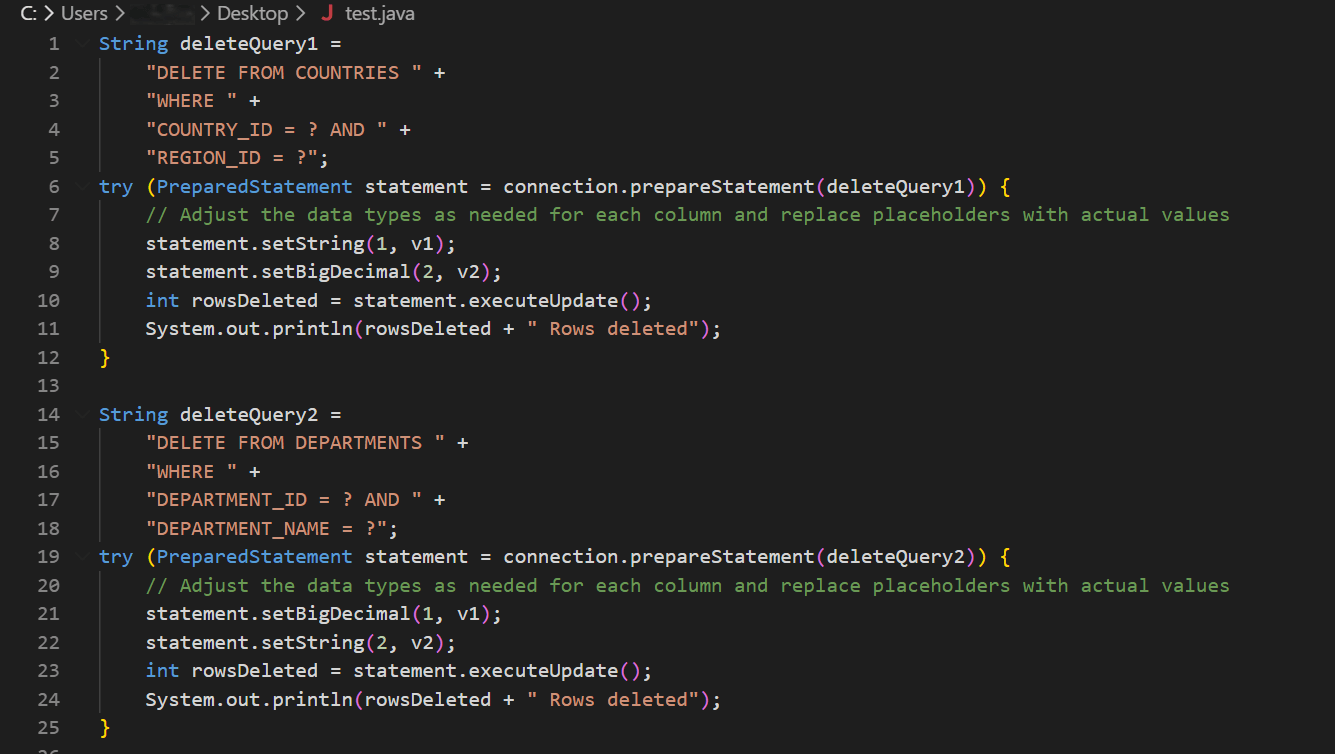
Example 3-3 Generating Java code for multiple database objects simultaneously
When you drag and drop the COUNTRIES and DEPARTMENTS tables, select a few columns from each, and choose the DELETE statement option, delete code for each individual table is automatically generated. This code deletes records from multiple database tables (COUNTRIES and DEPARTMENTS) using parameterized SQL delete queries with JDBC’s PreparedStatement.