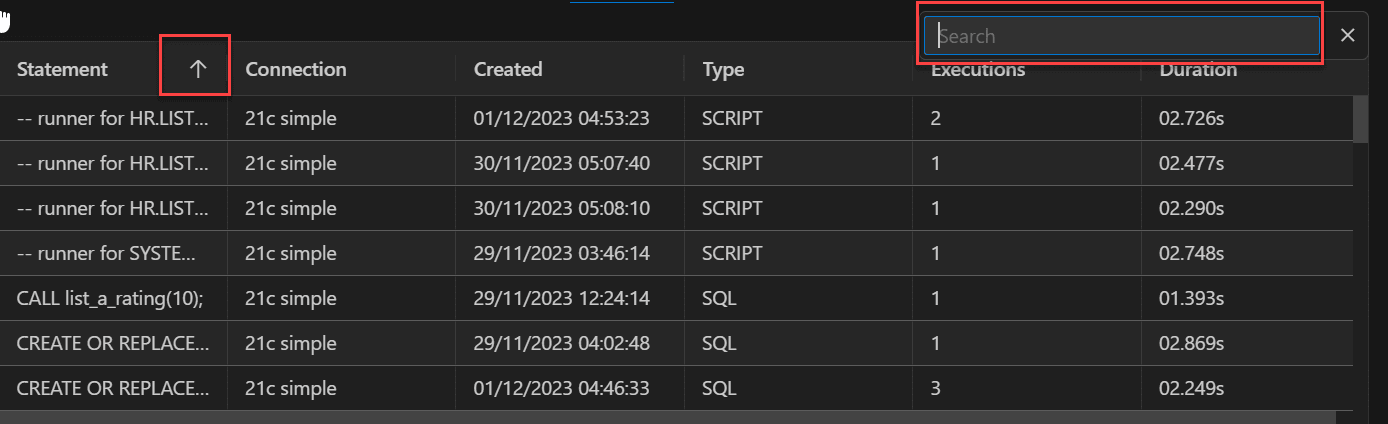
SQL History
You can click the SQL History tab in the lower right pane to view a list of SQL statements and scripts that you have executed, and optionally double-click one or more statements to have them either replace the statements currently on the SQL Worksheet or be added to the statements currently on the SQL Worksheet. The list is at first organized by date, and then by connection name.
The SQL history list will not contain any statement that can include a password. Such statements include (but are not necessarily limited to) CONNECT, ALTER USER, and CREATE DATABASE LINK.
You can control the maximum number of statements in the history by setting the SQL History Limit in Preferences.
When a SQL statement in the SQL History list is selected, it automatically opens the PL/SQL subprogram in the SQL Worksheet pane.
To sort the statements in the list, double-click the column header that you want to sort on and the statements are sorted in ascending order. Double-click the header again to sort in descending order. To remove sorting applied to the column, double-click the column header again.
To display the Search functionality, in the SQL History pane, press Ctrl+F (Cmd+F for MacOS).