Task Monitor
Note: This feature is available only if you are a user with a Database Administrator role.
The Task Monitor enables you to monitor the progress of all tasks in real time allowing you to effectively manage your time and resources. This is significantly useful for long-running tasks such as large data imports/exports, complex queries, running scripts, or database maintenance tasks. You can prioritize tasks based on their progress and estimated completion time.
The Task Monitor is a tab in the SQL worksheet output panel and displays a list of in-progress and unfinished tasks. Normally completed tasks disappear from the list.
When no tasks are running, the Task Monitor displays the Nothing to show message.
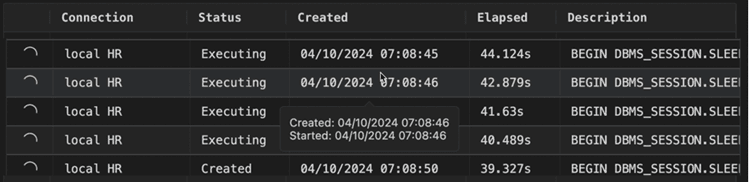
The information displayed for a task consists of the following:
-
Icon: Visually indicates the status of the task using icons.
-
Connection: Name of the connection.
-
Status: Current status of the task.
-
Waiting: The task is queued up to execute.
This only happens if the Connections Sessions Sharing option in the Extensions Settings is set to
OFF. -
Created: The task is created and waiting to be executed.
-
Executing: The task is being executed.
-
Completed: The task is completed.
-
Error: An error occurred when executing the task.
-
-
Created: Timestamp of the task creation.
When hovering over an entry, a popup is displayed with status-related timestamp information (such as Created, Started).
-
Elapsed: Depends on the status of the task. When the status is Created, Elapsed refers to the time taken to execute since creation. When the status is Executing, the Elapsed time then resets to calculate the time taken to execute the task.
-
Description: SQL statement or script that forms the task.
To cancel a task, right-click the respective task row and click Cancel.