Understanding Database Debug Sessions
For a database session, the network connection is initiated by the client (SQL Developer for VS Code) and addressed by the server (Oracle Database). For a database debug session, SQL Developer for VS Code acts as the debug server and listens for connections from the debug client (Oracle Database).
The database must initiate the connection to SQL Developer for VS Code. For this to happen:
-
The database must be configured to allow network access from the database to SQL Developer for VS Code. This done by creating an entry in the network access control list (ACL).
-
The network ACL must specify the IP address (or host name) and port that SQL Developer for VS Code is using to listen for debug connections.
-
There must be a network route from the database to SQL Developer for VS Code. For example, the firewall on the machine where SQL Developer for VS Code is running may need to be configured to allow the incoming connection from Oracle Database. Or if the Oracle Database is running within a Docker container, the container’s network configuration may need to be adjusted to create a route between the Docker container and the machine where SQL Developer for VS Code is running.
SQL Developer for VS Code can help you add an entry to the ACL required for the database to connect to SQL Developer for VS Code.
-
From the Connections panel, open the PL/SQL object to debug and click the Debug icon in the toolbar at the top of the worksheet editor panel.
-
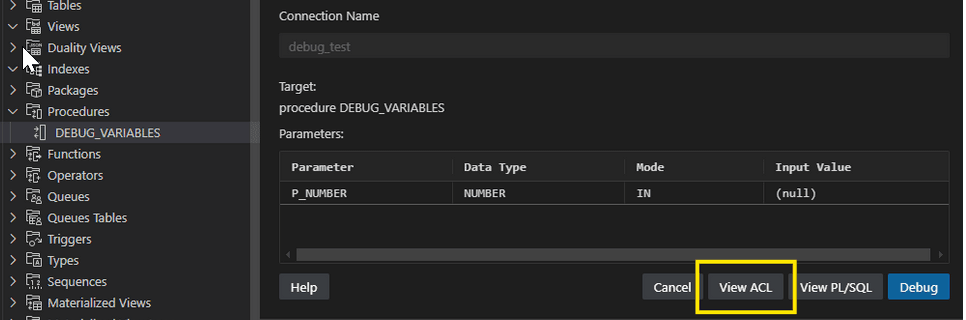
In the editor pane that appears, click View ACL.
-
You are prompted to provide the IP address that the database should use to connect to SQL Developer for VS Code. Choose one of the suggestions or enter your own.
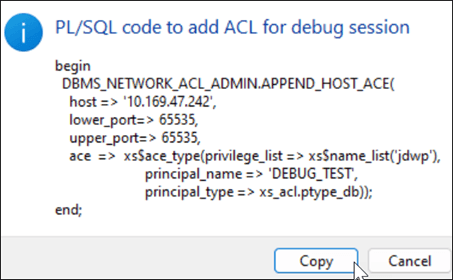
The PL/SQL code block that is required to add an entry in ACL is shown.
Note: The PL/SQL block must be executed by a user with DBA privileges.