Understand the Cube.FederatedPartition Worksheet
The Cube.FederatedPartition worksheet in an Essbase application workbook defines a federated partition to Autonomous AI Lakehouse, including the connection name, fact table name, pivot dimension name, and storage management type. It also includes mappings for dimensions and the pivot dimension.
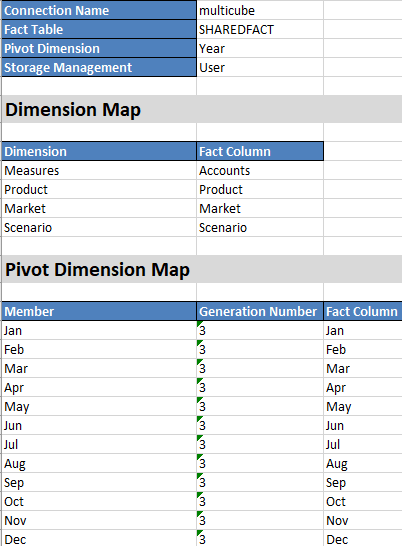
| Property or Field | Valid Values | Description |
|---|---|---|
|
Connection Name |
The name of the connection |
The global level connection to Autonomous AI Lakehouse that was previously created by an administrator as shown in Create a Connection for Federated Cubes. |
|
Fact Table |
The name of the fact table |
The name of the fact table in Autonomous AI Lakehouse that stores numeric values and keys. |
|
Pivot Dimension |
The name of the pivot dimension |
The name of the pivot dimension you decided to use from the Essbase outline, during the Identify the Pivot Dimension process. |
|
Storage Management |
|
With User managed, you create and manage the fact table. With Essbase managed, you let Essbase create and manage the fact table. |
Dimension Map table fields and valid values
| Property or Field | Valid Values | Description |
|---|---|---|
| Dimension | Dimension names | Essbase dimension member names that map to fact table column names. |
| Fact Column | Fact table column names | Fact table column names that are mapped to Essbase dimension member names. |
Pivot Dimension Map table fields and valid values
| Property or Field | Valid Values | Description |
|---|---|---|
| Member | Member names from the pivot dimension | Names of Essbase members in the pivot dimension. |
| Generation Number | Numerals matching the generation number | The generation number. |
| Fact Column | Fact table column names. | The fact table column names that are mapped to Essbase members in the pivot dimension. |
Note:
For the pivot dimension, a one-to-one relationship between the fact table column and Essbase member names is enforced.You can create federated partition worksheets in Cube Designer's Designer Panel. See Create a Federated Partition using Cube Designer.
To learn more about federated partitions, see Federated Cubes: Integrate Essbase with Autonomous AI Database.