Using the Proxy in a secure data store
Starting up the Proxy
Configuring and starting the Oracle NoSQL Database Proxy is part of the data store administration. The proxy can be started on a secure data store using the following steps.
-
Before you start up the proxy, you need to create a user (
proxy_user) as the proxy needs an identity to connect to the secure data store. This proxy user identity (proxy_user) is never used for actual data operations. It is only needed for the initial connection to the store.In SQL shell, the following command will create a bootstrap user for the proxy. See Developers Guide for getting started with SQL commands.
Create the
proxy_useras shown below:sql-> CREATE USER proxy_user IDENTIFIED BY "<proxyuser_password>" -
Create a password store file or Oracle wallet named
proxy.loginto store the credentials needed to login asproxy_user. The secret value that you enter must match the value of<proxyuser_password>that you have set in the above step. -
Use self-signed certificates or certificate chains to securely connect to the Oracle NoSQL Database Proxy.
-
Use the following command to start up the proxy for a secure data store:
java -jar lib/httpproxy.jar \
-storeName <kvstore_name> \
-helperHosts <kvstore_helper_host> \
[-hostname <proxy_host>] \
[-httpsPort <proxy_https_port>] \
-storeSecurityFile $KVROOT/security/proxy.login \
-sslCertificate certificate.pem \
-sslPrivateKey key-pkcs8.pem \
-sslPrivateKeyPass <privatekey_password> \
[-verbose true]
where,
-
kvstore_nameis the data store name obtained from the data store deployment. See ping to obtain information about the runtime entities (Storage Nodes and Replication Nodes) of the data store.. -
kvstore_helper_hostis the data store’s helper host:port list obtained from the data store deployment. See Obtaining a KVStore Handle in the Java Direct Driver Developer’s Guide. -
proxy_hostis the hostname of the machine running the proxy service. This parameter is optional and defaults tolocalhost. You can also specify the complete hostname of the machine running the proxy. -
proxy_https_portis the port on which the proxy is listening for requests. This is an optional parameter and defaults to 443.Note: Using port 443 requires root privilege. You can use port 8443 if you do not have root privilege.
-
proxy.loginis the security login file generated in the earlier step for accessing the secure kvstore. -
certificate.pemis the certificate file generated in the previous step. -
key-pkcs8.pemis the private key file generated in the previous step. -
privatekey_passwordis the password for the encryptedkey-pkcs8.pemfile.Note: The proxy start-up only accepts private key file in PKCS#8 format. If your private key is already in PKCS#8 (start with —–BEGIN ENCRYPTED PRIVATE KEY—– or —–BEGIN PRIVATE KEY—–), you don’t need any additional conversion. Otherwise, you can use OpenSSL to do the conversion.
-
Connecting an application to the secure data store
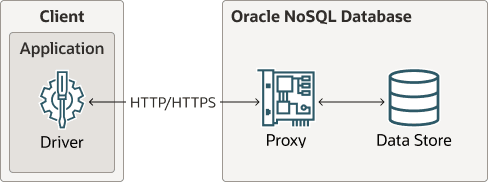
Description of the illustration proxy_arch.png
Oracle NoSQL Database drivers are available in various programming languages that are used in the client application. Currently, Java, Python, Go, Node.js, C#, and Rust are supported. Oracle NoSQL Database Proxy is a server that accepts requests from the client application and processes them using the Oracle NoSQL Database.
Authentication:
Within a secure Oracle NoSQL Database, access to the database is limited to authenticated users. You need to create a user for your application (appln_user) and pass the credentials of this user while connecting to your data store through the proxy from your drivers. The user will be authenticated using the credentials supplied( username/password) in the data store.
In the driver configuration, the application user name and password are provided. When the handle is created from the secure configuration the driver will send a login request to the proxy. The proxy uses this identity (appln_user/applnuser_password) to log into the data store, authenticating the user. This user identity (appln_user) must already exist in the store.
Create the user (appln_user) as shown below for your application to access the secure data store.
sql-> CREATE USER <appln_user> IDENTIFIED BY "<applnuser_password>"Authorization:
Oracle NoSQL Database provides role-based authorization which enables the user to assign kvstore roles to user accounts to define accessible data and allow database administrative operations for each user account. Users can acquire desired privileges by role-granting. Your application should be given a role based on the least privilegeaccess, carefully balancing the needs of the application with security concerns. See Configuring privileges and roles for more details.
After successful authentication of the application user, every driver request from the handle created sends the identity (appln_user) which is used by the proxy and data store to authorize any data operations such as table creation, put, get, query, etc. The data store is the entity that does the authorization. The authorization is based on the identity and operation, and the data store uses the roles assigned to the appln_user to make authorization decisions.
Any request from the driver to the data store goes through the following steps:
-
The driver sends the request to the proxy and the request contains the authenticated identity.
-
The proxy uses the authenticated identity to send the request to the data store.
-
The data store validates the identity and authorizes the identity for the desired operation (put, get, query, etc) using the privileges set in the data store for that identity.
The Oracle NoSQL Database Java Driver contains the jar files that enable an application to communicate with the Oracle NoSQL Database Proxy. You can connect to the proxy using the following steps.
-
Create an application user (
appln_user) to access the data store through the secure proxy as shown in the above section. -
For secure access, create an instance of the
StoreAccessTokenProviderclass with the parameterized constructor. Provide the reference ofStoreAccessTokenProviderclass to theNoSQLHandleConfigclass to establish the appropriate connection. Install the Oracle NoSQL Database Java Driver in the application’s classpath and use the following code to connect to the data store.String endpoint = "https://<proxy_host>:<proxy_https_port>"; StoreAccessTokenProvider atProvider = new StoreAccessTokenProvider("<appln_user>","<applnuser_password>".toCharArray()); NoSQLHandleConfig config = new NoSQLHandleConfig(endpoint); config.setAuthorizationProvider(atProvider); NoSQLHandle handle = NoSQLHandleFactory.createNoSQLHandle(config);where,
-
proxy_hostis the hostname of the machine running the proxy service. This should match the proxy host you configured earlier. -
proxy_https_portis the port on which the proxy is listening for requests. This should match the proxy https port configured earlier. -
appln_useris the user created to connect to the secure store. This should match the user created in the above section. -
applnuser_passwordis the password of theappln_user.
-
-
You can specify the details of the trust store containing the SSL certificate for the proxy in one of the following two ways.
You can set it as part of your Java code as shown below:
/* the trust store containing SSL cert for the proxy */
System.setProperty("javax.net.ssl.trustStore", trustStore);
if (trustStorePassword != null) {
System.setProperty("javax.net.ssl.trustStorePassword",trustStorePassword);
}
Alternatively, you can start-up the application program and set the
driver.trustfile’s path to the Java trust store by using the following command. This is required as the proxy is already set up using thecertificate.pemandkey-pkcs8.pemfiles.java -Djavax.net.ssl.trustStore=driver.trust \ -Djavax.net.ssl.trustStorePassword=<password of driver.trust> \ -cp .:lib/nosqldriver.jar application_programThe
driver.trustcontains thecertificate.pemorrootCA.crtcertificate. If the certificatecertificate.pemis in a chain signed by a trusted CA that is listed inJAVA_HOME/jre/lib/security/cacerts, then you don’t need to append Java environment parameter-Djavax.net.ssl.trustStorein the Java command.
The Oracle NoSQL Database Python driver contains the files that enable an application to communicate with the Oracle NoSQL Database Proxy. You can connect to a secure data store using the following steps.
-
Create an application user (
appln_user) to access the data store through the secure proxy as shown in the above section. - If running a secure store, a certificate path should be specified through the
REQUESTS_CA_BUNDLEenvironment variable:$ export REQUESTS_CA_BUNDLE= <fully_qualified_path_to_certificate>/certificate.pem:$REQUESTS_CA_BUNDLEor
borneo.NoSQLHandleConfig.set_ssl_ca_certs(). -
Use the following code to connect to the proxy.
from borneo import NoSQLHandle, NoSQLHandleConfig
from borneo.kv import StoreAccessTokenProvider
endpoint = 'https://<proxy_host>:<proxy_https_port>'
# Create the AuthorizationProvider for a secure store:
ap = StoreAccessTokenProvider('<appln_user>','<applnuser_password>')
# create a configuration object
config = NoSQLHandleConfig(endpoint).set_authorization_provider(ap)
# set the certificate path if running a secure store
config.set_ssl_ca_certs(<ca_certs>)
# create a handle from the configuration object
handle = NoSQLHandle(config)
where,
-
proxy_hostis the hostname of the machine running the proxy service. This should match the proxy host you configured earlier. -
proxy_https_portis the port on which the proxy is listening for requests. This should match the proxy https port configured earlier. -
appln_useris the user created to connect to the secure store. This should match the user created in the above section. -
applnuser_passwordis the password of theappln_user.
-
The Oracle NoSQL Database Go driver contains the files that enable an application to communicate with the Oracle NoSQL Database Proxy. You can connect to a secure data store using the following steps.
-
Create an application user (
appln_user) to access the data store through the secure proxy as shown in the above section. -
Use the following code to connect to the proxy. To connect an application to a secure NoSQL database, you need to provide user credentials used to authenticate with the server. If the Proxy server is configured with a self-signed certificate or a certificate that is not trusted by the default system CA, you also need to specifiy CertPath and ServerName for the certificate path and server name used to verify server’s certificate.
import (
    "fmt"
    "github.com/oracle/nosql-go-sdk/nosqldb"
    "github.com/oracle/nosql-go-sdk/nosqldb/httputil"
)
...cfg:= nosqldb.Config{
    Endpoint: "https://<proxy_host>:<proxy_https_port>",
    Mode:     "onprem",
    Username: "<appln_user>",
    Password: "<applnuser_password>>",
   },
    // Specify the CertPath and ServerName
    // ServerName is used to verify the hostname for self-signed certificates.
    // This field is set to the "CN" subject value from the certificate specified by CertPath.
    HTTPConfig: httputil.HTTPConfig{
       CertPath: "<fully_qualified_path_to_cert>",
       ServerName: "<server_name>",
    },
}
client, err:=nosqldb.NewClient(cfg)
iferr!=nil {
    fmt.Printf("failed to create a NoSQL client: %v\n", err)
    return
}
deferclient.Close()
// Perform database operations using client APIs.
// ...
where,
-
proxy_hostis the hostname of the machine running the proxy service. This should match the proxy host you configured earlier. -
proxy_https_portis the port on which the proxy is listening for requests. This should match the proxy https port configured earlier. -
appln_useris the user created to connect to the secure store. This should match the user created in the above section. -
applnuser_passwordis the password of theappln_user.
The Oracle NoSQL Database Node.js driver contains the files that enable an application to communicate with the Oracle NoSQL Database Proxy. You can connect to a secure data store using the following steps.
-
Create an application user (
appln_user) to access the data store through the secure proxy as shown in the above section. -
In secure mode the proxy requires the SSL Certificate and Private key. The proxy certificate was created when configuring the proxy as explained here. If the root certificate authority (CA) for your proxy certificate is not one of the trusted root CAs , the driver needs the certificate chain file (e.g. certificates.pem) or a root CA certificate file (e.g. rootCA.crt) in order to connect to the proxy. If you are using self-signed certificate instead, the driver will need the certificate file (e.g. certificate.pem) for the self-signed certificate in order to connect.
To provide the certificate or certificate chain to the driver, you have two options , either specifying in the code or setting as environment variables.
You can specify the certificates through
httpOptproperty while creating the NoSQL handle. InsidehttpOptyou can usecaproperty to specify the CA as shown below.const client = new NoSQLClient({ ....., httpOpt: { ca: fs.readFileSync(<caCertFile>) },..... });Note: If a file path is supplied, the path can be absolute or relative to the current working directory of the application.
Alternatively, before running your application, set the environment variable
NODE_EXTRA_CA_CERTSas shown below.export NODE_EXTRA_CA_CERTS="<fully_qualified_path_to_driver.trust>"where driver.trust is either a certificate chain file (certificates.pem) for your CA, your root CA’s certificate (rootCA.crt) or a self-signed certificate (certificate.pem).
-
To connect to the proxy in secure mode, in addition to communication endpoint, you need to specify user name and password of the driver user. This information is passed in
Config#authobject underkvstoreproperty and can be specified in one of 3 ways as described below.You may choose to specify user name and password directly:
const NoSQLClient = require('oracle-nosqldb').NoSQLClient;
const client = new NoSQLClient({
endpoint: 'https://<proxy_host>:<proxy_https_port>',
auth: {
    kvstore: {
        user: '<appln_user>',
        password: '<applnuser_password>'
    }
}
});
where,
-
proxy_hostis the hostname of the machine running the proxy service. This should match the proxy host you configured earlier. -
proxy_https_portis the port on which the proxy is listening for requests. This should match the proxy https port configured earlier. -
appln_useris the user created to connect to the secure store. This should match the user created in the above section. -
applnuser_passwordis the password of theappln_user.
This option is less secure because the password is stored in plain text in memory.
You may choose to store credentials in a separate file which is protected by file system permissions, thus making it more secure than previous option, because the credentials will not be stored in memory, but will be accessed from this file only when login is needed. Credentials file should have the following format:
{
  "user":     "<appln_user>",
  "password": "<applnuser_password>"
}
Then you may reference this credentials file as following:
const NoSQLClient = require('oracle-nosqldb').NoSQLClient;
const client = new NoSQLClient({
    endpoint: 'https://<proxy_host>:<proxy_https_port>',
    auth: {
        kvstore: {
            credentials: '<path/to/credentials.json>'
        }
    }
});
You may also reference
credentials.jsonin the configuration file that is used to createNoSQLClientinstance.Contents of
config.json{ "endpoint": "https://<proxy_host>:<proxy_https_port>", "auth": { "kvstore": { "credentials": "<path/to/credentials.json>" } } }const NoSQLClient = require('oracle-nosqldb').NoSQLClient; const client = new NoSQLClient('</path/to/config.json>');Note: If a file path is supplied, the path can be absolute or relative to the current working directory of the application.
-
The Oracle NoSQL Database Dotnet driver contains the files that enable an application to communicate with the Oracle NoSQL Database Proxy. You can connect to a secure data store using the following steps.
-
Create an application user (
appln_user) to access the data store through the secure proxy as shown in the above section. -
To connect to the proxy in secure mode, in addition to communication endpoint, you need to specify the details of the user connecting to the secure data store. This information is passed in the instance of
KVStoreAuthorizationProviderand can be specified in any of the ways as described below.You may choose to specify user name and password directly:
var client = new NoSQLClient(
new NoSQLConfig
    {
        Endpoint = "https://<proxy_host>:<proxy_https_port>",
        AuthorizationProvider = new KVStoreAuthorizationProvider(
        <appln_user, // user name as string
        <applnuser_password>) // password as char[]
    });
where,
-
proxy_hostis the hostname of the machine running the proxy service. This should match the proxy host you configured earlier. -
proxy_https_portis the port on which the proxy is listening for requests. This should match the proxy https port configured earlier. -
appln_useris the user created to connect to the secure store. This should match the user created in the above section. -
applnuser_passwordis the password of theappln_user.
This option is less secure because the password is stored in plain text in memory for the lifetime of
NoSQLClientinstance. Note that the password is specified as char[] which allows you to erase it after you are finished using NoSQLClient.You may choose to store credentials in a separate file which is protected by file system permissions, thus making it more secure than the previous option, because the credentials will not be stored in memory, but will be accessed from this file only when the login to the store is required. Credentials file should have the following format:
{
    "UserName": "<appln_user>",
    "Password": "<applnuser_password>"
}
Then you may use this credentials file as following:
Contents of
config.jsonvar client = new NoSQLClient( new NoSQLConfig { Endpoint = "https://<proxy_host>:<proxy_https_port>", AuthorizationProvider = new KVStoreAuthorizationProvider( "<path/to/credentials.json>") });You may also reference credentials.json in the JSON configuration file that is used to create
NoSQLClientinstance:Contents of
config.json{ "Endpoint": "https://<proxy_host>:<proxy_https_port>", "AuthorizationProvider": { "AuthorizationType": "KVStore", "CredentialsFile": "<path/to/credentials.json>" } }var client = new NoSQLClient("</path/to/config.json>"); -
Note: If a file path is supplied, the path can be absolute or relative to the current working directory of the application.
Note that in config.json the authorization provider is represented as a JSON object with the properties for KVStoreAuthorizationProvider and an additional AuthorizationType property indicating the type of the authorization provider, which is KVStore for the secure on-premises store.
You need to provide the trusted root certificate to the driver if the certificate chain for your proxy certificate is not rooted in one of the well known CAs. The provided certificate may be either your custom CA or self-signed proxy certificate. It must be specified using TrustedRootCertificateFile property, which sets a file path (absolute or relative to the current working directory) to a PEM file containing one or more trusted root certificates (multiple roots are allowed in this file). This property is specified as part of ConnectionOptions in NoSQLConfig.
var client = new NoSQLClient(
new NoSQLConfig {
   Endpoint: 'https://<proxy_host>:<proxy_https_port>',
   AuthorizationProvider = new KVStoreAuthorizationProvider( "<path/to/credentials.json>"),
   ConnectionOptions: { "TrustedRootCertificateFile": "<path/to/certificates.pem>" }
});
The Oracle NoSQL Database Rust driver contains the files that enable an application to communicate with the Oracle NoSQL Database Proxy. You can connect to a secure data store using the following steps.
-
Create an application user (
appln_user) to access the data store through the secure proxy as discussed above. -
To connect to the proxy in secure mode, in addition to communication endpoint, you need to specify the user name and password of the driver user. This information is passed as shown below.
{
    let handle = Handle::builder()
    .endpoint("https://<proxy_host>:<proxy_https_port>")?
    .mode(HandleMode::Onprem)?
    .onprem_auth("<appln_user>", "<applnuser_password>")?
    .build().await?;
}
where
-
proxy_hostis the host name of the machine running the proxy service. This should match the proxy host you configured earlier. -
proxy_https_portis the port on which the proxy is listening for requests. This should match the proxy https port configured earlier. -
appln_useris the user created to connect to the secure store. This should match the user created in the above section. -
applnuser_passwordis the password of theappln_user.
Instead of providing the credentials directly, you can also store the credentials in a separate file which is protected by file system permissions. Credentials file should have the following format:
{
    "UserName": "<appln_user>",
    "Password": "<applnuser_password>"
}
Then you may use this credentials file as following:
{
    let handle = Handle::builder()
    .endpoint("https://<proxy_host>:<proxy_https_port>")?
    .mode(HandleMode::Onprem)?
    .onprem_auth_from_file("/path/to/user_pass_file")?
    .build().await?;
}
Note: If a file path is supplied, the path can be absolute or relative to the current working directory of the application.
-
You need to provide trusted root certificate to the driver if the certificate chain for your proxy certificate is not rooted in one of the well known certificate authorities (CA). The provided certificate may be either your custom certificate authority or self-signed proxy certificate.
{
        let handle = Handle::builder()
        .endpoint("https://<proxy_host>:<proxy_https_port>")?
        .mode(HandleMode::Onprem)?
        .onprem_auth_from_file("/path/to/user_pass_file")?
        .add_cert_from_pemfile("/path/to/certificate.pem")?
        .build().await?;
}
Note: If a file path is supplied, the path can be absolute or relative to the current working directory of the application.
If you want to instruct the client to skip verifying the server’s certificate, you can specify as follows:
{
        let handle = Handle::builder()
        .endpoint("https://<proxy_host>:<proxy_https_port>")?
        .mode(HandleMode::Onprem)?
        .onprem_auth_from_file("/path/to/user_pass_file")?
        .danger_accept_invalid_certs(true)?
        .build().await?;
}