Privileges
A privilege is an approval to perform an operation on one or more Oracle NoSQL Database objects. In Oracle NoSQL Database, all privileges fall into the two general categories:
-
System privileges
This gives a user the ability to perform a particular action, or to perform an action on any data objects of a particular type.
-
Object privileges
This gives a user the ability to perform a particular action on a specific object, such as a table.
System Privileges
Oracle NoSQL Database provides the following system privileges, covering both data access and administrative operations:
-
SYSDBACan perform Oracle NoSQL Database management, including table create/drop/evolve and index create/drop.
-
SYSVIEWCan view/show system information, configuration and metadata.
-
DBVIEWCan query data object information. The object is defined as a resource in Oracle NoSQL Database, subject to access control. At present, you can have this privilege to query the table and index information.
-
USRVIEWCan query users’ own information, like their own user information, the status of commands they issued and have access to the current topology information using Oracle NoSQL Database Java direct driver.
-
SYSOPERCan perform Oracle NoSQL Database system configuration, topology management, user privilege/role management, diagnostic and maintenance operations. Allows a role to perform cancel, execute, interrupt, and wait on any plan.
-
WRITE_SYSTEM_TABLECan make modifications to system tables if the necessary read and write privileges are granted for the table. The multi-region agent is the intended user of this privilege. The
WRITE_SYSTEM_TABLEprivilege is needed when you need to use theLoadprogram to restore records into a secure data store. See Using the Load Program for more details. Typically, normal users should not modify system tables. -
READ_ANYCan get/iterate keys and values in the entire store, including any tables.
-
WRITE_ANYCan put/delete values in the entire store, including any tables.
-
CREATE_ANY_TABLECan create any table in the store.
-
DROP_ANY_TABLECan drop any table from the store.
-
EVOLVE_ANY_TABLECan evolve any table in the store.
-
CREATE_ANY_INDEXCan create any index on any table in the store.
-
DROP_ANY_INDEXCan drop any index from any table in the store.
-
READ_ANY_TABLECan read from any table in the store.
-
DELETE_ANY_TABLECan delete data from any table in the store.
-
INSERT_ANY_TABLECan insert and update data in any table in the store.
Object Privileges
The object privileges defined in Oracle NoSQL Database are:
-
READ_TABLECan read from a specific table.
-
DELETE_TABLECan delete data from a specific table.
-
INSERT_TABLECan insert and update data to a specific table.
-
EVOLVE_TABLECan evolve a specific table.
-
CREATE_INDEXCan create indexes on a specific table.
-
DROP_INDEXCan drop indexes from a specific table.
For more information on the privileges required by the user to access specific KVStore APIs as well as CLI commands, see KVStore Required Privileges.
The object privileges defined in Oracle NoSQL Database for namespaces are:
-
CREATE_ANY_NAMESPACECan create any namespace. When creating a new namespace the user will also be able to READ_IN_NAMESPACE, INSERT_IN_NAMESPACE, DELETE_IN_NAMESPACE on the respective new namespace.
-
DROP_ANY_NAMESPACECan drop any namespace.
-
CREATE_TABLE_IN_NAMESPACECan create tables in a specific namespace.
-
DROP_TABLE_IN_NAMESPACECan drop tables in a specific namespace.
-
EVOLVE_TABLE_IN_NAMESPACECan evolve tables in a specific namespace.
-
CREATE_INDEX_IN_NAMESPACECan create an index in a specific namespace.
-
DROP_INDEX_IN_NAMESPACECan drop an index in a specific namespace.
-
READ_IN_NAMESPACECan read items in a specific namespace.
-
INSERT_IN_NAMESPACECan insert items in a specific namespace.
-
DELETE_IN_NAMESPACECan delete items in a specific namespace.
-
MODIFY_IN_NAMESPACEHas all the DDL privileges for a specific namespace.
Table Ownership
When you are using a secure store, tables are owned by the user that created them. A table’s owner has by default full privileges to the table. That is, the owner has all the table object privileges. Note: For tables created in a non-secured store, or tables created prior to the 3.3 release, the table’s owner is null.
Once a table is created, its owner cannot be changed. If a table is dropped and then recreated, all previously granted table privileges must be granted again.
Parent and child tables are required to have the same owner. However, table privileges are not automatically granted to the table’s children. For example, if READ_TABLE is granted to table myTable, then that privilege is not automatically granted to any of that table’s children. To grant READ_TABLE to the child tables, you must individually grant the privilege to each child table in turn.
A table’s owner can grant or revoke all table privileges to or from other roles. To do this, use the GRANT DDL statement. (See Grant Roles or Privileges for details.) To make a user other than the owner be able to read/insert/delete a specific table, two conditions must be met:
-
The user has the read/insert/delete privilege for the table in question; and
-
The user has the same privilege, or read privilege, for all parent tables of that table.
For example, for table myTable and its child myTable.child1, a non-owner user can only insert data to myTable.child1 when she has insert privilege (or better) on myTable.child1, and read and/or insert privilege on myTable.
If you have one or more namespaces in your store, you can grant authorization permissions to a namespace to determine who can access both the namespace and the tables within it. For more details, see Granting Authorization Access to Namespaces.
Privilege Hierarchy
In Oracle NoSQL Database, there is a relationship between parts of existing privileges, called ‘implications’. Implication means that a privilege may be a superset of some other privileges.
For example, Privilege A implies (=>) B means that privilege A has all the permissions defined in privilege B.
The following illustration depicts all implication relationship among Oracle NoSQL Database privileges:
Figure 1 - Privilege Hierarchy
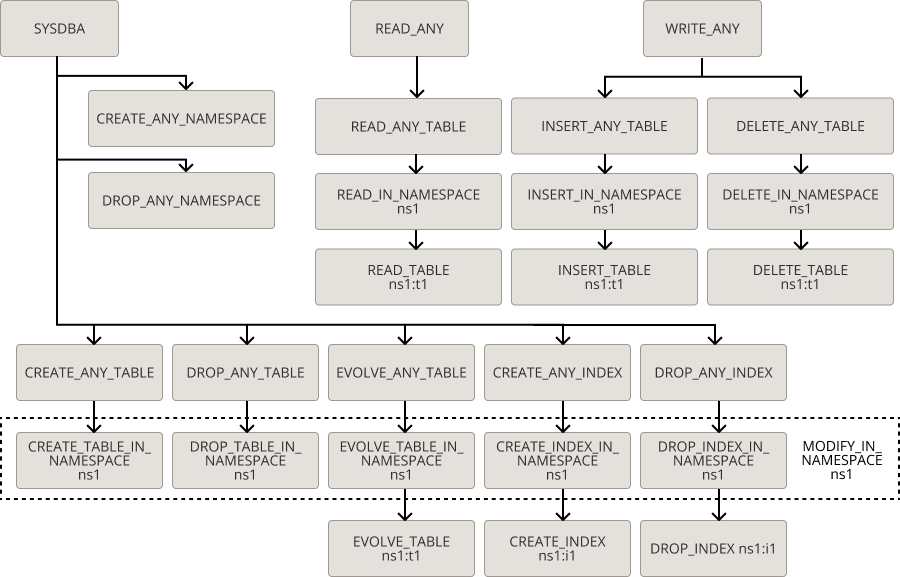
Note: All implications are transitive, that is, if A=>B and B=>C, then A=>C.
You can perform read operation on a table in namespace ns1:t1 if the user has any of the following privileges specified:
-
READ_ANY
-
READ_ANY_TABLE
-
READ_IN_NAMESPACE ns1
-
READ_TABLE ns1:t1