Before You Begin
Purpose
In this tutorial, you do a bulk insert across different shards of an Oracle NoSQL Database.
Time to Complete
15 minutes (approximately).
Background
Oracle NoSQL Database is a scalable, distributed NoSQL database, designed to provide highly reliable, flexible and available data management across a configurable set of storage nodes.
Oracle NoSQL Database has the ability to perform a bulk insert or bulk put records across different shards. This functionality allows developers to work effectively with large data-sets.
The BulkPut API is available for both table and key/value data model. The API provides significant performance gains over single row inserts. It reduces the network traffic round trip and performs ordered inserts in batch on internally sorted data across different shards parallely.
Scenario
Consider an example of a shipping company, using Oracle NoSQL Database for their ship management application. This application is used to track the movement of their container ships that moves the cargo from port to port. The cargo ships are equipped with GPS and other tracking devices, which relays ship's location after few seconds into the application. The application is then queried for:
- The location of all the ships (displayed on the map)
- A specific ship's trajectory over a given period of time (displayed on the map)
As the volume of the location data increase each day, the company is finding it difficult to scale the application and is now looking at a back-end system that can ingest this large data-set efficiently.
What Do You Need?
Oracle NoSQL Database (4.2 or above) - The software must be installed, configured, and running
-
Scripts used in this tutorial
Pinging the KVStore
In this section, you verify that Oracle NoSQL Database is installed and the KVStore is running.
-
Log into the system where Oracle NoSQL Database is installed and running. Open a terminal window and navigate to your working directory.
$ cd /home/oracle/kvstore -
Confirm that the configured kvstore is running by using the
pingcommand.$ java -jar $KVHOME/lib/kvstore.jar ping -host localhost -port 5000Pinging components of store kvstore based upon topology sequence #14 10 partitions and 1 storage nodes Time: 2016-12-07 13:03:17 UTC Version: 12.1.4.2.14 Shard Status: healthy:1 writable-degraded:0 read-only:0 offline:0 Admin Status: healthy Zone [name=KVLite id=zn1 type=PRIMARY allowArbiters=false] RN Status: online:1 offline:0 Storage Node [sn1] on host01:5000 Zone: [name=KVLite id=zn1 type=PRIMARY allowArbiters=false] Status: RUNNING Ver: 12cR1.4.2.14 2016-11-24 03:59:15 UTC Build id: 4c309251a012 Admin [admin1] Status: RUNNING,MASTER Rep Node [rg1-rn1] Status: RUNNING,MASTER sequenceNumber:46 haPort:5006
Inserting Bulk Data
In this section, you create a java class to insert bulk data across different shards. You inspect the key lines of the code and then compile and run the Java class.
Saving the Java Class File
In this section, you save a java class file to your working machine.
-
Download the class file (if not already done).
-
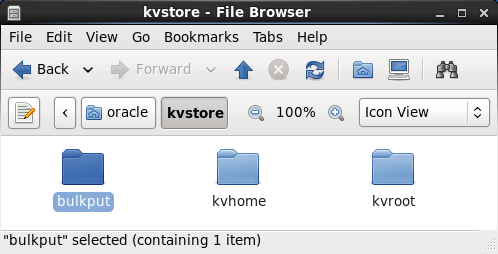
Create a directory called bulkput and save the downloaded file to this directory.
Description of this image
Understanding the Java Class File
In this section, you review the key code lines in the Java class file.
-
Open the Java class file in an editor and review the code. The file starts with all the required import statements.
package bulkput; import java.util.ArrayList; import java.util.List; import java.util.concurrent.atomic.AtomicLong; import oracle.kv.BulkWriteOptions; import oracle.kv.EntryStream; import oracle.kv.FaultException; import oracle.kv.KVStore; import oracle.kv.KVStoreConfig; import oracle.kv.KVStoreFactory; import oracle.kv.Key; import oracle.kv.KeyValue; import oracle.kv.Value; import oracle.kv.table.Row; import oracle.kv.table.Table; import oracle.kv.table.TableAPI; -
In this example, the table name is set to users and the
CREATE_TABLEstring is defined.public class BulkPutExample { private final KVStore store; private final BulkWriteOptions bulkWriteOptions; private int streamParallelism = 1; private int perShardParallelism = 2; private int heapPercent = 70; private int nLoad = 1000; private boolean useTable = false; private final static String TABLE_NAME = "users"; private final static int BINARY_LEN = 128; private final static String CREATE_TABLE = "CREATE TABLE if not exists " + TABLE_NAME + "(id long, name string, data binary, primary key(id))"; private Table userTable = null; public static void main(final String args[]) { try { BulkPutExample runTest = new BulkPutExample(args); runTest.run(); } catch (Exception e) { e.printStackTrace(); } } -
The bulkwrite option is created. The class constructor retrieves the kvstore handle that is required to perform any operation on a kvstore. In this example, the
storeNameandhostNameis set to null.-
BulkWriteOptions(Durability durability, long timeout, TimeUnit timeoutUnit):The options used to configure the bulk put operation. In this example, Durability and TimeUnit is set to null, and TimeOut is set to 0. setStreamParallelism:Sets the maximum number of streams that can be read concurrently. Each stream is read by a dedicated thread from a thread pool. This setting determines the size of the thread pool used for reading streams.The default parallelism is 1. For streams with high overheads, say because the I/O device underlying the stream is slow and there are different I/O devices underlying each stream, a higher value would be appropriate.
setPerShardParallelism:Sets the maximum number of threads that can concurrently write it's batch of entries to a single shard in the store.The default value is 3 and allows for overlapping the reading of the next batch with processing of the current batch at a server node. Higher capacity networks and and storage nodes can allow for higher parallelism.
setBulkHeapPercent:The percentage of Runtime.maxMemory() that can be used for the operation. This heap is used to assemble batches of entries associated with specific shards and partitions.The default is 40%.
BulkPutExample(final String[] argv) { String storeName = null; String hostName = null; int port = -1; final int nArgs = argv.length; int argc = 0; if (nArgs == 0) { usage(null); } while (argc < nArgs) { final String thisArg = argv[argc++]; if (thisArg.equals("-store")) { if (argc < nArgs) { storeName = argv[argc++]; } else { usage("-store requires an argument"); } } else if (thisArg.equals("-host")) { if (argc < nArgs) { hostName = argv[argc++]; } else { usage("-host requires an argument"); } } else if (thisArg.equals("-port")) { if (argc < nArgs) { port = Integer.parseInt(argv[argc++]); } else { usage("-port requires an integer argument"); } } else if (thisArg.equals("-streamParallelism")) { if (argc < nArgs) { streamParallelism = Integer.parseInt(argv[argc++]); } else { usage("-streamParallelism requires an argument"); } } else if (thisArg.equals("-perShardParallelism")) { if (argc < nArgs) { perShardParallelism = Integer.parseInt(argv[argc++]); } else { usage("-perShardParallelism requires an argument"); } } else if (thisArg.equals("-heapPercent")) { if (argc < nArgs) { heapPercent = Integer.parseInt(argv[argc++]); } else { usage("-heapPercent requires an argument"); } } else if (thisArg.equals("-load")) { if (argc < nArgs) { nLoad = Integer.parseInt(argv[argc++]); } else { usage("-load requires an argument"); } } else if (thisArg.equals("-useTable")) { useTable = true; } else { usage("Unknown argument: " + thisArg); } } if (hostName == null) { usage("Missing argument: -host"); } if (port == -1) { usage("Missing argument: -port"); } if (storeName == null) { usage("Missing argument: -store"); } final String fmt = "\thost:%s\n\tport:%d\n\tstore:%s\n" + "\tnumToload:%,d\n\tuseTable:%s\n" + "\tbulkWriteOptions:\n" + "\t\tstreamParallelism:%d\n" + "\t\tperShardParallelism:%d\n" + "\t\theapPercent:%d\n"; System.err.println(String.format(fmt, hostName, port, storeName, nLoad, String.valueOf(useTable), streamParallelism, perShardParallelism, heapPercent)); bulkWriteOptions = new BulkWriteOptions(null, 0, null); bulkWriteOptions.setStreamParallelism(streamParallelism); bulkWriteOptions.setPerShardParallelism(perShardParallelism); bulkWriteOptions.setBulkHeapPercent(heapPercent); store = KVStoreFactory.getStore (new KVStoreConfig(storeName, hostName + ":" + port)); } -
-
Review the
runmethod. Here, the program creates a table, if the user wishes to use table, and loads the rows into the table. If table is not being used, then it loads key value pairs.private void usage(final String message) { if (message != null) { System.err.println("\n" + message + "\n"); } System.err.println("usage: " + getClass().getName()); System.err.println ("\t-store <instance name>\n" + "\t-host <host name>\n" + "\t-port <port number>\n" + "\t[-load <# records to load>] (default: 1000)\n" + "\t[-streamParallelism <the number of streams>]" + " (default: 1)\n" + "\t[-perShardParallelism <the number of writer threads per shard>]" + " (default: 2)\n" + "\t[-heapPercent <percentage of max memory used for bulk put>]" + " (default: 70)]\n" + "\t[-useTable]"); System.exit(1); } private void run() { try { if (useTable) { createTable(); doLoadRows(); } else { doLoadKVs(); } } finally { store.close(); } } -
The
createTable()method is executed to create a table when the-useTableflag is used. It creates a table called users.private void createTable() { final TableAPI tableImpl = store.getTableAPI(); try { store.executeSync(CREATE_TABLE); } catch (FaultException fe) { System.out.println("Create table failed: " + fe.getMessage()); throw fe; } userTable = tableImpl.getTable(TABLE_NAME); System.err.println("Created table " + TABLE_NAME + "."); } -
The
doLoadKVs()method loads the key values to the NoSQL Database. This method is executed when the-useTableflag is not used.private void doLoadKVs() { System.err.println("Loading KVs..."); final List<EntryStream<KeyValue>> streams = new ArrayList<EntryStream<KeyValue>>(streamParallelism); final int num = (nLoad + (streamParallelism - 1)) /streamParallelism; for (int i = 0; i < streamParallelism; i++) { final int min = num * i; final int max = Math.min((min + num) , nLoad); streams.add(new LoadKVStream(i, min, max)); } store.put(streams, bulkWriteOptions); long total = 0; long keyExists = 0; for (EntryStream<KeyValue> stream: streams) { total += ((LoadKVStream)stream).getCount(); keyExists += ((LoadKVStream)stream).getKeyExistsCount(); } final String fmt = "Loaded %,d records, %,d pre-existing."; System.err.println(String.format(fmt, total, keyExists)); } -
The
doLoadRows()method loads the rows inside the table. This method is executed with the-useTableflag is used.private void doLoadRows() { System.err.println("Loading rows to " + TABLE_NAME + "..."); final List<EntryStream<Row>> streams = new ArrayList<EntryStream<Row>>(streamParallelism); final int num = (nLoad + (streamParallelism - 1)) / streamParallelism; for (int i = 0; i < streamParallelism; i++) { final int min = num * i; final int max = Math.min((min + num) , nLoad); streams.add(new LoadRowStream(i, min, max)); } final TableAPI tableImpl = store.getTableAPI(); tableImpl.put(streams, bulkWriteOptions); long total = 0; long keyExists = 0; for (EntryStream<Row> stream: streams) { total += ((LoadRowStream)stream).getCount(); keyExists += ((LoadRowStream)stream).getKeyExistsCount(); } final String fmt = "Loaded %,d rows to %s, %,d pre-existing."; System.err.println(String.format(fmt, total, TABLE_NAME, keyExists)); } -
The
LoadKVStreamclass creates entries in the NoSQL Database for key value pairs.private class LoadKVStream extends LoadStream<KeyValue> { LoadKVStream(long index, long min, long max) { super("LoadKVStream", index, min, max); } @Override KeyValue createEntry(long idx) { final Key key = Key.fromString("/bulk/" + idx); final Value value = Value.createValue(getBinaryData(BINARY_LEN)); return new KeyValue(key, value); } @Override String entryToString(KeyValue entry) { return entry.toString(); } } -
The
LoadRowStreamclass creates rows in the users table.private class LoadRowStream extends LoadStream<Row> { LoadRowStream(long index, long min, long max) { super("LoadRowStream", index, min, max); } @Override Row createEntry(long idx) { return createUserRow(idx); } @Override String entryToString(Row entry) { return entry.toJsonString(false); } private Row createUserRow(long id) { final Row row = userTable.createRow(); final String name = "name" + id; row.put("id", id); row.put("name", name); row.put("data", getBinaryData(BINARY_LEN)); return row; } } private byte[] buffer = null; private byte[] getBinaryData(int len) { if (buffer != null) { return buffer; } buffer = new byte[len]; for (int i = 0; i < len; i++) { buffer[i] = (byte)('A' + i % 26); } return buffer; } private static abstract class LoadStream<E> implements EntryStream<E> { private final String name; private final long index; private final long max; private final long min; private long id; private long count; private final AtomicLong keyExistsCount; LoadStream(String name, long index, long min, long max) { this.index = index; this.max = max; this.min = min; this.name = name; id = min; count = 0; keyExistsCount = new AtomicLong(); } abstract E createEntry(long idx); abstract String entryToString(E entry); @Override public String name() { return name + index + "- [" + min + ", " + max + ")"; } @Override public E getNext() { if (id++ == max) { return null; } count++; return createEntry(id); } @Override public void completed() { System.err.println(name() + " completed, loaded: " + count); } @Override public void keyExists(E entry) { keyExistsCount.incrementAndGet(); } @Override public void catchException(RuntimeException exception, E entry) { System.err.println(name() + " catch exception: " + exception.getMessage() + " for entry: " + entryToString(entry)); throw exception; } public long getCount() { return count; } public long getKeyExistsCount() { return keyExistsCount.get(); } } }
Compiling and Running the Java Class
-
In the terminal window, ensure that the present working directory is set to
/home/oracle/kvstoreand compile the Java class file.$ javac -classpath $KVHOME/lib/kvstore.jar bulkput/BulkPutExample.java -
Run the Java class to bulk insert into a table.
$ java -cp $KVHOME/lib/kvclient.jar:. bulkput.BulkPutExample \
-store kvstore -host localhost -port 5000 -streamParallelism 3 \
-load 2000 -perShardParallelism 2 -heapPercent 70 -useTable
host:localhost port:5000 store:kvstore numToload:2,000 useTable:true bulkWriteOptions: streamParallelism:3 perShardParallelism:2 heapPercent:70 Created table users. Loading rows to users... LoadRowStream0- [0, 667) completed, loaded: 667 LoadRowStream1- [667, 1334) completed, loaded: 667 LoadRowStream2- [1334, 2000) completed, loaded: 666 Loaded 2,000 rows to users, 0 pre-existing. -
Run the Java class to bulk insert key values.
$ java -cp $KVHOME/lib/kvclient.jar:. bulkput.BulkPutExample \
-store kvstore -host localhost -port 5000 -load 1000
host:localhost port:5000 store:kvstore numToload:1,000 useTable:false bulkWriteOptions: streamParallelism:1 perShardParallelism:2 heapPercent:70 Loading KVs... LoadKVStream0- [0, 1000) completed, loaded: 1000 Loaded 1,000 records, 0 pre-existing.
Want to Learn More?
-
Java doc - Class BulkWriteOptions: This document explains the various BulkPut APIs.