Scroll Parent Container: Handling Internal Scrollbars
Overview of Scrollbars
To understand this setting we must first understand what a scrollbar is.
"A scrollbar is a graphical control element with which continuous text, pictures or anything else can be scrolled including time in video applications, i.e., viewed even if it does not fit into the space in a computer display, window, or viewport."
You would normally see a scrollbar on the right hand side of your browser. It allows you to scroll the text up/down in order to see the whole page. Sometimes, however, a web application would include additional scrollbars.
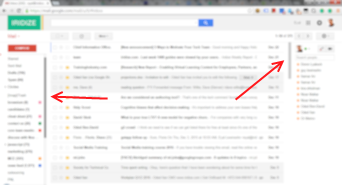
Gmail is a great example of this (see image below with 2 internal scrollbars highlighted).
Back to Oracle Guided Learning...
Let's say you want to create a guide on a page with an internal scrollbar. And let's say that you need to scroll that internal scrollbar in order to highlight a certain element in your guide.
Notice that in order to view this element (for example a certain email in your gmail inbox) you need to use the internal scroll. Scrolling the standard browser scrollbar on the right will not help at all.
When you run this guide, Guided Learning will try to automatically sense that you element is contained in an internal scroll but sometimes it will not succeed in doing so. For this reason, by setting 'Scroll parent container', you can explicitly tell Guided Learning that it needs to scroll an internal scroll to bring a certain element to view instead of scrolling the default browser scrollbar.