Guide Setting Management
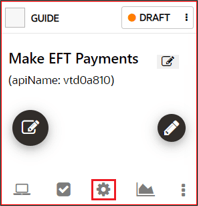
To access the Guide settings, select the Settings
 for the target guide.
Settings include:
Table 4-2 Guide Settings
| Option | Description | |
|---|---|---|
| API Name | A unique identifier for the guide. | 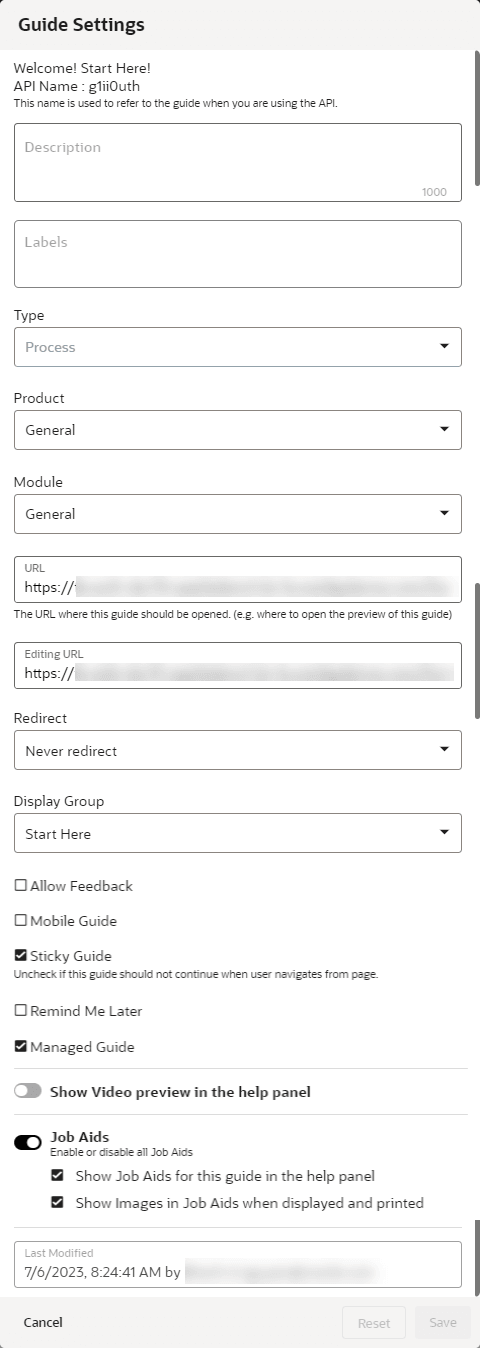 |
| Description |
Brief description of the guide. Note: The description is searchable, and you can add keywords to help your searches here. |
|
| Labels | Allows console users to create and assign labels for use in organizing and filtering guidesaccordingly to their labels. Labels can also be created and managed as a bulk action for multiple guides. | |
| Type | Indicates the type of guide: Beacon, Hotspot, Launcher, Link, Message, Process, Smart Tip, Survey, Task List, Training, or Video. | |
| Product | Lists the available Fusion Products set up for the OGL AppID. Select the product that the guide applies to. | |
| Module | Lists the available Fusion Modules set up for the OGL AppID. Select the module that the guide applies to. | |
| URL | The URL where the guide starts. This is also where the preview will display. | |
| Editing URL | The page to open when editing the guide. This can be different from the URL. | |
| Redirect | Specifies where to begin the guide. Typically, Never Redirect, the default option, is the best choice here. | |
| Allow Feedback | Specifies whether the guide will prompt the end-user to provide feedback on the guide per the Feedback settings. | |
| Mobile Guide | Specifies whether the guide is intended to appear on mobile devices. | |
| Sticky Guide | A Sticky guide remains active when the user leaves
the page on which the guide is running. Upon returning to the page
with the last step, the guide will start up again from the last
position.
Note: The Sticky Guide setting must be enabled for all Process guides to ensure that users can resume the guide from the last position if they leave the page and later return to resume the guide. |
|
| Remind Me Later |
This setting allows content developers to enable a button on the guide that allows end-users in the host application to temporarily hide auto-launched guides and to specify a time delay for the guide to re-launch at a later time that may be more convenient for user to take action (e.g., In 20 minutes, in 1 hour, in 3 hours, Tomorrow, or Next Week). Note: This feature can only be used on the following guide types: process, message, beacon, smart tip, and survey, and will only display on the first step of the guide. |
|
| Managed Guide | If your organization purchased Managed Service packs along with OGL, you will work with Oracle to identify Managed Service guides. Manage Service guides are maintained by Oracle and individuals without the appropriate permissions have limited access. This setting identifies which of your guides fall into that category. | |
| Show Video preview in help panel | Allows you to enable a video preview option for end users to play a video recording of the guide through the help panel. (Available for Process guides only.) | |
| Job Aids | Allows you to determine whether Job Aids (or "Step Guides") will be available to end-users through the help panel for this guide and whether images will be displayed in the Job Aids. (Available for Process guides only.) | |
| Last Modified | Indicates the date, time, and username of the OGL console user to last modified the guide. |  |
