12 Gateway Infrastructure Maintenance and Change Management Process
This section describes the Gateway infrastructure maintenance and change management process for Oracle Platinum Services Support and Customer Success Services.
Understanding Responsibilities
Customer Responsibilities
The Customer is responsible for:
- Notifying Oracle of issues with, or changes to, any of their connected services.
- Providing advance notice and any required information to Oracle Support about any upcoming scheduled maintenance tasks by creating a Change Management (CM) request which is processed automatically.
- Providing access to their connected systems as needed for the effective delivery of their services.
Note:
In certain limited cases, Oracle enables the customer to control remote access by providing the capability to enable and disable Oracle’s interactive inbound access (this feature is sometimes referred to as "Green Button" functionality). Customers with this functionality enabled or another form of restricted access must work with Oracle, when requested, to perform the required maintenance tasks on the Gateway.Note:
At a minimum the connection must be enabled at least once per month for security updates. - Maintaining the list of users in My Oracle Support (MOS).
- Updating the passwords in Credential Management in OASP whenever passwords are changed on their systems (see KB 3061921).
- Monitoring SR updates and emails and taking action as necessary.
Oracle Responsibilities
Oracle is responsible for:
- Maintaining the infrastructure used for supporting the various services delivered via the Gateway and related tools.
- Processing and performing tasks based on customer requests and updates.
- Identifying security risks promptly; developing and deploying a solution to address these risks.
Generating a Change Management Request
A Change Management (CM) request can be generated as follows:
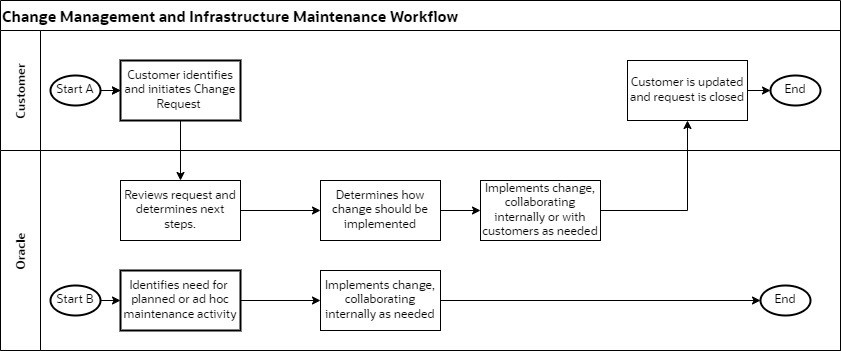
- Customer: Creates a Service Request (SR) in My Oracle Support. Based on the type of request, the SR is routed to the relevant Oracle team.
- Oracle: Identifies the need for regular maintenance on the Gateway or a request to address newly identified security risks.
Tip:
For instructions on generating a CM request, see KB 504181Understanding the Change Management Workflow
Figure 12-1 High Level Gateway Change Management and Infrastructure Maintenance Workflow
Understanding Maintenance Activities
| Activity Type | Activity Name | Activity Description | Frequency |
| Upgrade | OEM upgrade | Upgrade performed on Oracle Enterprise Manager (OEM) on the Gateway. | Every 24 months |
| Upgrade | Gateway application | Upgrade performed on the Gateway applications. | Every month |
| Upgrade | OS/kernel |
Upgrade performed on the Gateway platform. Sometimes these are included in the Gateway application upgrade. |
Every month |
| Upgrade | OEM agents | Upgrades performed on OEM agents installed on customer systems. | Every 3 months |
| Upgrade | Gateway agents (oasg_agent) | Upgrades performed on Gateway agents installed on customer systems. | Every month |
| Upgrade | Oracle Autonomous Health Framework (AHF) agent | Upgrades performed on AHF agents installed on customer systems. | Every month |
| Upgrade | Gateway ILOM | Upgrades performed on the ILOM version to the latest Oracle hardware version for the Gateway. | Every 6 months |
| Patching | Quarterly | Application of the latest quarterly patches. | Every 3 months |
| Patching | Security | Application of security patches at the express request of Oracle Global Information Security (GIS). This process may require 48 hours notice. | As required |
| Security | Password Change | Changes all Gateway passwords in accordance with Oracle security policies. | Every 90 days |